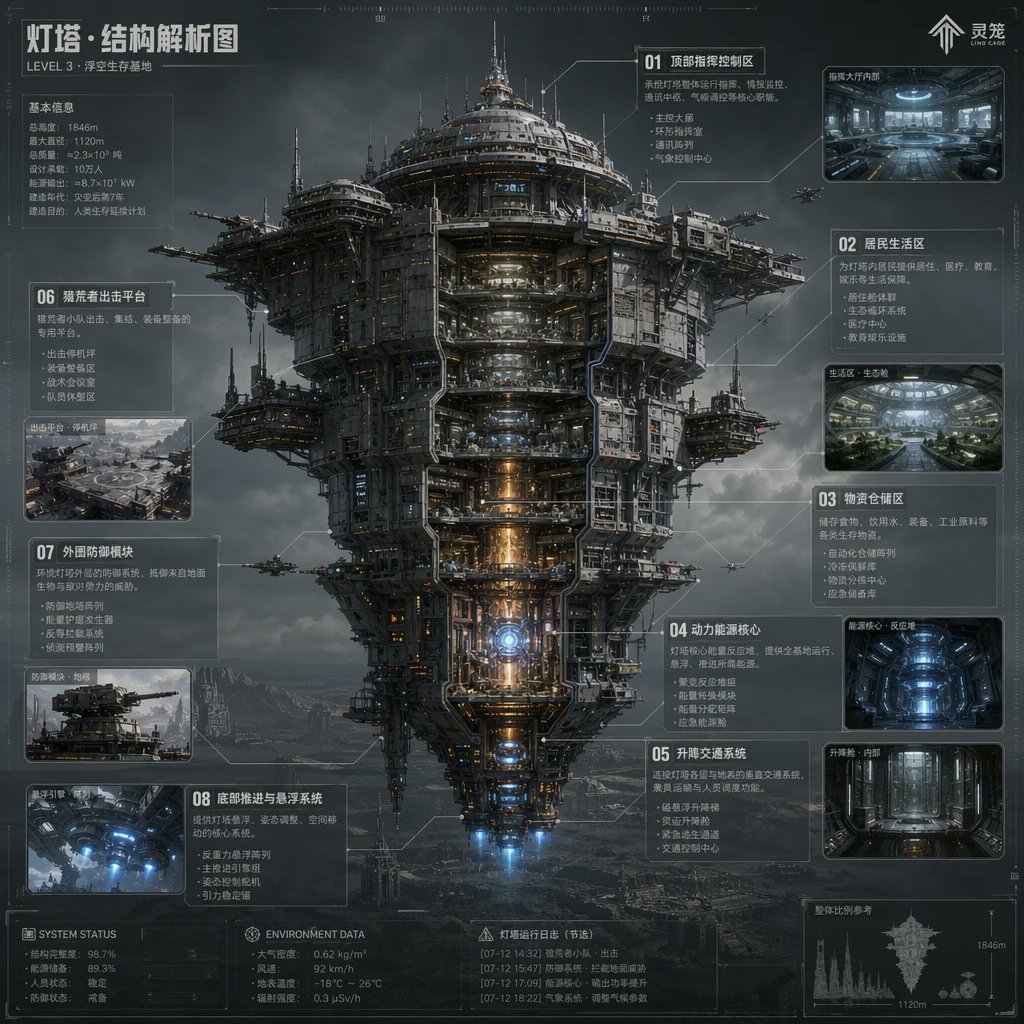
Sci-Fi Lighthouse Structure Diagram
This prompt generates a dense futuristic Chinese infographic poster of a colossal floating fortress with cutaway sections, ideal for concept art presentations and worldbuilding sheets.
This is a GPT Image 2 prompt case for Illustration & Art. Use the copy-ready prompt below to generate similar visuals, and review Awesome GPT Image 2 Prompts attribution plus commercial-use rights before reuse.
Free 1K preview
Generate one preview image instantly, no sign-up required.
Prompt
Copy-ready prompt
{
  "type": "sci-fi technical infographic poster",
  "subject": "massive floating fortress megastructure shown in a front-facing cutaway view",
  "style": "ultra-detailed hard-surface science fiction concept art, cinematic industrial realism, blueprint-inspired HUD overlay, atmospheric volumetric clouds, dark steel textures, subtle orange and blue internal lighting, high-detail labeling lines and schematic callouts",
  "setting": {
    "location": "stormy sky above a barren mountainous wasteland",
    "mood": "cold, monumental, futuristic, dystopian"
  },
  "main_structure": {
    "name": "Lighthouse · Structural Analysis Diagram",
    "subtitle": "LEVEL 3 · Floating Survival Base",
    "form": "a colossal vertically layered airborne city tower with a broad circular upper crown, dense mechanical superstructure, exposed platforms, antenna spires, docking arms, suspended side pods, and a tapered lower engine section",
    "view": "centered full-body elevation, symmetrical composition, partial internal cutaway exposing stacked interior decks and core systems",
    "materials": "gunmetal steel, weathered titanium, pipes, cables, reinforced glass, illuminated machinery",
    "lighting": "moody overcast daylight with glowing interior corridors, warm reactor core light, blue thruster light at the bottom"
  },
  "layout": {
    "composition": "single central megastructure surrounded by labeled info panels and inset images",
    "sections": [
      {
        "title": "01 Top Command and Control Area",
        "position": "upper right",
        "count": 1,
        "labels": [
          "Top Command and Control Area"
        ]
      },
      {
        "title": "02 Residential Area",
        "position": "right upper-middle",
        "count": 1,
        "labels": [
          "Residential Area"
        ]
      },
      {
        "title": "03 Logistics Storage Area",
        "position": "right middle",
        "count": 1,
        "labels": [
          "Logistics Storage Area"
        ]
      },
      {
        "title": "04 Power Core",
        "position": "right lower-middle",
        "count": 1,
        "labels": [
          "Power and energy core"
        ]
      },
      {
        "title": "05 Lifting and transportation system",
        "position": "right lower",
        "count": 1,
        "labels": [
          "Lifting and transportation system"
        ]
      },
      {
        "title": "06 Suspended shell impact sharing platform",
        "position": "left upper-middle",
        "count": 1,
        "labels": [
          "Suspended shell impact sharing platform"
        ]
      },
      {
        "title": "07 External Defense Module",
        "position": "left middle-lower",
        "count": 1,
        "labels": [
          "External Defense Module"
        ]
      },
      {
        "title": "08 Bottom Propulsion and Suspension System",
        "position": "left lower",
        "count": 1,
        "labels": [
          "Bottom Propulsion and Suspension System"
        ]
      }
    ],
    "inset_images_count": 6,
    "inset_images": [
      "upper-right command hall interior",
      "right upper-middle residential green interior",
      "right middle blue-lit storage or reactor chamber",
      "right lower vertical elevator corridor",
      "left middle platform exterior overview",
      "left lower underside thruster interior"
    ],
    "extra_panels_count": 5,
    "extra_panels": [
      "top-left basic information stats block",
      "bottom-left SYSTEM STATUS block",
      "bottom-center ENVIRONMENT DATA block",
      "Bottom Center Beacon Operation Log (Excerpt) Block",
      "bottom-right silhouette scale comparison with 1846m and 1120m markings"
    ]
  },
  "text_elements": {
    "brand_mark": "Soul",
    "top_left_heading": "Lighthouse · Structural Analysis Diagram",
    "small_subheading": "LEVEL 3 · Floating Survival Base",
    "language": "Chinese",
    "density": "heavy technical annotations, small schematic notes, thin connector lines, measurement marks, tiny interface glyphs"
  },
  "secondary_elements": {
    "aircraft_count": 6,
    "aircraft": "small escort drones or gunships flying around the structure",
    "background_details": "distant mountains, fog, layered storm clouds, faint ground structures"
  },
  "rendering": {
    "quality": "high-resolution polished concept sheet",
    "aspect_ratio": "1:1",
    "camera": "orthographic-like telephoto infographic presentation with slight cinematic depth",
    "color_palette": "charcoal gray, steel blue, cold white, amber highlights, electric blue thrusters"
  },
  "customization": {
    "headline": "{argument name=\"headline text\" default=\"Lighthouse · Structural Analysis Diagram\"}",
    "subtitle": "{argument name=\"subtitle text\" default=\"LEVEL 3 · Floating Survival Base\"}",
    "structure_name": "{argument name=\"structure name\" default=\"Lighthouse\"}",
    "primary_style": "{argument name=\"visual style\" default=\"ultra-detailed hard-surface science fiction concept art\"}",
    "environment": "{argument name=\"environment\" default=\"stormy sky above a barren mountainous wasteland\"}"
  }
}
Prompt variables
Editable argument placeholders found in the prompt, with their default values.
Best for
- - Illustration & Art visual exploration
- - Image generation and reference-image edits
- - Reusable briefs that keep source attribution visible
Change these parts
- - Subject, product, character, or scene
- - Aspect ratio, camera, lighting, and background
- - Brand, text, color, and output constraints
Recommended model and settings
- - Model: gpt-image-2
- - Input mode: Text to Image
- - Aspect ratio: source
- - Commercial status: review original source
How to use this prompt
- 1. Copy the prompt and preserve its structure for the first test.
- 2. Replace the subject, context, and publishing channel.
- 3. Change one camera, lighting, or style variable per iteration.
- 4. Inspect the output, source, text, and rights before reuse.
Limitations, source, and reuse cautions
- - Generated output is an editable draft, not factual, legal, or rights evidence.
- - Review the linked source, people, brands, logos, text, and third-party media before commercial use.
More cases in this category
Prioritized by category, input mode compatibility, quality, and lower risk.





Reuse and source notes
Use this prompt safely after previewing the case.
- 1.Copy the prompt or open it directly in Dovoo with the generation button.
- 2.Adjust variables, aspect ratio, and reference images for your own use case.
- 3.Before publishing or paid usage, verify source rights, attribution requirements, and brand or likeness risks.
Can I use this prompt commercially?
Commercial-use status is allowed. Review the original source, license, brand constraints, and legal requirements before paid usage.
Where does this case come from?
This case is imported from Awesome GPT Image 2 Prompts; keep attribution visible and check the source URL before reuse.