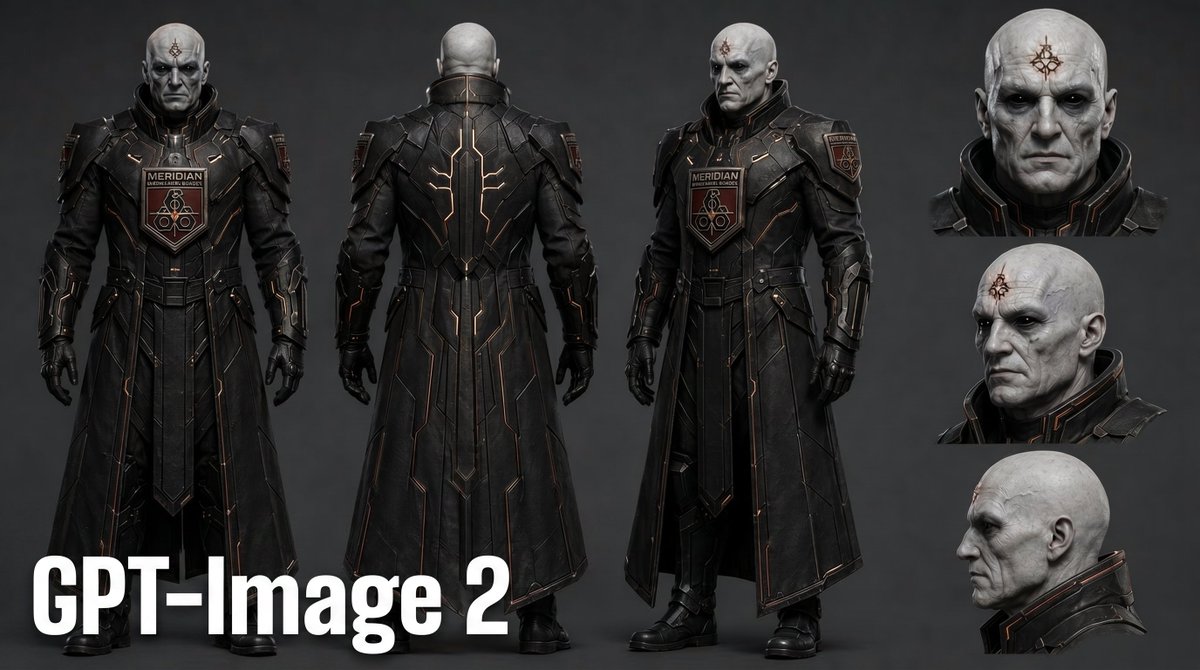
Dark Sci-Fi Commander Character Sheet
A cinematic concept-art prompt for generating a near-future armored commander character turnaround with full-body views and head studies.
This is a GPT Image 2 prompt case for Portrait & Character. Use the copy-ready prompt below to generate similar visuals, and review Awesome GPT Image 2 Prompts attribution plus commercial-use rights before reuse.
Free 1K preview
Generate one preview image instantly, no sign-up required.
Free text preview doesn’t preserve reference-image consistency.
Prompt
Copy-ready prompt
Goal: Create a dark near-future sci-fi character design sheet for {argument name="character name" default="MERIDIAN officer"}, a severe bald humanoid commander in black tactical armor, presented as a cinematic concept-art lineup.

Canvas: Wide 16:9 character sheet on a dark charcoal gray studio background with subtle vignette lighting. Use realistic high-detail digital concept art with a slightly stylized GPT-image look, sharp armor detailing, matte textures, and dramatic soft frontal lighting.

Layout: Show exactly 6 character renderings total: 3 full-body views across the left and center, and 3 cropped head studies stacked vertically on the right. The 3 full-body views are: 1 front-facing full body on the far left, 1 rear full body in the center-left, and 1 three-quarter front full body in the center-right. The 3 head studies on the right are: 1 frontal bust close-up at the top, 1 three-quarter left-facing head close-up in the middle, and 1 strict side-profile head close-up at the bottom. Add a large bold white label reading {argument name="bottom label" default="GPT-Image 2"} in the bottom-left corner, overlapping the feet area.

Subject details: The character is an imposing pale-skinned bald male humanoid with sunken dark eyes, gaunt cheekbones, wrinkled scarred skin, pointed ears, and a stern emotionless expression. Place a small red-brown occult geometric insignia tattoo or brand centered on his forehead. His face should look aged, alien, authoritarian, and intimidating.

Costume: Dress him in a long black armored military coat with high rigid collar, layered shoulder plates, segmented chest armor, gauntlets, gloves, heavy boots, and a split skirt-like armored coat reaching near the ankles. The armor is mostly matte black and gunmetal with thin copper-orange circuit-like trim lines running symmetrically along the chest, arms, back, and coat panels. Include exactly 2 visible insignia/patch types: a central chest plaque labeled {argument name="chest patch text" default="MERIDIAN"} with a red emblem beneath it, and a shoulder patch with a small shield-like badge. The rear view should emphasize vertical glowing/copper linework down the spine and coat panels.

Visual style: High-resolution AAA game character sheet, cinematic sci-fi dystopian military design, realistic materials, subtle scratches and worn leather/metal surfaces, controlled studio lighting, crisp silhouettes, dark monochrome palette with copper-red accents. Keep the composition clean and professional, like a film or game preproduction character turnaround.

Constraints: Use exactly 3 full-body views and exactly 3 head close-ups. Keep the same character identity, costume, forehead mark, and armor design consistent across all views. Do not add weapons, helmets, extra characters, environment scenery, or additional text beyond the bottom-left label and armor insignia.
Prompt variables
Editable argument placeholders found in the prompt, with their default values.
Best for
- - Portrait & Character visual exploration
- - Image generation and reference-image edits
- - Reusable briefs that keep source attribution visible
Change these parts
- - Subject, product, character, or scene
- - Aspect ratio, camera, lighting, and background
- - Brand, text, color, and output constraints
Recommended model and settings
- - Model: gpt-image-2
- - Input mode: Image to Image
- - Aspect ratio: source
- - Commercial status: review original source
How to use this prompt
- 1. Copy the prompt and preserve its structure for the first test.
- 2. Replace the subject, context, and publishing channel.
- 3. Change one camera, lighting, or style variable per iteration.
- 4. Inspect the output, source, text, and rights before reuse.
Limitations, source, and reuse cautions
- - Generated output is an editable draft, not factual, legal, or rights evidence.
- - Review the linked source, people, brands, logos, text, and third-party media before commercial use.
More cases in this category
Prioritized by category, input mode compatibility, quality, and lower risk.



Reuse and source notes
Use this prompt safely after previewing the case.
- 1.Copy the prompt or open it directly in Dovoo with the generation button.
- 2.Adjust variables, aspect ratio, and reference images for your own use case.
- 3.Before publishing or paid usage, verify source rights, attribution requirements, and brand or likeness risks.
Can I use this prompt commercially?
Commercial-use status is allowed. Review the original source, license, brand constraints, and legal requirements before paid usage.
Where does this case come from?
This case is imported from Awesome GPT Image 2 Prompts; keep attribution visible and check the source URL before reuse.