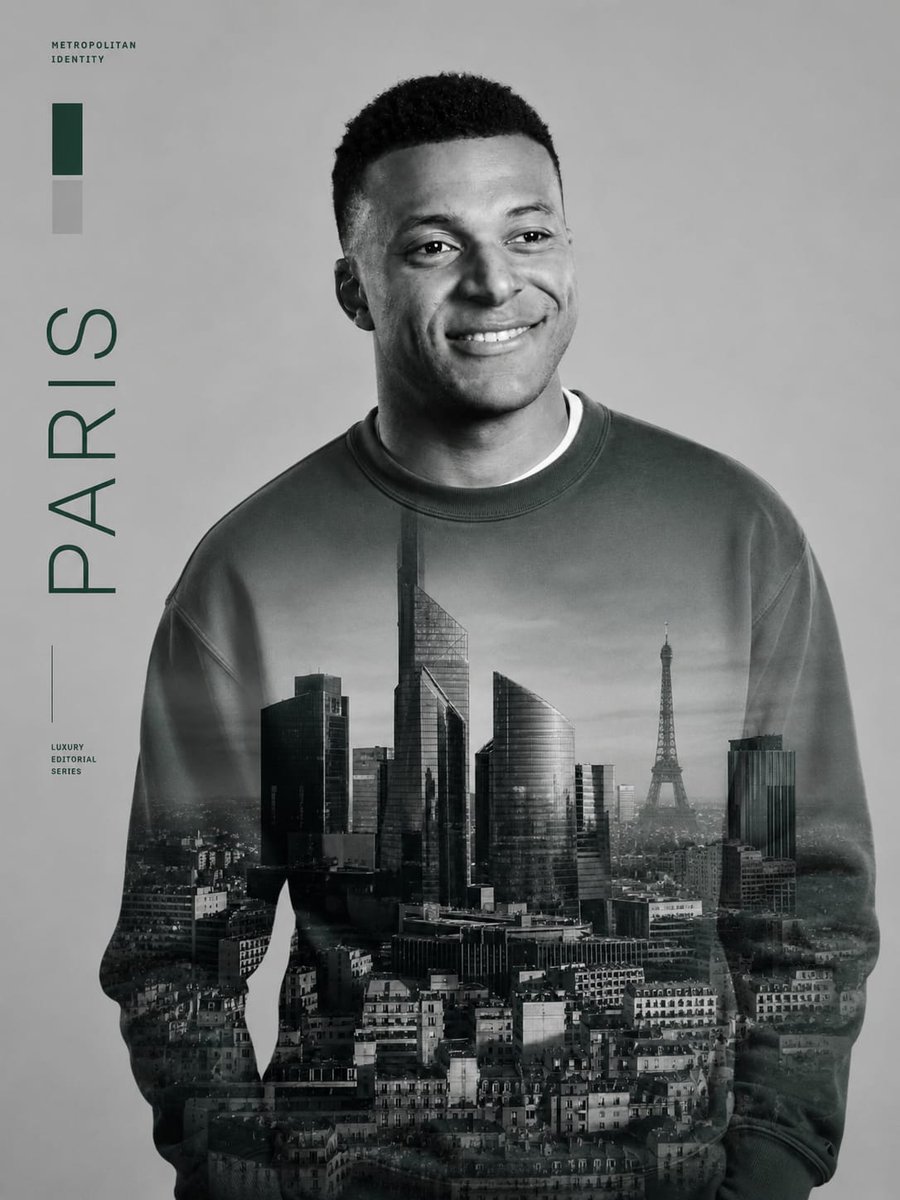
Metropolitan Double Exposure Portrait
Creates a luxury monochrome editorial portrait from a reference face with a cityscape double exposure on the sweatshirt and minimalist city typography.
This is a GPT Image 2 prompt case for Portrait & Character. Use the copy-ready prompt below to generate similar visuals, and review Awesome GPT Image 2 Prompts attribution plus commercial-use rights before reuse.
Free 1K preview
Generate one preview image instantly, no sign-up required.
Free text preview doesn’t preserve reference-image consistency.
Prompt
Copy-ready prompt
Using the provided reference image as the strict identity reference, transform the person into a luxury black-and-white metropolitan editorial portrait poster. Preserve the exact facial identity, facial proportions, hairstyle, expression, and natural likeness, but change the outfit into a plain oversized crewneck sweatshirt and remove the sports jersey, logos, number, collar, and team branding.

Composition: Place the subject slightly right of center in a waist-up portrait, facing forward with the head turned subtly to the viewer’s right. Use a clean light-gray studio background with lots of negative space on the left. Apply refined monochrome lighting, soft contrast, and a premium magazine-cover finish.

Main visual effect: Blend a realistic grayscale cityscape of {argument name="city name" default="Paris"} across the sweatshirt as a double-exposure print, including modern high-rise buildings, dense urban rooftops, and the Eiffel Tower visible on the right side of the torso. The city image should look integrated into the fabric, fading naturally at the sleeves and lower body.

Left-side editorial graphics: Add exactly 4 graphic/text elements along the left margin: 1) a small uppercase label reading “METROPOLITAN IDENTITY” near the top-left, 2) exactly 2 vertical color swatches beneath it, one dark green and one light gray, 3) a large vertical word reading “{argument name="vertical city text" default="PARIS"}”, and 4) a small lower-left label reading “LUXURY EDITORIAL SERIES” with a thin vertical line above it. Use dark forest-green typography and minimalist Swiss editorial spacing.

Style constraints: high-end fashion editorial, monochrome portrait, crisp facial detail, subtle film grain, realistic fabric texture, no extra logos, no sports branding, no additional text beyond the specified 4 left-side graphic/text elements, no watermark.
Prompt variables
Editable argument placeholders found in the prompt, with their default values.
Best for
- - Portrait & Character visual exploration
- - Image generation and reference-image edits
- - Reusable briefs that keep source attribution visible
Change these parts
- - Subject, product, character, or scene
- - Aspect ratio, camera, lighting, and background
- - Brand, text, color, and output constraints
Recommended model and settings
- - Model: gpt-image-2
- - Input mode: Image to Image
- - Aspect ratio: source
- - Commercial status: review original source
How to use this prompt
- 1. Copy the prompt and preserve its structure for the first test.
- 2. Replace the subject, context, and publishing channel.
- 3. Change one camera, lighting, or style variable per iteration.
- 4. Inspect the output, source, text, and rights before reuse.
Limitations, source, and reuse cautions
- - Generated output is an editable draft, not factual, legal, or rights evidence.
- - Review the linked source, people, brands, logos, text, and third-party media before commercial use.
More cases in this category
Prioritized by category, input mode compatibility, quality, and lower risk.


Reuse and source notes
Use this prompt safely after previewing the case.
- 1.Copy the prompt or open it directly in Dovoo with the generation button.
- 2.Adjust variables, aspect ratio, and reference images for your own use case.
- 3.Before publishing or paid usage, verify source rights, attribution requirements, and brand or likeness risks.
Can I use this prompt commercially?
Commercial-use status is allowed. Review the original source, license, brand constraints, and legal requirements before paid usage.
Where does this case come from?
This case is imported from Awesome GPT Image 2 Prompts; keep attribution visible and check the source URL before reuse.