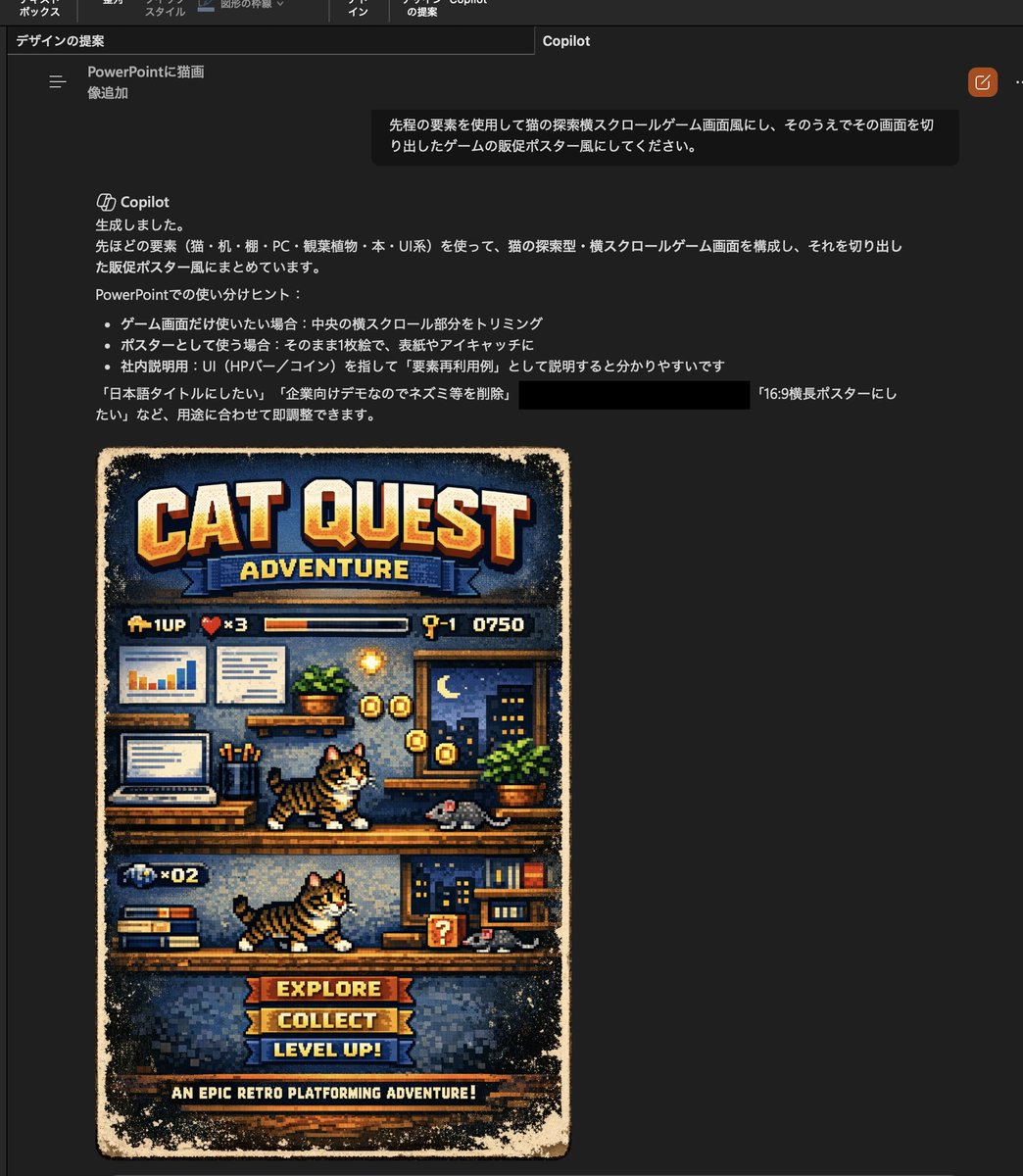
Retro Pixel Cat Game Poster
This prompt turns a reference photo of a cat into a pixel-art side-scrolling game poster, useful for playful presentation visuals or mock retro game covers.
This is a GPT Image 2 prompt case for Anime & Game. Use the copy-ready prompt below to generate similar visuals, and review Awesome GPT Image 2 Prompts attribution plus commercial-use rights before reuse.
Free 1K preview
Generate one preview image instantly, no sign-up required.
Free text preview doesn’t preserve reference-image consistency.
Prompt
Copy-ready prompt
Using the provided reference image, transform the cat and the office-desk setting into a retro 16-bit side-scrolling video game mock poster. Keep the reference cat recognizable as the main character, but redraw everything in detailed pixel art. Build a vertical poster composition with 1 large title at the top reading "CAT QUEST", 1 subtitle ribbon reading "ADVENTURE", 1 HUD row beneath it showing 4 elements: a 1UP icon, a heart counter marked "x3", a horizontal status bar, and a stage/score display reading "Q-1 0750". Turn the reference office scene into a 2-level platform stage using the desk, laptop, charts, books, plant, and room decor as game-environment props. Show 2 playable-cat sprite poses total, one on the upper platform and one on the lower platform, both side-view walking/running. Add 2 gray mouse enemies, one on each platform. Add collectible coin effects around the upper platform and a small question-block style item on the lower platform. At the bottom, include 3 stacked menu buttons labeled "EXPLORE", "COLLECT", and "LEVEL UP!", plus 1 footer tagline reading "AN EPIC RETRO PLATFORMING ADVENTURE!". Use a worn printed-game-poster look with distressed edges, warm arcade colors, and a nostalgic console-game cover aesthetic.
Best for
- - Anime & Game visual exploration
- - Image generation and reference-image edits
- - Reusable briefs that keep source attribution visible
Change these parts
- - Subject, product, character, or scene
- - Aspect ratio, camera, lighting, and background
- - Brand, text, color, and output constraints
Recommended model and settings
- - Model: gpt-image-2
- - Input mode: Image to Image
- - Aspect ratio: source
- - Commercial status: review original source
How to use this prompt
- 1. Copy the prompt and preserve its structure for the first test.
- 2. Replace the subject, context, and publishing channel.
- 3. Change one camera, lighting, or style variable per iteration.
- 4. Inspect the output, source, text, and rights before reuse.
Limitations, source, and reuse cautions
- - Generated output is an editable draft, not factual, legal, or rights evidence.
- - Review the linked source, people, brands, logos, text, and third-party media before commercial use.
More cases in this category
Prioritized by category, input mode compatibility, quality, and lower risk.


Reuse and source notes
Use this prompt safely after previewing the case.
- 1.Copy the prompt or open it directly in Dovoo with the generation button.
- 2.Adjust variables, aspect ratio, and reference images for your own use case.
- 3.Before publishing or paid usage, verify source rights, attribution requirements, and brand or likeness risks.
Can I use this prompt commercially?
Commercial-use status is allowed. Review the original source, license, brand constraints, and legal requirements before paid usage.
Where does this case come from?
This case is imported from Awesome GPT Image 2 Prompts; keep attribution visible and check the source URL before reuse.