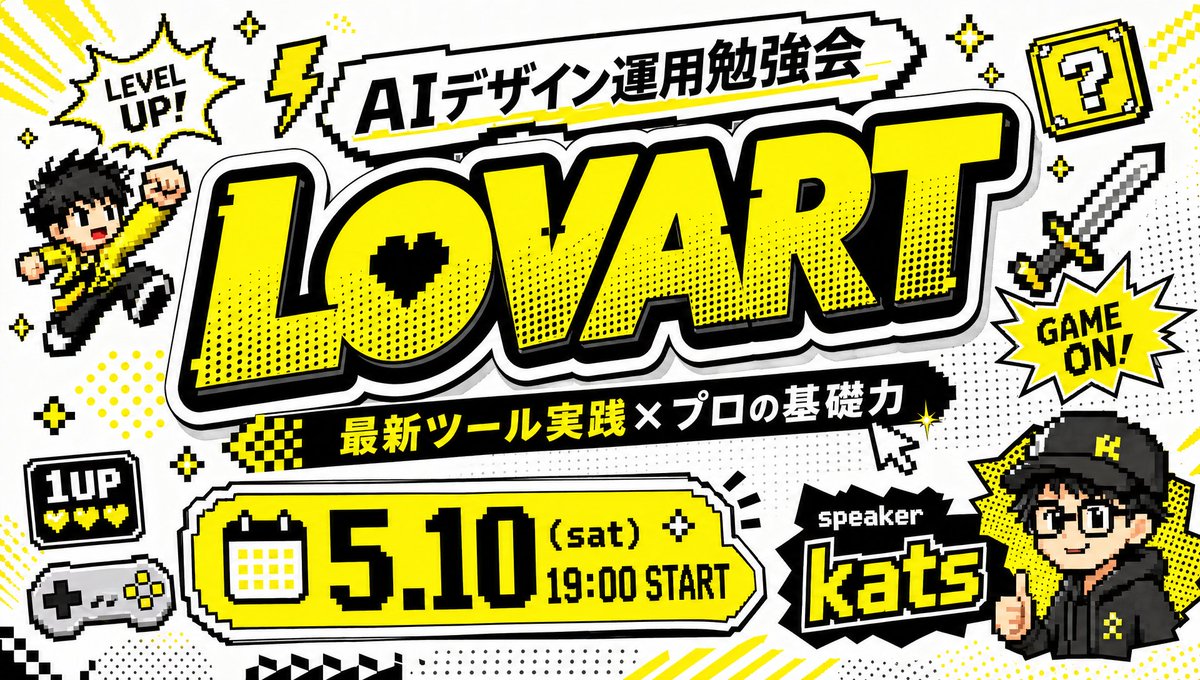
Retro Game Style Japanese Event Banner
A bold arcade-inspired Japanese workshop thumbnail with crisp typography, ideal for social posts, YouTube covers, and event promotions.
This is a GPT Image 2 prompt case for Graphic & Poster. Use the copy-ready prompt below to generate similar visuals, and review Awesome GPT Image 2 Prompts attribution plus commercial-use rights before reuse.
Free 1K preview
Generate one preview image instantly, no sign-up required.
Prompt
Copy-ready prompt
Create a bold Japanese event thumbnail in a retro 8-bit video game style on a clean white background with a black, white, and vivid yellow color palette. The composition is a single highly graphic poster packed with pixel-art decorations, thick black outlines, comic halftone dots, drop shadows, and arcade-inspired stickers. In the center, place an enormous headline reading “{argument name="main title" default="LOVART"}” in oversized block letters, bright yellow with a thick black outline, white border, and heavy shadow, slightly tilted and dominating most of the image. Above it, add a jagged white banner with black outline containing the Japanese title “{argument name="top banner text" default="AIデザイン運用勉強会"}”. Below the main title, place a black ribbon with yellow and white Japanese text reading “{argument name="subheading text" default="最新ツール実践 × プロの基礎力"}”. At the lower left-center, add a large rounded rectangular date panel in yellow with black outline and white trim, including a pixel calendar icon on the left and the text “{argument name="event date" default="5.10 (sat) 19:00 START"}” in huge black retro type. At the lower right, place a black spiky label reading “speaker” above the large yellow-outlined name “{argument name="speaker name" default="kats"}”. Surround the layout with exactly 11 decorative gaming elements: 1 pixel speech burst at upper left saying “LEVEL UP!”, 1 yellow lightning bolt near the top, 1 yellow question block with a black question mark at upper right, 1 pixel sword on the right side, 1 starburst on the right saying “GAME ON!”, 1 chibi pixel character jumping on the left in a yellow jacket with raised fist, 1 small black “1UP” life icon with three yellow hearts at lower left, 1 retro game controller beneath it, 3 groups of sparkle stars scattered around the composition. Add comic accents such as dotted halftone patches, angled yellow speed lines, small checkerboard strips, and a pixel cursor pointer near the subtitle. Include a stylized anime-like speaker avatar in the lower right corner wearing a black cap and black hoodie with yellow accents, Show every face clearly with natural, detailed facial features, integrated like a streamer or event host badge. Make all Japanese and English text crisp, readable, and accurately typeset, with the overall feeling of a high-energy YouTube thumbnail or social media event banner for a design/AI workshop.Prompt variables
Editable argument placeholders found in the prompt, with their default values.
Best for
- - Graphic & Poster visual exploration
- - Image generation and reference-image edits
- - Reusable briefs that keep source attribution visible
Change these parts
- - Subject, product, character, or scene
- - Aspect ratio, camera, lighting, and background
- - Brand, text, color, and output constraints
Recommended model and settings
- - Model: gpt-image-2
- - Input mode: Text to Image
- - Aspect ratio: source
- - Commercial status: review original source
How to use this prompt
- 1. Copy the prompt and preserve its structure for the first test.
- 2. Replace the subject, context, and publishing channel.
- 3. Change one camera, lighting, or style variable per iteration.
- 4. Inspect the output, source, text, and rights before reuse.
Limitations, source, and reuse cautions
- - Generated output is an editable draft, not factual, legal, or rights evidence.
- - Review the linked source, people, brands, logos, text, and third-party media before commercial use.
More cases in this category
Prioritized by category, input mode compatibility, quality, and lower risk.





Reuse and source notes
Use this prompt safely after previewing the case.
- 1.Copy the prompt or open it directly in Dovoo with the generation button.
- 2.Adjust variables, aspect ratio, and reference images for your own use case.
- 3.Before publishing or paid usage, verify source rights, attribution requirements, and brand or likeness risks.
Can I use this prompt commercially?
Commercial-use status is allowed. Review the original source, license, brand constraints, and legal requirements before paid usage.
Where does this case come from?
This case is imported from Awesome GPT Image 2 Prompts; keep attribution visible and check the source URL before reuse.