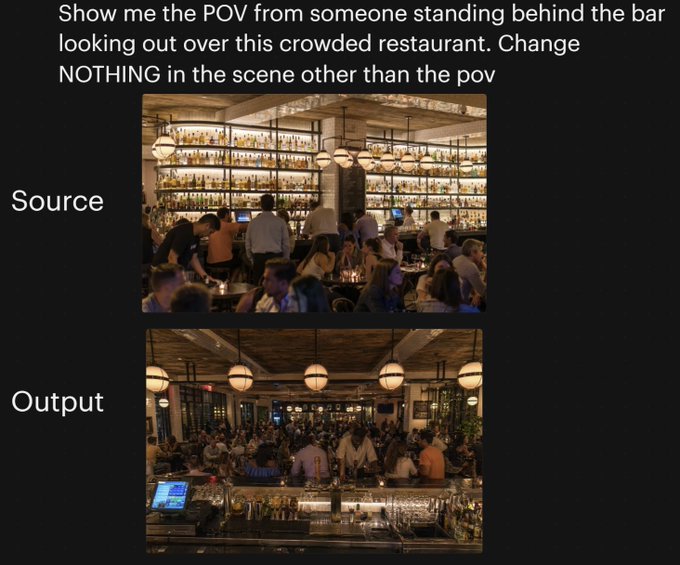
Restaurant POV Change Comparison
A social-media style comparison graphic showing a crowded restaurant before and after changing only the camera viewpoint, useful for demonstrating image-model perspective control.
This is a GPT Image 2 prompt case for Graphic & Poster. Use the copy-ready prompt below to generate similar visuals, and review Awesome GPT Image 2 Prompts attribution plus commercial-use rights before reuse.
This prompt is designed for multiple reference images. We will open Dovoo with the prompt and the available preview image; add the remaining references in Dovoo before generating.
Free 1K preview
Generate one preview image instantly, no sign-up required.
Free text preview doesn’t preserve reference-image consistency.
Prompt
Copy-ready prompt
A side-by-side comparison graphic on a black background demonstrating a camera-angle change in the same restaurant scene. At the top, large white sans-serif text reads: "Show me the POV from someone standing behind the bar looking out over this crowded restaurant. Change NOTHING in the scene other than the pov". Below, place 2 stacked rectangular photos centered vertically: the top image labeled "Source" in large white text on the left, and the bottom image labeled "Output" in large white text on the left. The top photo shows a warmly lit, upscale, crowded restaurant interior seen from the dining room side, facing a tall back bar filled with many illuminated liquor bottles on wall-to-wall shelves, with bartenders and guests in front, amber lighting, globe pendant lights, wood ceiling, beige columns, and tightly packed seated diners in the foreground. The bottom photo shows the exact same restaurant, same crowd density, same warm lighting, same decor, same bar shelving, same globe pendant lights, and same overall composition elements, but now from the point of view of someone standing behind the bar and looking outward across the crowded restaurant; the foreground includes the bar counter with glassware, metal bar tools, bottles, and a point-of-sale screen visible at the lower left, while guests and staff fill the middle ground and the dining room extends into the background. Preserve the sense that only the camera position changed between the 2 images, with no other scene alterations.
Best for
- - Graphic & Poster visual exploration
- - Image generation and reference-image edits
- - Reusable briefs that keep source attribution visible
Change these parts
- - Subject, product, character, or scene
- - Aspect ratio, camera, lighting, and background
- - Brand, text, color, and output constraints
Recommended model and settings
- - Model: gpt-image-2
- - Input mode: Multi Image to Image
- - Aspect ratio: source
- - Commercial status: review original source
How to use this prompt
- 1. Copy the prompt and preserve its structure for the first test.
- 2. Replace the subject, context, and publishing channel.
- 3. Change one camera, lighting, or style variable per iteration.
- 4. Inspect the output, source, text, and rights before reuse.
Limitations, source, and reuse cautions
- - Generated output is an editable draft, not factual, legal, or rights evidence.
- - Review the linked source, people, brands, logos, text, and third-party media before commercial use.
More cases in this category
Prioritized by category, input mode compatibility, quality, and lower risk.





Reuse and source notes
Use this prompt safely after previewing the case.
- 1.Copy the prompt or open it directly in Dovoo with the generation button.
- 2.Adjust variables, aspect ratio, and reference images for your own use case.
- 3.Before publishing or paid usage, verify source rights, attribution requirements, and brand or likeness risks.
Can I use this prompt commercially?
Commercial-use status is allowed. Review the original source, license, brand constraints, and legal requirements before paid usage.
Where does this case come from?
This case is imported from Awesome GPT Image 2 Prompts; keep attribution visible and check the source URL before reuse.