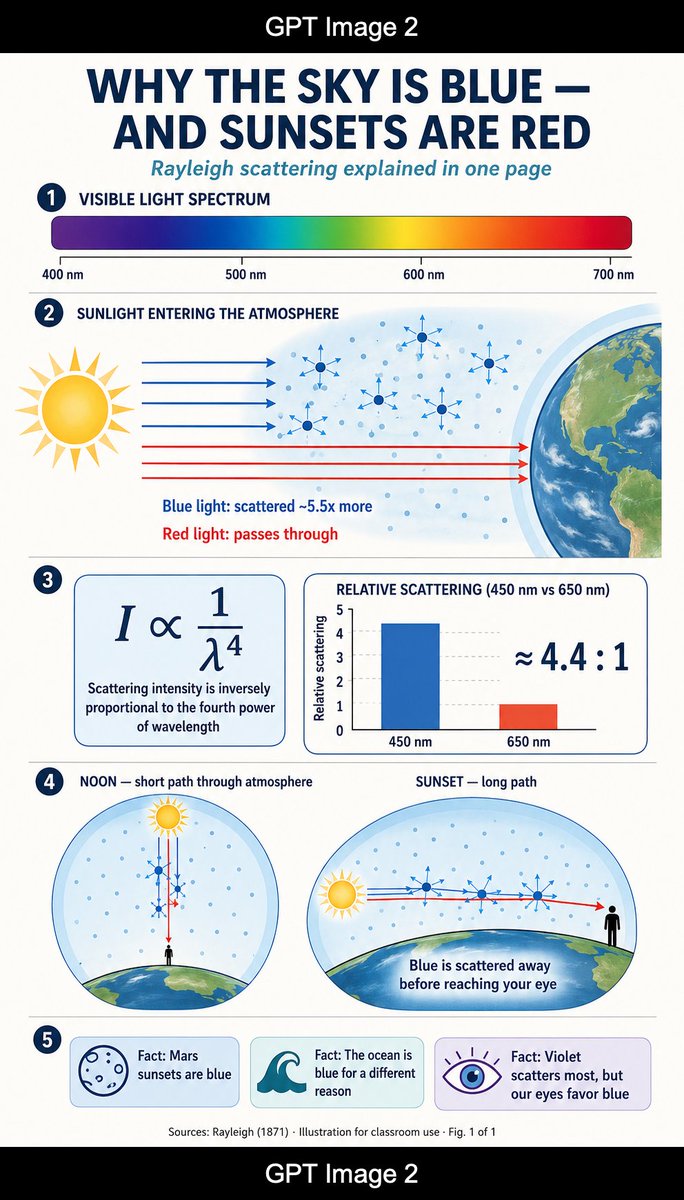
Rayleigh Scattering Infographic
A vertical classroom-style infographic explaining why the sky is blue and sunsets are red through Rayleigh scattering diagrams, formulas, and fact cards.
This is a GPT Image 2 prompt case for Graphic & Poster. Use the copy-ready prompt below to generate similar visuals, and review Awesome GPT Image 2 Prompts attribution plus commercial-use rights before reuse.
Free 1K preview
Generate one preview image instantly, no sign-up required.
Prompt
Copy-ready prompt
Goal: Create a tall single-page educational science infographic explaining {argument name="headline text" default="WHY THE SKY IS BLUE — AND SUNSETS ARE RED"} with the subtitle {argument name="subtitle text" default="Rayleigh scattering explained in one page"}. Use a clean flat-design science-magazine look, suitable for a classroom handout.

Canvas: Vertical 9:16 poster on an off-white background, framed by black horizontal bars at the very top and bottom. Center the white text “GPT Image 2” inside each black bar. Main infographic area has generous margins, thin navy divider lines, rounded cards, and a navy/teal/coral/yellow palette.

Layout: Use exactly 5 numbered sections, each marked by a dark navy circular badge with white numbers 1 through 5 on the left. Keep all typography geometric sans-serif, with bold uppercase navy headings and teal italic subtitle.

Section 1 — Visible Light Spectrum: Heading reads “VISIBLE LIGHT SPECTRUM”. Show one long rounded horizontal rainbow gradient bar from violet/blue at left through cyan, green, yellow, orange, and red at right. Add exactly 4 wavelength labels beneath it: “400 nm”, “500 nm”, “600 nm”, and “700 nm”, with small tick marks.

Section 2 — Sunlight Entering the Atmosphere: Heading reads “SUNLIGHT ENTERING THE ATMOSPHERE”. Draw a large stylized yellow sun on the left, Earth’s curved edge on the right, and a pale blue atmospheric band between them filled with many small blue air-molecule dots. Show exactly 4 blue horizontal light rays entering and scattering with small blue arrows, plus exactly 3 red horizontal rays passing straight through toward Earth. Include exactly 6 larger molecule/star scattering icons in the atmosphere. Add two explanatory captions below the rays: “Blue light: scattered ~5.5x more” in blue and “Red light: passes through” in red.

Section 3 — Formula and Bar Chart: Create two rounded rectangular cards side by side. Left card shows the large equation “I ∝ 1/λ⁴” and the caption “Scattering intensity is inversely proportional to the fourth power of wavelength”. Right card title reads “RELATIVE SCATTERING (450 nm vs 650 nm)”. Include a simple bar chart with exactly 2 bars: a tall blue bar labeled “450 nm” and a shorter red-orange bar labeled “650 nm”, y-axis labeled “Relative scattering”, and large text “≈ 4.4 : 1” on the right.

Section 4 — Noon vs Sunset: Make two large circular/oval diagrams side by side. Left diagram title: “NOON — short path through atmosphere”. It shows a small sun above a curved Earth horizon, a tiny black human silhouette at ground level, blue dots in the sky, and vertical red and blue rays passing through a short atmospheric path with blue scattering arrows. Right diagram title: “SUNSET — long path”. It shows a low sun near the horizon on the left, a long horizontal path through a pale blue atmosphere over curved Earth, blue light scattering away along the path, a red ray continuing to a black human silhouette at the right, and the caption “Blue is scattered away before reaching your eye”.

Section 5 — Facts: Create exactly 3 rounded fact cards in a row. Card 1 has a simple outlined Mars-like planet icon and text “Fact: Mars sunsets are blue”. Card 2 has a teal ocean wave icon and text “Fact: The ocean is blue for a different reason”. Card 3 has a purple eye icon with rays and text “Fact: Violet scatters most, but our eyes favor blue”.

Footer: Add small centered source text: “Sources: Rayleigh (1871) · Illustration for classroom use · Fig. 1 of 1”.

Visual style: Flat vector illustration, thin navy outlines, soft gradients only where needed, crisp readable labels, science textbook clarity, no photorealism except the Earth texture may be lightly detailed. Keep spacing balanced and ensure every label is legible.
Prompt variables
Editable argument placeholders found in the prompt, with their default values.
Best for
- - Graphic & Poster visual exploration
- - Image generation and reference-image edits
- - Reusable briefs that keep source attribution visible
Change these parts
- - Subject, product, character, or scene
- - Aspect ratio, camera, lighting, and background
- - Brand, text, color, and output constraints
Recommended model and settings
- - Model: gpt-image-2
- - Input mode: Text to Image
- - Aspect ratio: source
- - Commercial status: review original source
How to use this prompt
- 1. Copy the prompt and preserve its structure for the first test.
- 2. Replace the subject, context, and publishing channel.
- 3. Change one camera, lighting, or style variable per iteration.
- 4. Inspect the output, source, text, and rights before reuse.
Limitations, source, and reuse cautions
- - Generated output is an editable draft, not factual, legal, or rights evidence.
- - Review the linked source, people, brands, logos, text, and third-party media before commercial use.
More cases in this category
Prioritized by category, input mode compatibility, quality, and lower risk.






Reuse and source notes
Use this prompt safely after previewing the case.
- 1.Copy the prompt or open it directly in Dovoo with the generation button.
- 2.Adjust variables, aspect ratio, and reference images for your own use case.
- 3.Before publishing or paid usage, verify source rights, attribution requirements, and brand or likeness risks.
Can I use this prompt commercially?
Commercial-use status is allowed. Review the original source, license, brand constraints, and legal requirements before paid usage.
Where does this case come from?
This case is imported from Awesome GPT Image 2 Prompts; keep attribution visible and check the source URL before reuse.