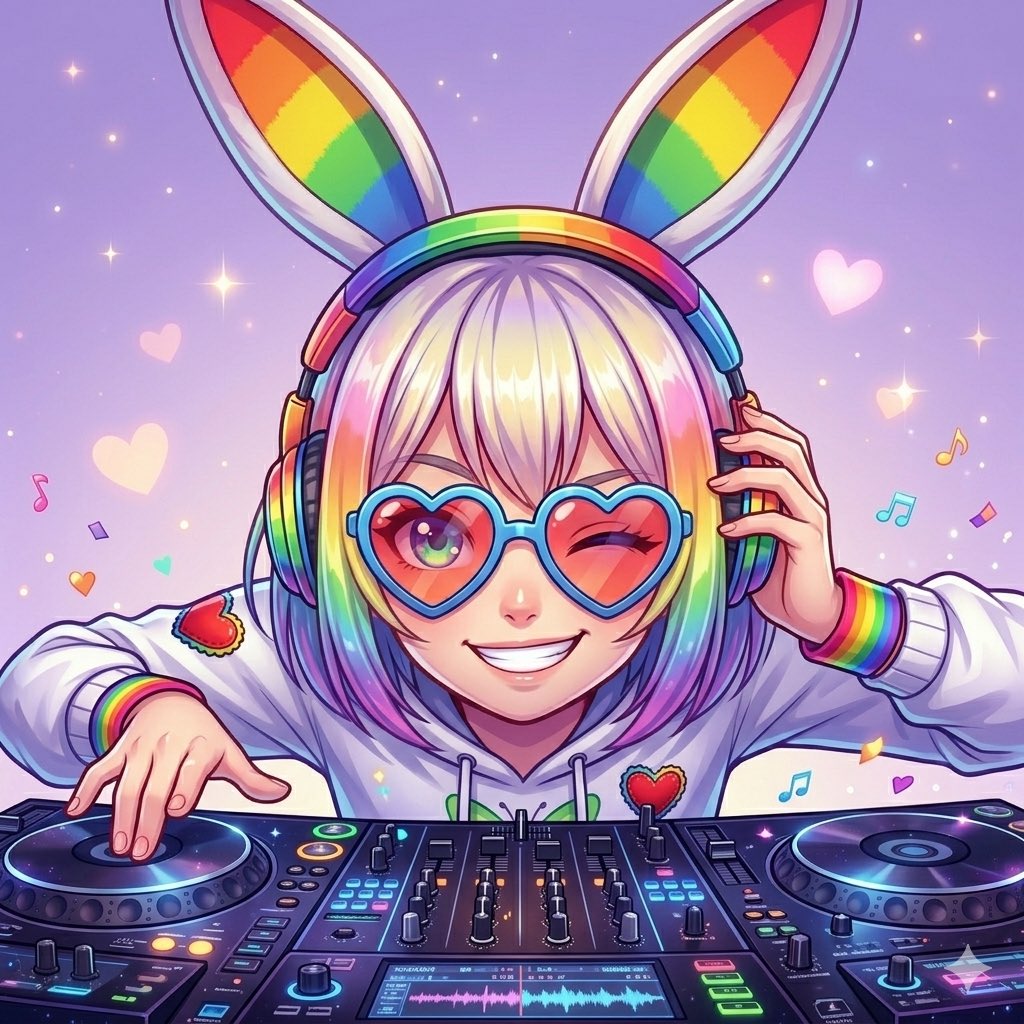
Rainbow Bunny DJ Anime Portrait
A colorful anime DJ portrait prompt for creating a cute, emotional club-themed character illustration with rainbow accessories and a playful wink.
This is a GPT Image 2 prompt case for Anime & Game. Use the copy-ready prompt below to generate similar visuals, and review Awesome GPT Image 2 Prompts attribution plus commercial-use rights before reuse.
Free 1K preview
Generate one preview image instantly, no sign-up required.
Prompt
Copy-ready prompt
A vibrant anime-style DJ girl in a cute, dreamy rave aesthetic, centered in a close-up upper-body composition behind a professional DJ controller. She wears oversized rainbow bunny ears on a headband and large rainbow over-ear headphones, with one hand pressing the right headphone cup and the other hand touching the left turntable as if cueing the next track. Use a slightly low-angle viewpoint looking up at her to create an energetic, emotional performance mood. Give her a short straight bob haircut with blunt bangs in {argument name="hair color" default="pastel blonde with rainbow-tinted ends"}. Her face should show a playful DJ expression: one eye winking and a wide mischievous grin, as if she is about to drop the beat. Dress her in a white hoodie with rainbow-striped cuffs and two small red heart patches on the chest and sleeve. The DJ setup should include exactly 2 turntables, 1 central mixer section, 4 vertical channel faders, 3 EQ knob rows, and 2 small display screens with glowing waveform-like graphics. Fill the background with a soft lavender-to-pink gradient, tiny sparkles, floating pastel hearts, and exactly 6 colorful music-note icons scattered around the character. Render it in polished, glossy, high-detail anime illustration style with luminous rainbow lighting, soft shading, clean line art, saturated colors, cute idol-meets-club energy, and an extra emotive, magical, “emo” atmosphere.Prompt variables
Editable argument placeholders found in the prompt, with their default values.
Best for
- - Anime & Game visual exploration
- - Image generation and reference-image edits
- - Reusable briefs that keep source attribution visible
Change these parts
- - Subject, product, character, or scene
- - Aspect ratio, camera, lighting, and background
- - Brand, text, color, and output constraints
Recommended model and settings
- - Model: gpt-image-2
- - Input mode: Text to Image
- - Aspect ratio: source
- - Commercial status: review original source
How to use this prompt
- 1. Copy the prompt and preserve its structure for the first test.
- 2. Replace the subject, context, and publishing channel.
- 3. Change one camera, lighting, or style variable per iteration.
- 4. Inspect the output, source, text, and rights before reuse.
Limitations, source, and reuse cautions
- - Generated output is an editable draft, not factual, legal, or rights evidence.
- - Review the linked source, people, brands, logos, text, and third-party media before commercial use.
More cases in this category
Prioritized by category, input mode compatibility, quality, and lower risk.
Reuse and source notes
Use this prompt safely after previewing the case.
- 1.Copy the prompt or open it directly in Dovoo with the generation button.
- 2.Adjust variables, aspect ratio, and reference images for your own use case.
- 3.Before publishing or paid usage, verify source rights, attribution requirements, and brand or likeness risks.
Can I use this prompt commercially?
Commercial-use status is allowed. Review the original source, license, brand constraints, and legal requirements before paid usage.
Where does this case come from?
This case is imported from Awesome GPT Image 2 Prompts; keep attribution visible and check the source URL before reuse.