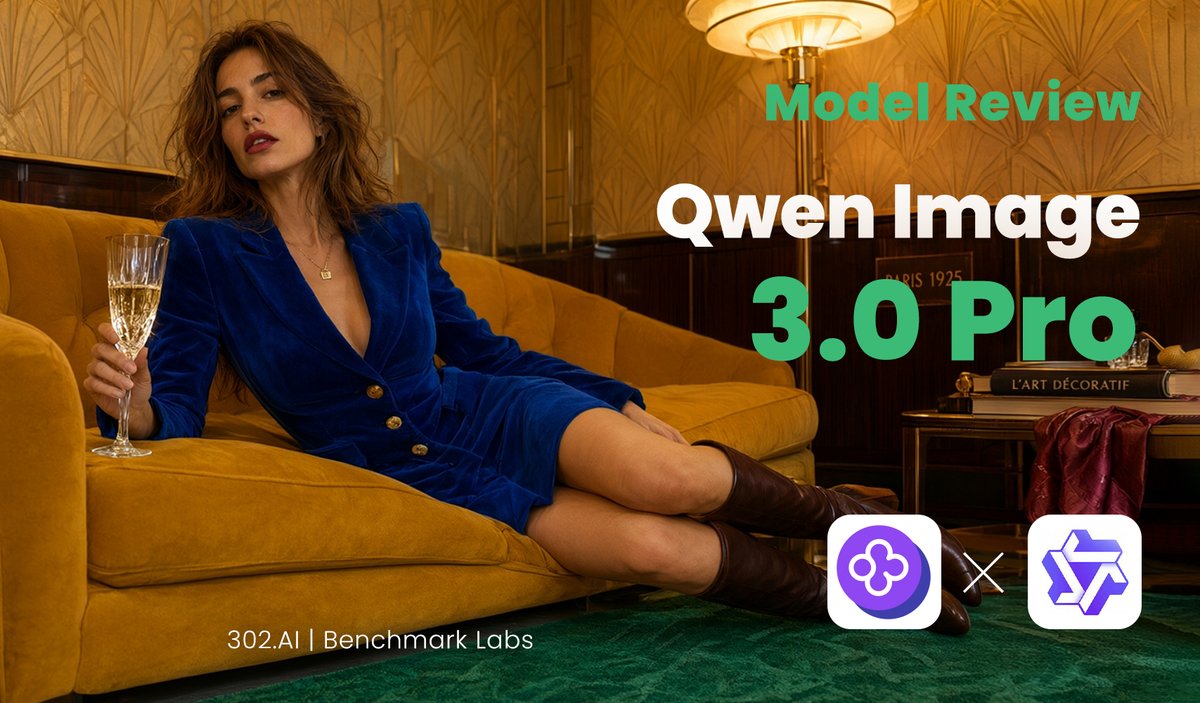
Qwen Image Model Review Banner
A luxury editorial social media banner template for promoting an AI image model review or benchmark comparison.
This is a GPT Image 2 prompt case for Graphic & Poster. Use the copy-ready prompt below to generate similar visuals, and review Awesome GPT Image 2 Prompts attribution plus commercial-use rights before reuse.
Free 1K preview
Generate one preview image instantly, no sign-up required.
Prompt
Copy-ready prompt
Goal: Create a cinematic editorial social media banner for an AI model review of {argument name="model name" default="Qwen Image 3.0 Pro"}, combining a luxury lounge fashion photograph with bold tech-review typography.

Canvas: Wide landscape 16:9 banner, about 1200×675 px, optimized for X/Twitter link preview. Use a warm golden color grade with high contrast and shallow cinematic lighting.

Main image: A fashionable adult woman lounges diagonally across a mustard-yellow velvet sofa in an art deco interior. She has loose wavy brown hair, red lipstick, and a confident relaxed expression, wearing a deep royal-blue velvet blazer dress with gold buttons, bare legs, and dark brown knee-high boots. Her left side is toward the viewer; she holds a champagne flute in one hand near the left edge while reclining with legs extended toward the lower right. The room has patterned gold wallpaper, dark wood wall paneling, a green carpet, and a glowing vintage floor lamp near the upper center-right. Include a small side table on the right with stacked art/design books and a draped burgundy fabric, creating a 1920s Parisian hotel lounge mood.

Text layout: Place large review text on the right half, leaving the woman mostly unobstructed on the left. Use exactly 3 main text elements: top label “Model Review” in bold teal-green sans serif, main title “Qwen Image” in very large bold white sans serif, and version line “3.0 Pro” in extra-large bold teal-green sans serif. Add a small footer credit near the bottom left-center reading “{argument name="footer credit" default="302.AI | Benchmark Labs"}” in thin white sans serif.

Logo area: At the bottom right, show exactly 3 discrete logo/comparison elements: a rounded white square containing a purple circular clover-like AI icon on the left, a white “×” multiplication sign in the middle, and a rounded white square containing a purple geometric star/cube-like logo on the right.

Visual style: Luxury editorial photography blended with clean SaaS benchmark branding; crisp typography, warm amber highlights, teal accent text, deep green floor, mustard sofa, royal-blue outfit. Make the composition look like a polished review thumbnail for {argument name="review topic" default="Qwen Image 3.0 Pro versus GPT-Image-2"}.

Constraints: Keep all visible text legible and spelled exactly as specified. Do not add extra captions, watermarks, interface chrome, or additional logos. Preserve the wide banner layout and the three-logo comparison cluster.
Prompt variables
Editable argument placeholders found in the prompt, with their default values.
Best for
- - Graphic & Poster visual exploration
- - Image generation and reference-image edits
- - Reusable briefs that keep source attribution visible
Change these parts
- - Subject, product, character, or scene
- - Aspect ratio, camera, lighting, and background
- - Brand, text, color, and output constraints
Recommended model and settings
- - Model: gpt-image-2
- - Input mode: Text to Image
- - Aspect ratio: source
- - Commercial status: review original source
How to use this prompt
- 1. Copy the prompt and preserve its structure for the first test.
- 2. Replace the subject, context, and publishing channel.
- 3. Change one camera, lighting, or style variable per iteration.
- 4. Inspect the output, source, text, and rights before reuse.
Limitations, source, and reuse cautions
- - Generated output is an editable draft, not factual, legal, or rights evidence.
- - Review the linked source, people, brands, logos, text, and third-party media before commercial use.
More cases in this category
Prioritized by category, input mode compatibility, quality, and lower risk.


Reuse and source notes
Use this prompt safely after previewing the case.
- 1.Copy the prompt or open it directly in Dovoo with the generation button.
- 2.Adjust variables, aspect ratio, and reference images for your own use case.
- 3.Before publishing or paid usage, verify source rights, attribution requirements, and brand or likeness risks.
Can I use this prompt commercially?
Commercial-use status is allowed. Review the original source, license, brand constraints, and legal requirements before paid usage.
Where does this case come from?
This case is imported from Awesome GPT Image 2 Prompts; keep attribution visible and check the source URL before reuse.