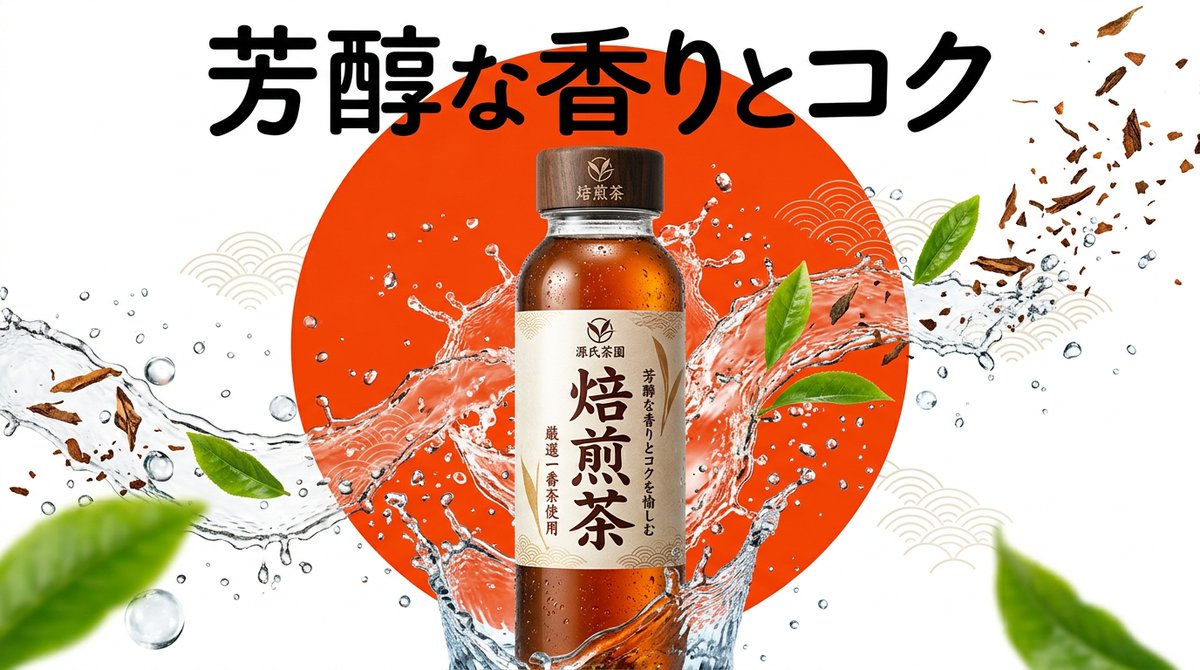
Beverage Campaign Key Visual
A professional advertising prompt for creating vibrant beverage or frozen food product shots with a pop aesthetic and dynamic splashing effects.
This is a GPT Image 2 prompt case for Product & Commercial. Use the copy-ready prompt below to generate similar visuals, and review Awesome GPT Image 2 Prompts attribution plus commercial-use rights before reuse.
Free 1K preview
Generate one preview image instantly, no sign-up required.
Prompt
Copy-ready prompt
[Product/Package]
- Product name/genre: {argument name="product name" default="{productName}"}
- Appeal: {argument name="tagline" default="{subText}"}

[Design Gimmick]
- Background visual element: {argument name="background element" default="{circleColor}"}

[Image quality, production, composition specification]
- Style: Pop and bright Japanese convenience store or food manufacturer campaign KV. Sizzle feeling and high visual impact.
- Subject: A can, bottle, or package of {argument name="product name" default="{productName}"} placed in the center. Surrounded by ice fragments, water droplets, splashes, or fresh raw materials (tea leaves or fruit) of the product jumping around with a sense of dynamism.
- Background: High-contrast, clear solid color or gradient background with {argument name="background element" default="{circleColor}"} placed as the main graphic element.
- Typography (for GPT-image / Nano Banana Pro): The copy "{argument name="tagline" default="{subText}"}" is placed in a thick and energetic font in a position that does not overlap with the product.
- Lighting/Color: Bright and vivid studio lighting, crystal clear reflections, energetic color composition.

[Strict layout and output constraints (Required)]
- Output the finished design itself filling the entire screen. Interior background and scene descriptions (walls, spaces, shadows, etc.) may follow the instructions in the text.
- Prohibited items: Photos of finished posters in frames, photos of posters stuck on walls, mock-up photos placed on desks or paper, perspective distortion of paper edges or drop shadows.
- Output the finished flat 2D design itself, filling the entire canvas. Scene elements inside the design (walls, rooms, shadows) described above are allowed. Absolutely NO photo-of-a-poster mockups: no picture frames, no poster-on-wall or poster-on-desk shots, no perspective warp or drop shadow around the artwork's edges.

- Aspect ratio: --ar 16:9
Prompt variables
Editable argument placeholders found in the prompt, with their default values.
Best for
- - Product & Commercial visual exploration
- - Image generation and reference-image edits
- - Reusable briefs that keep source attribution visible
Change these parts
- - Subject, product, character, or scene
- - Aspect ratio, camera, lighting, and background
- - Brand, text, color, and output constraints
Recommended model and settings
- - Model: gpt-image-2
- - Input mode: Text to Image
- - Aspect ratio: source
- - Commercial status: review original source
How to use this prompt
- 1. Copy the prompt and preserve its structure for the first test.
- 2. Replace the subject, context, and publishing channel.
- 3. Change one camera, lighting, or style variable per iteration.
- 4. Inspect the output, source, text, and rights before reuse.
Limitations, source, and reuse cautions
- - Generated output is an editable draft, not factual, legal, or rights evidence.
- - Review the linked source, people, brands, logos, text, and third-party media before commercial use.
More cases in this category
Prioritized by category, input mode compatibility, quality, and lower risk.

Reuse and source notes
Use this prompt safely after previewing the case.
- 1.Copy the prompt or open it directly in Dovoo with the generation button.
- 2.Adjust variables, aspect ratio, and reference images for your own use case.
- 3.Before publishing or paid usage, verify source rights, attribution requirements, and brand or likeness risks.
Can I use this prompt commercially?
Commercial-use status is allowed. Review the original source, license, brand constraints, and legal requirements before paid usage.
Where does this case come from?
This case is imported from Awesome GPT Image 2 Prompts; keep attribution visible and check the source URL before reuse.