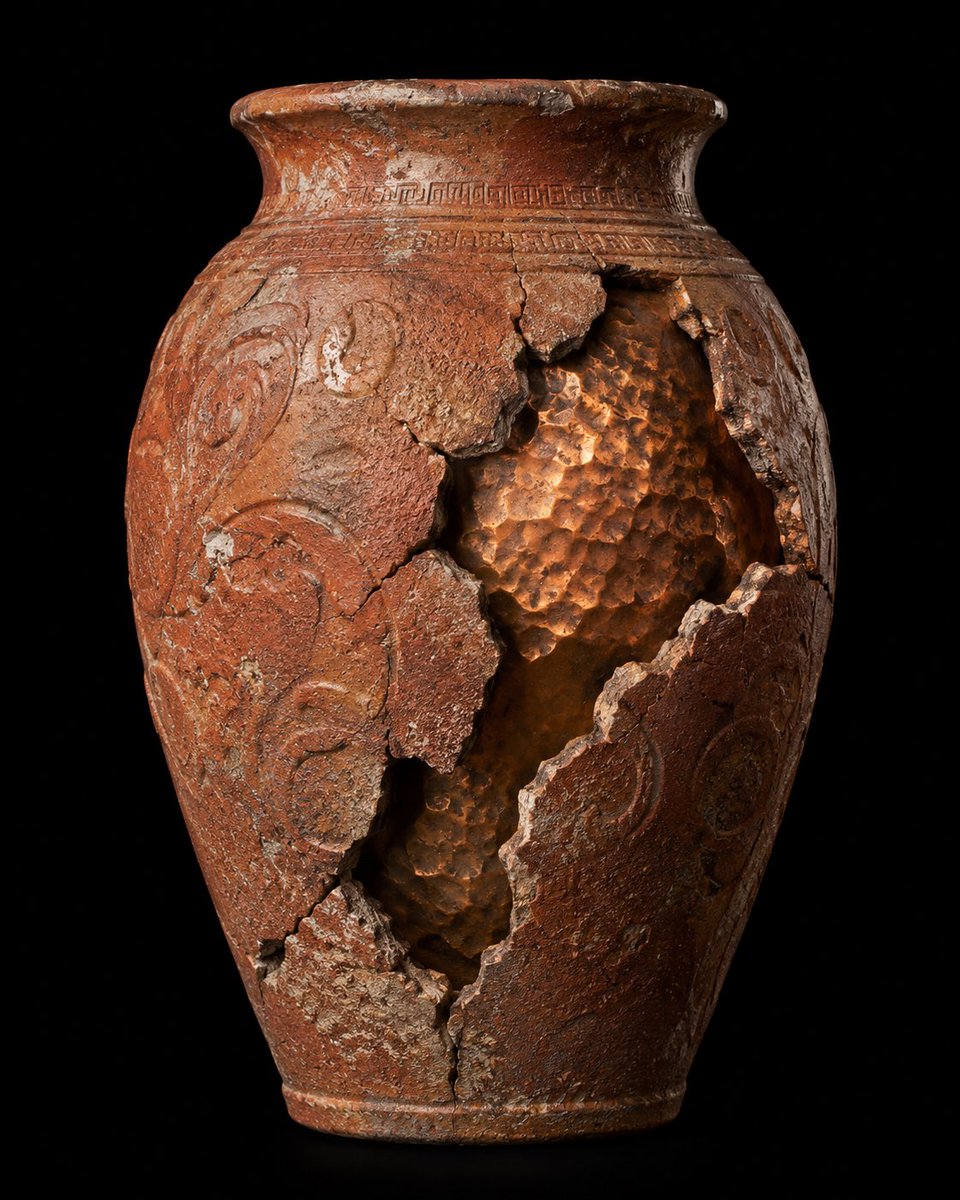
Broken Ancient Terracotta Vase
A realistic studio product shot prompt for generating an aged cracked terracotta artifact with a glowing exposed interior on a black background.
This is a GPT Image 2 prompt case for Product & Commercial. Use the copy-ready prompt below to generate similar visuals, and review Awesome GPT Image 2 Prompts attribution plus commercial-use rights before reuse.
Free 1K preview
Generate one preview image instantly, no sign-up required.
Prompt
Copy-ready prompt
Create a hyper-realistic museum-style product photograph of a single ancient {argument name="artifact type" default="terracotta ceramic vase"} centered on a pure black background. The vessel is tall and ovoid with a narrow foot, rounded shoulders, and a wide flared rim, made of reddish-brown weathered clay with heavy age patina, mineral deposits, chips, scratches, white abrasions, and fine cracks. Add carved ornamental decoration: one continuous geometric band around the neck just below the rim and raised swirling vine-like relief patterns on the body. The front right side has one large jagged vertical rupture exposing the hollow interior, with multiple broken clay shards still attached around the opening; the opening runs from the upper shoulder down toward the lower body and shows a warm copper-orange hammered, dimpled inner surface catching light. Use dramatic studio lighting from the upper left and subtle warm internal/reflected glow inside the broken cavity, emphasizing rough ceramic texture, fractured edges, depth, and archaeological realism. Composition is a straight-on three-quarter product view, full vase visible with slight shadow at the base, high contrast, sharp focus, ultra-detailed, no labels, no people, no extra objects, no watermark.Prompt variables
Editable argument placeholders found in the prompt, with their default values.
Best for
- - Product & Commercial visual exploration
- - Image generation and reference-image edits
- - Reusable briefs that keep source attribution visible
Change these parts
- - Subject, product, character, or scene
- - Aspect ratio, camera, lighting, and background
- - Brand, text, color, and output constraints
Recommended model and settings
- - Model: gpt-image-2
- - Input mode: Text to Image
- - Aspect ratio: source
- - Commercial status: review original source
How to use this prompt
- 1. Copy the prompt and preserve its structure for the first test.
- 2. Replace the subject, context, and publishing channel.
- 3. Change one camera, lighting, or style variable per iteration.
- 4. Inspect the output, source, text, and rights before reuse.
Limitations, source, and reuse cautions
- - Generated output is an editable draft, not factual, legal, or rights evidence.
- - Review the linked source, people, brands, logos, text, and third-party media before commercial use.
More cases in this category
Prioritized by category, input mode compatibility, quality, and lower risk.


Reuse and source notes
Use this prompt safely after previewing the case.
- 1.Copy the prompt or open it directly in Dovoo with the generation button.
- 2.Adjust variables, aspect ratio, and reference images for your own use case.
- 3.Before publishing or paid usage, verify source rights, attribution requirements, and brand or likeness risks.
Can I use this prompt commercially?
Commercial-use status is allowed. Review the original source, license, brand constraints, and legal requirements before paid usage.
Where does this case come from?
This case is imported from Awesome GPT Image 2 Prompts; keep attribution visible and check the source URL before reuse.