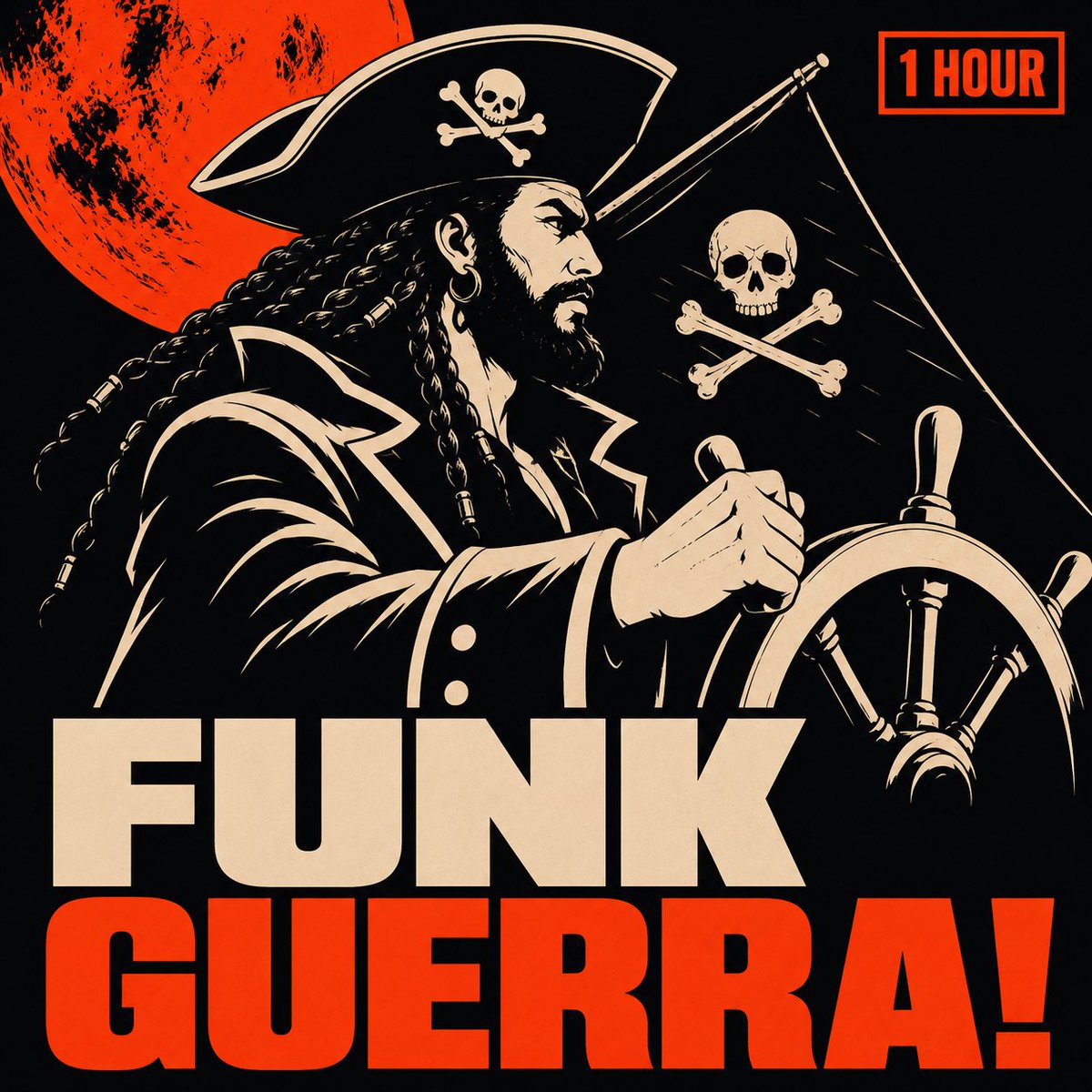
Pirate Funk Playlist Cover
A bold square playlist cover featuring a vintage screen-print pirate captain, skull flag, red moon, and huge funk title typography.
This is a GPT Image 2 prompt case for Graphic & Poster. Use the copy-ready prompt below to generate similar visuals, and review Awesome GPT Image 2 Prompts attribution plus commercial-use rights before reuse.
Free 1K preview
Generate one preview image instantly, no sign-up required.
Prompt
Copy-ready prompt
Create square Spotify playlist artwork for {argument name="playlist title" default="FUNK GUERRA!"} in a bold retro silkscreen style reminiscent of pirate funk album posters. Utilize a black background with a limited color palette of warm cream and vibrant reddish-orange, featuring heavy distressed ink textures, rough halftone/grain, sharp high-contrast vector shapes, and dramatic comic book-style lighting. The central subject is a fierce pirate captain in profile facing right, with long black braids and a thick beard, wearing hoop earrings and a tricorn hat adorned with a skull and crossbones, and clad in a dark navy coat with cream outlining and buttons. He tightly grips a massive ship's wheel in the lower right foreground. Behind him, incorporate 2 pirate symbols: one on the hat and another on a black flag to his right. Add a large, distressed reddish-orange moon behind the pirate in the upper left corner. Place a small rectangular reddish-orange outlined label in the upper right corner containing {argument name="duration label" default="1 HOUR"} written in bold capital letters. The lower half is dominated by oversized stacked typography: the first word, {argument name="top title word" default="FUNK"}, in cream, and the second word, {argument name="bottom title word" default="GUERRA!"}, in reddish-orange, both in a massive, compressed sans-serif typeface/block lettering with tight kerning. The overall composition should evoke an aggressive punk funk pirate propaganda poster aesthetic, ensuring clarity and readability at thumbnail size, and excluding any additional text, watermarks, photorealistic rendering, or extra characters.Prompt variables
Editable argument placeholders found in the prompt, with their default values.
Best for
- - Graphic & Poster visual exploration
- - Image generation and reference-image edits
- - Reusable briefs that keep source attribution visible
Change these parts
- - Subject, product, character, or scene
- - Aspect ratio, camera, lighting, and background
- - Brand, text, color, and output constraints
Recommended model and settings
- - Model: gpt-image-2
- - Input mode: Text to Image
- - Aspect ratio: source
- - Commercial status: review original source
How to use this prompt
- 1. Copy the prompt and preserve its structure for the first test.
- 2. Replace the subject, context, and publishing channel.
- 3. Change one camera, lighting, or style variable per iteration.
- 4. Inspect the output, source, text, and rights before reuse.
Limitations, source, and reuse cautions
- - Generated output is an editable draft, not factual, legal, or rights evidence.
- - Review the linked source, people, brands, logos, text, and third-party media before commercial use.
More cases in this category
Prioritized by category, input mode compatibility, quality, and lower risk.
Reuse and source notes
Use this prompt safely after previewing the case.
- 1.Copy the prompt or open it directly in Dovoo with the generation button.
- 2.Adjust variables, aspect ratio, and reference images for your own use case.
- 3.Before publishing or paid usage, verify source rights, attribution requirements, and brand or likeness risks.
Can I use this prompt commercially?
Commercial-use status is allowed. Review the original source, license, brand constraints, and legal requirements before paid usage.
Where does this case come from?
This case is imported from Awesome GPT Image 2 Prompts; keep attribution visible and check the source URL before reuse.