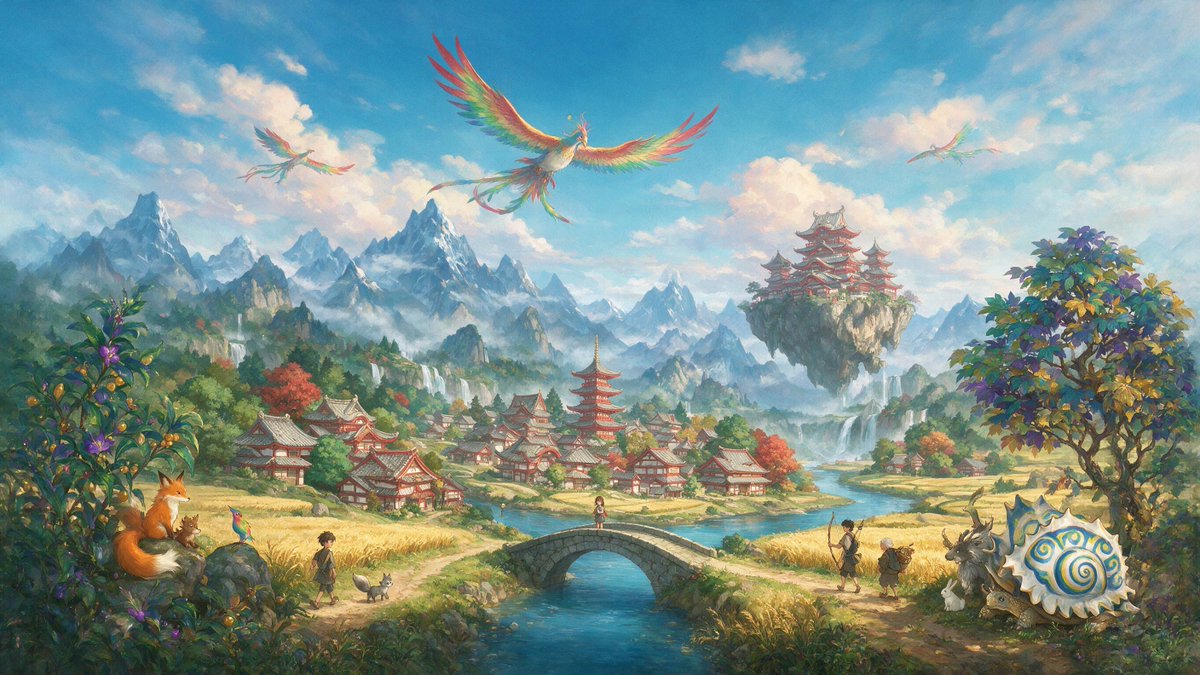
Whimsical Phoenix Mountain Kingdom
Generates a richly detailed fantasy valley with phoenixes, temples, travelers, and magical creatures for cinematic worldbuilding art.
This is a GPT Image 2 prompt case for Anime & Game. Use the copy-ready prompt below to generate similar visuals, and review Awesome GPT Image 2 Prompts attribution plus commercial-use rights before reuse.
Free 1K preview
Generate one preview image instantly, no sign-up required.
Prompt
Copy-ready prompt
Create a wide cinematic fantasy landscape in a bright, painterly Studio Ghibli-inspired storybook style. Show a magical East Asian mountain valley under a vivid blue sky with soft peach-white clouds, sunlit mist, and distant jagged snowy peaks. In the middle ground, place a peaceful village of red-and-white Japanese-style buildings with gray tiled roofs, including one tall red pagoda near the center, surrounded by golden rice fields, autumn-colored trees, streams, and small waterfalls. A clear turquoise river runs from the distant mountains toward the viewer, crossed by a small arched stone bridge in the center foreground with one small girl standing on it. Above the valley, include exactly 3 rainbow-feathered phoenix birds: 1 large phoenix centered high in the sky with wings fully spread and long trailing tail feathers, 1 smaller phoenix at upper left, and 1 faint smaller phoenix at upper right. On the right middle distance, show a floating rocky island with a grand red tiered temple complex perched on top, waterfalls pouring down from the island into the mist. Foreground details should feel whimsical and richly populated: on the left, dense flowering green bushes and a large orange fox sitting on a rock beside a tiny brown creature; nearby on the path are exactly 1 boy, 1 small gray dog, and 1 tiny colorful bird. On the bridge is exactly 1 girl. On the right path are exactly 2 human travelers, one taller adult with a walking staff and one shorter elderly-looking companion carrying a pack. Near them are exactly 4 fantasy animals: 1 large antlered goat-like beast, 1 small white rabbit, 1 small deer-like animal, and 1 enormous cream-colored spiral-shelled snail with blue and gold swirls. Add a large leafy tree on the far right with yellow, green, and violet foliage. Use luminous watercolor-and-gouache textures, intricate but soft detail, warm golden highlights, atmospheric depth, and a sense of wonder. No text, no logo, no watermark. The setting should feel like {argument name="fantasy kingdom style" default="a serene Japanese-inspired magical mountain kingdom"}, with {argument name="sky mood" default="clear blue morning sky with glowing clouds"}, {argument name="main creature" default="rainbow phoenix birds"}, {argument name="village architecture" default="red-and-white Japanese temple village"}, and {argument name="overall art style" default="painterly whimsical anime fantasy concept art"}.Prompt variables
Editable argument placeholders found in the prompt, with their default values.
Best for
- - Anime & Game visual exploration
- - Image generation and reference-image edits
- - Reusable briefs that keep source attribution visible
Change these parts
- - Subject, product, character, or scene
- - Aspect ratio, camera, lighting, and background
- - Brand, text, color, and output constraints
Recommended model and settings
- - Model: gpt-image-2
- - Input mode: Text to Image
- - Aspect ratio: source
- - Commercial status: review original source
How to use this prompt
- 1. Copy the prompt and preserve its structure for the first test.
- 2. Replace the subject, context, and publishing channel.
- 3. Change one camera, lighting, or style variable per iteration.
- 4. Inspect the output, source, text, and rights before reuse.
Limitations, source, and reuse cautions
- - Generated output is an editable draft, not factual, legal, or rights evidence.
- - Review the linked source, people, brands, logos, text, and third-party media before commercial use.
More cases in this category
Prioritized by category, input mode compatibility, quality, and lower risk.



Reuse and source notes
Use this prompt safely after previewing the case.
- 1.Copy the prompt or open it directly in Dovoo with the generation button.
- 2.Adjust variables, aspect ratio, and reference images for your own use case.
- 3.Before publishing or paid usage, verify source rights, attribution requirements, and brand or likeness risks.
Can I use this prompt commercially?
Commercial-use status is allowed. Review the original source, license, brand constraints, and legal requirements before paid usage.
Where does this case come from?
This case is imported from Awesome GPT Image 2 Prompts; keep attribution visible and check the source URL before reuse.