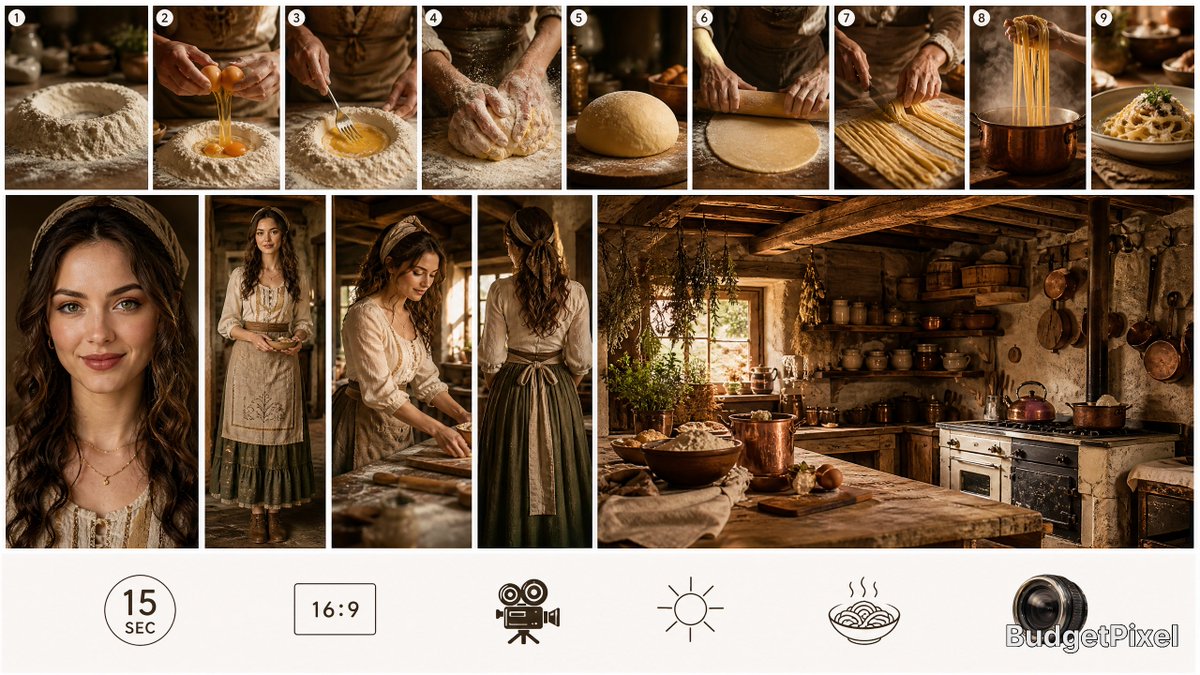
Rustic Pasta Tutorial Reference Sheet
A cinematic 16:9 production reference board for planning a short rustic pasta-making tutorial video.
This is a GPT Image 2 prompt case for Graphic & Poster. Use the copy-ready prompt below to generate similar visuals, and review Awesome GPT Image 2 Prompts attribution plus commercial-use rights before reuse.
Free 1K preview
Generate one preview image instantly, no sign-up required.
Prompt
Copy-ready prompt
Goal: Create one single composite reference sheet for a {argument name="video duration" default="15-second"} realistic pasta-making tutorial video, designed as a clean high-end production reference board rather than a poster. The board should communicate story sequence, character styling, location mood, aspect ratio, and filming constraints at a glance.

Canvas: Wide 16:9 horizontal reference sheet with elegant white margins and crisp white gutters between panels. Use warm cinematic rustic lighting, realistic photography, shallow depth of field, earthy browns, flour whites, copper highlights, antique wood textures, and a premium food-film look.

Top sequence strip: Include exactly 9 small numbered process panels across the top, each with a white circular number badge in the upper-left corner. The 9 panels are: 1) a mound of flour with a well on a wooden table, 2) hands cracking eggs into the flour well, 3) a fork mixing egg into flour, 4) floury hands kneading dough, 5) a smooth round pasta dough ball resting on a floured board, 6) hands rolling dough with a wooden rolling pin, 7) hands cutting or separating long fresh pasta strands, 8) fresh pasta being lifted from a copper pot of boiling water, 9) plated pasta finished with garnish and sauce.

Middle reference row: Use a collage of exactly 5 larger reference panels. Panel 1 is a tight portrait crop of the host, a rustic young woman with long wavy dark brown hair, soft linen blouse, delicate necklace, and face intentionally left as an indistinct blocked placeholder for identity flexibility. Panel 2 is a full-body wardrobe reference of the same host wearing a cream embroidered apron or tunic over an olive-green skirt and brown boots, standing in a rustic kitchen. Panel 3 is a medium action shot of the host rolling or preparing pasta at the wooden table, also with an indistinct face placeholder. Panel 4 is a rear-view costume reference showing long wavy hair tied partly back, cream blouse, dark green skirt, and apron ties. Panel 5 is a wide environment reference of a cozy old-world farmhouse kitchen with rough plaster walls, exposed timber beams, shelves of bowls and jars, hanging herbs, copper pots, a vintage stove, a wooden worktable, flour, eggs, and warm sunlight through a window.

Bottom production-spec band: Leave a clean white band along the bottom with exactly 5 simple black-outline icons and labels or implied labels: 1) a circular badge reading "15 SEC", 2) a rectangular badge reading "16:9", 3) a vintage movie camera icon, 4) a sun/daylight icon, 5) a steaming bowl of pasta icon. At the far bottom-right, add a camera-lens mark with the visible brand text {argument name="brand text" default="BudgetPixel"}.

Subject details: The host should feel like {argument name="host style" default="a rustic young Italian farmhouse cook"}; wardrobe should be natural linen, cream embroidery, olive green skirt, apron ties, and worn leather boots. The kitchen should feel {argument name="kitchen style" default="rustic Tuscan farmhouse"}, with practical food-prep clutter but still art-directed and elegant.

Visual style: Realistic cinematic photography, warm golden window light, soft contrast, tactile flour and dough textures, copper cookware, weathered wood, handmade pasta authenticity, editorial production-board composition. Keep typography minimal and functional.

Constraints: Do not create a text-heavy poster. Preserve the exact count of 9 top step panels, 5 middle reference panels, and 5 bottom icons. Maintain clean white gutters, white margins, numbered process badges, realistic food styling, and a professional video production reference-sheet layout.
Prompt variables
Editable argument placeholders found in the prompt, with their default values.
Best for
- - Graphic & Poster visual exploration
- - Image generation and reference-image edits
- - Reusable briefs that keep source attribution visible
Change these parts
- - Subject, product, character, or scene
- - Aspect ratio, camera, lighting, and background
- - Brand, text, color, and output constraints
Recommended model and settings
- - Model: gpt-image-2
- - Input mode: Text to Image
- - Aspect ratio: source
- - Commercial status: review original source
How to use this prompt
- 1. Copy the prompt and preserve its structure for the first test.
- 2. Replace the subject, context, and publishing channel.
- 3. Change one camera, lighting, or style variable per iteration.
- 4. Inspect the output, source, text, and rights before reuse.
Limitations, source, and reuse cautions
- - Generated output is an editable draft, not factual, legal, or rights evidence.
- - Review the linked source, people, brands, logos, text, and third-party media before commercial use.
More cases in this category
Prioritized by category, input mode compatibility, quality, and lower risk.


Reuse and source notes
Use this prompt safely after previewing the case.
- 1.Copy the prompt or open it directly in Dovoo with the generation button.
- 2.Adjust variables, aspect ratio, and reference images for your own use case.
- 3.Before publishing or paid usage, verify source rights, attribution requirements, and brand or likeness risks.
Can I use this prompt commercially?
Commercial-use status is allowed. Review the original source, license, brand constraints, and legal requirements before paid usage.
Where does this case come from?
This case is imported from Awesome GPT Image 2 Prompts; keep attribution visible and check the source URL before reuse.