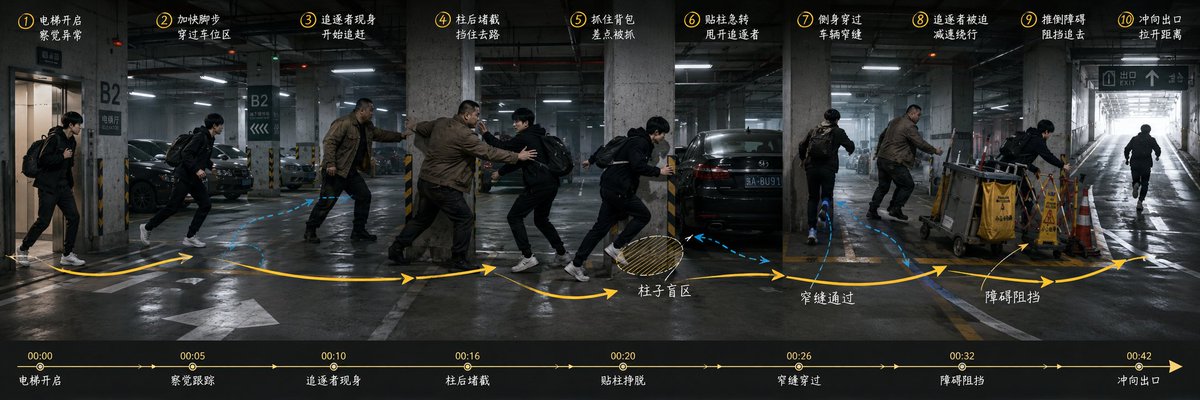
Underground Parking Chase Storyboard
Generates a cinematic ultra-wide annotated storyboard for planning a one-take underground parking garage chase sequence.
This is a GPT Image 2 prompt case for Illustration & Art. Use the copy-ready prompt below to generate similar visuals, and review Awesome GPT Image 2 Prompts attribution plus commercial-use rights before reuse.
Free 1K preview
Generate one preview image instantly, no sign-up required.
Prompt
Copy-ready prompt
Objective: Create a 3:1 ultra-wide cinematic storyboard keyframe to showcase an action chase sequence in an underground parking garage in a single take. Present the complete route, character positioning, chase relationship, conflict points, and final exit in a continuous panoramic view.

Canvas: Horizontal 3:1 aspect ratio, dark, realistic film still style, composition approximately 1200x400. Use a dimly lit concrete underground parking garage labeled B2, with wet reflective floors, fluorescent ceiling lights, parked black sedans, concrete pillars with yellow and black warning stripes, ground guidance lines, and a bright ramp exit on the far right.

Main Action: Depict a scene where {argument name="protagonist description" default="a young man in a black jacket, black pants, white sneakers, carrying a black backpack"} is being chased by {argument name="pursuer description" default="a larger middle-aged man in a brown jacket and dark pants"}. Repeat these two characters multiple times in continuous space to demonstrate the action sequence, rather than segmented frames. The protagonist starts from the elevator on the far left, moves through the parking area, hides behind pillars, slides past parked vehicles, uses obstacle areas to slow down the pursuer, and then rushes towards the bright exit ramp on the far right. If necessary, add a third runner-like silhouette at the far right exit to emphasize the final escape.

Layout and Motion Graphics: Overlay a thick yellow curved path arrow across the entire image, with arrows indicating direction. Add blue dashed paths around vehicles and pillars to indicate alternative routes. Add a shaded circular blind spot marker near the pillars, labeled “Blind Spot”. Add small annotation arrows pointing to warning signs and obstacle areas near the trolleys.

Numbered Storyboard Labels: Place 10 yellow circular numbers evenly along the top edge, accompanied by white handwritten-style Chinese descriptions. Please use the following precise visible step descriptions: ① Elevator opens / Detects anomaly; ② Speeds up / Crosses parking area; ③ Pursuer appears / Begins chase; ④ Blocked by pillar / Obstructs the path; ⑤ Grabs backpack; ⑥ Turns sharply by pillar / Shakes off pursuer; ⑦ Slides through / Narrow gap between vehicles; ⑧ Pursuer forced to / Slow down and detour; ⑨ Knocks over obstacle / Blocks pursuit; ⑩ Rushes towards exit / Gains distance.

Bottom Timeline: Add a black semi-transparent horizontal timeline bar at the bottom. It must contain 7 time markers and event labels from left to right: 00:00 Elevator opens; 00:05 Detects tracking; 00:10 Pursuer appears; 00:16 Blocked by pillar; 00:20 Shakes off pursuer; 00:26 Slides through; 00:32 Obstacle blocks; and 00:42 Rushes towards exit on the far right. Use thin yellow lines with small arrows and dots.

Scene Details: The far left includes elevator doors labeled B2, several parked cars, multiple concrete support pillars, narrow gaps between vehicles, a garbage truck or cleaning vehicle, a yellow “Caution: Slippery Floor” sign, and a bright white daylight exit ramp with an exit sign overhead on the far right. Visible Chinese parking signs, such as “B2” and “EXIT”.

Visual Style: Photorealistic cinematic action storyboard, cool gray tones, high contrast, wet concrete reflections, motion blur for running figures, sharp scene details, yellow annotation graphics similar to a director’s planning scheme, white handwritten Chinese notes, a tense thriller atmosphere. Make it look like a finished pre-visualization project for {argument name="sequence title" default="Underground Parking Garage Chase"}.

Constraints: Maintain the composition as a continuous wide space, do not use comic book panels. Display 10 numbered top annotations, 8 bottom timeline events (including the final 00:42 mark), and maintain consistent character appearances for the protagonist and pursuer in all repeating poses. Do not add any logos, watermarks, or irrelevant text.
Prompt variables
Editable argument placeholders found in the prompt, with their default values.
Best for
- - Illustration & Art visual exploration
- - Image generation and reference-image edits
- - Reusable briefs that keep source attribution visible
Change these parts
- - Subject, product, character, or scene
- - Aspect ratio, camera, lighting, and background
- - Brand, text, color, and output constraints
Recommended model and settings
- - Model: gpt-image-2
- - Input mode: Text to Image
- - Aspect ratio: source
- - Commercial status: review original source
How to use this prompt
- 1. Copy the prompt and preserve its structure for the first test.
- 2. Replace the subject, context, and publishing channel.
- 3. Change one camera, lighting, or style variable per iteration.
- 4. Inspect the output, source, text, and rights before reuse.
Limitations, source, and reuse cautions
- - Generated output is an editable draft, not factual, legal, or rights evidence.
- - Review the linked source, people, brands, logos, text, and third-party media before commercial use.
More cases in this category
Prioritized by category, input mode compatibility, quality, and lower risk.

Reuse and source notes
Use this prompt safely after previewing the case.
- 1.Copy the prompt or open it directly in Dovoo with the generation button.
- 2.Adjust variables, aspect ratio, and reference images for your own use case.
- 3.Before publishing or paid usage, verify source rights, attribution requirements, and brand or likeness risks.
Can I use this prompt commercially?
Commercial-use status is allowed. Review the original source, license, brand constraints, and legal requirements before paid usage.
Where does this case come from?
This case is imported from Awesome GPT Image 2 Prompts; keep attribution visible and check the source URL before reuse.