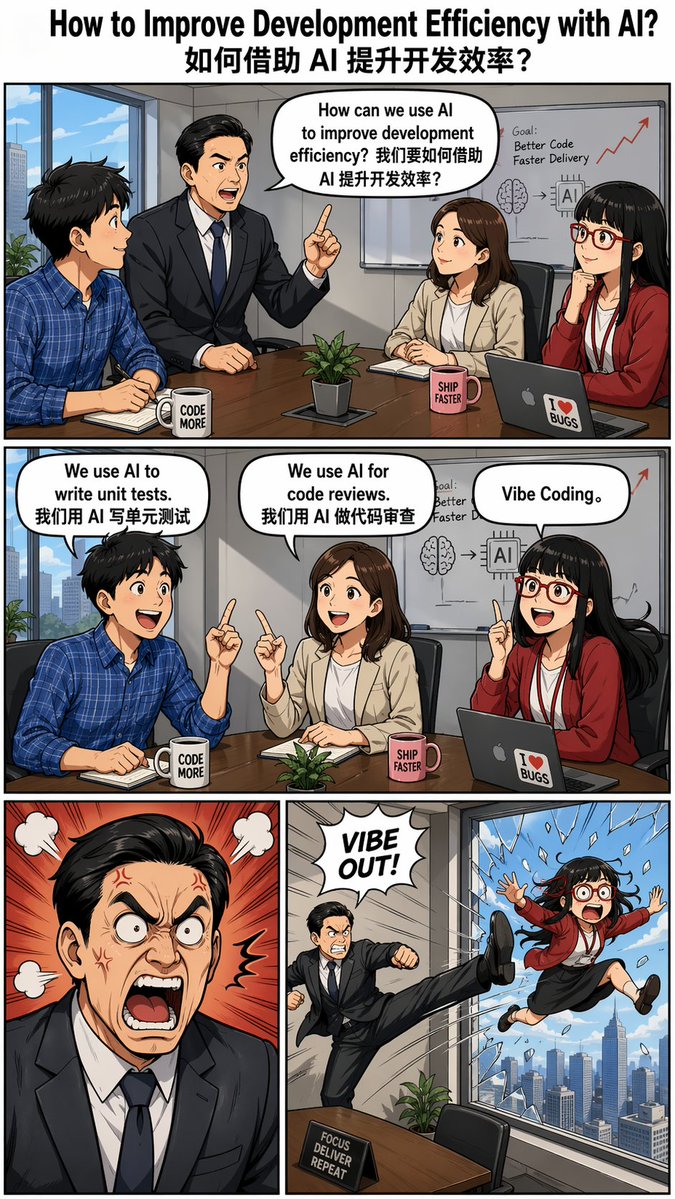
Out the Window meme comic prompt
A detailed prompt to generate a four-panel comic in the style of the 'Out the Window' meme, including character descriptions and panel content.
This is a GPT Image 2 prompt case for Illustration & Art. Use the copy-ready prompt below to generate similar visuals, and review Awesome GPT Image 2 Prompts attribution plus commercial-use rights before reuse.
Free 1K preview
Generate one preview image instantly, no sign-up required.
Prompt
Copy-ready prompt
Create a four-panel meme-style comic with the title "{argument name="title" default="How to Improve Development Efficiency with AI? 如何借助 AI 提升开发效率?"}", featuring dialogue bubbles, based on "{argument name="meme style" default="Out the Window"}".

--ar 9:16

Characters:

- Boss: Asian male, wearing a suit, neatly groomed.
- Employee Xiaoming: Male, wearing a blue plaid shirt.
- Employee Xiaohong: Female.
- Employee Xiaohu: Female, Asian, bangs, wearing red-framed glasses.

Scene Descriptions:

- First Panel (Single wide screen):
  The boss asks in a meeting: "How can we use AI to improve development efficiency? 我们要如何借助 AI 提升开发效率?"

  Three employees are sitting and listening.

- Second Panel (Single wide screen):
  Each employee answers:

  - Xiaoming: "We use AI to write unit tests. 我们用 AI 写单元测试"
  - Xiaohong: "We use AI for code reviews. 我们用 AI 做代码审查"
  - Xiaohu: "Vibe Coding."

- Third Row (Two panels):
  - Left Panel: The boss looks very angry.
  - Right Panel: Employee Xiaohu is comically kicked out of a high-rise window.
Prompt variables
Editable argument placeholders found in the prompt, with their default values.
Best for
- - Illustration & Art visual exploration
- - Image generation and reference-image edits
- - Reusable briefs that keep source attribution visible
Change these parts
- - Subject, product, character, or scene
- - Aspect ratio, camera, lighting, and background
- - Brand, text, color, and output constraints
Recommended model and settings
- - Model: gpt-image-2
- - Input mode: Text to Image
- - Aspect ratio: source
- - Commercial status: review original source
How to use this prompt
- 1. Copy the prompt and preserve its structure for the first test.
- 2. Replace the subject, context, and publishing channel.
- 3. Change one camera, lighting, or style variable per iteration.
- 4. Inspect the output, source, text, and rights before reuse.
Limitations, source, and reuse cautions
- - Generated output is an editable draft, not factual, legal, or rights evidence.
- - Review the linked source, people, brands, logos, text, and third-party media before commercial use.
More cases in this category
Prioritized by category, input mode compatibility, quality, and lower risk.




Reuse and source notes
Use this prompt safely after previewing the case.
- 1.Copy the prompt or open it directly in Dovoo with the generation button.
- 2.Adjust variables, aspect ratio, and reference images for your own use case.
- 3.Before publishing or paid usage, verify source rights, attribution requirements, and brand or likeness risks.
Can I use this prompt commercially?
Commercial-use status is allowed. Review the original source, license, brand constraints, and legal requirements before paid usage.
Where does this case come from?
This case is imported from Awesome GPT Image 2 Prompts; keep attribution visible and check the source URL before reuse.