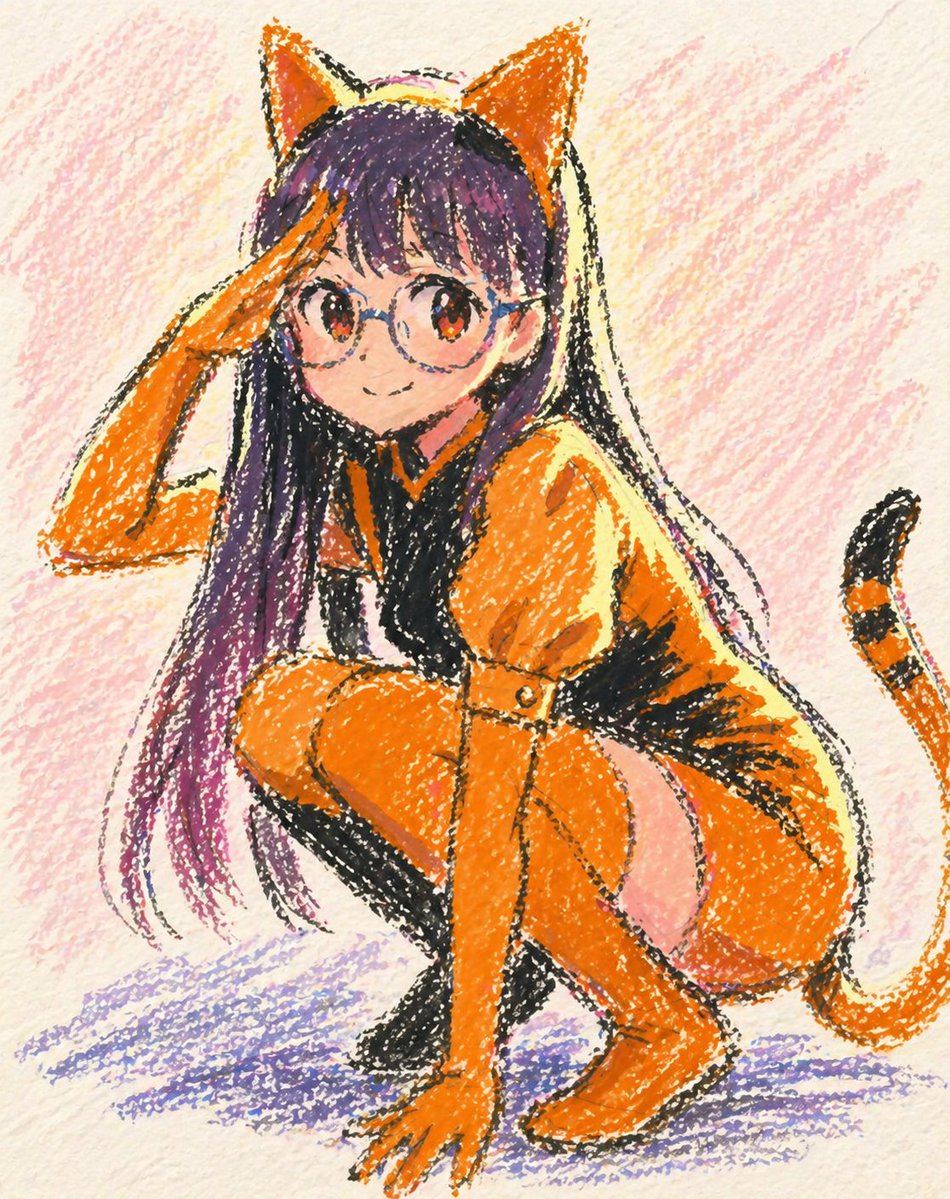
Oil Pastel Anime Catgirl
This prompt generates a cute full-body anime catgirl in a tiger-themed outfit rendered as a textured oil pastel crayon drawing, ideal for playful character art and stylized social posts.
This is a GPT Image 2 prompt case for Anime & Game. Use the copy-ready prompt below to generate similar visuals, and review Awesome GPT Image 2 Prompts attribution plus commercial-use rights before reuse.
Free 1K preview
Generate one preview image instantly, no sign-up required.
Prompt
Copy-ready prompt
A cute anime catgirl crouching low in a playful pose, drawn as a hand-made oil pastel illustration on textured off-white paper. She has long straight {argument name="hair color" default="deep purple with lighter lavender ends"} hair, large pointed orange cat ears on top of her head, and a striped orange-and-black cat tail curving in from the right side. Her outfit is a tiger-inspired bodysuit in vivid {argument name="outfit color" default="bright orange"} with bold black accents: long fitted sleeves, a dark black chest and torso panel, orange legs, orange gloves, and a soft pale pink patch on the hip and upper thigh area. She is squatting with one knee raised, one hand touching the ground in front of her, and the other hand lifted in a salute near her forehead, facing the viewer with a mischievous, energetic feel. Render the whole image in rough crayon-like oil pastel strokes with visible grain, uneven sketchy black outlines, scribbled color fill, and childlike analog texture. Use a warm pastel palette with orange as the dominant color, purple hair, soft pink scribbled background shading, and a purple-blue scribbled shadow beneath her. Keep the composition as a single centered full-body character on paper, whimsical, charming, slightly messy, and irresistibly cute, like an expressive pastel doodle illustration.Prompt variables
Editable argument placeholders found in the prompt, with their default values.
Best for
- - Anime & Game visual exploration
- - Image generation and reference-image edits
- - Reusable briefs that keep source attribution visible
Change these parts
- - Subject, product, character, or scene
- - Aspect ratio, camera, lighting, and background
- - Brand, text, color, and output constraints
Recommended model and settings
- - Model: gpt-image-2
- - Input mode: Text to Image
- - Aspect ratio: source
- - Commercial status: review original source
How to use this prompt
- 1. Copy the prompt and preserve its structure for the first test.
- 2. Replace the subject, context, and publishing channel.
- 3. Change one camera, lighting, or style variable per iteration.
- 4. Inspect the output, source, text, and rights before reuse.
Limitations, source, and reuse cautions
- - Generated output is an editable draft, not factual, legal, or rights evidence.
- - Review the linked source, people, brands, logos, text, and third-party media before commercial use.
More cases in this category
Prioritized by category, input mode compatibility, quality, and lower risk.

Reuse and source notes
Use this prompt safely after previewing the case.
- 1.Copy the prompt or open it directly in Dovoo with the generation button.
- 2.Adjust variables, aspect ratio, and reference images for your own use case.
- 3.Before publishing or paid usage, verify source rights, attribution requirements, and brand or likeness risks.
Can I use this prompt commercially?
Commercial-use status is allowed. Review the original source, license, brand constraints, and legal requirements before paid usage.
Where does this case come from?
This case is imported from Awesome GPT Image 2 Prompts; keep attribution visible and check the source URL before reuse.