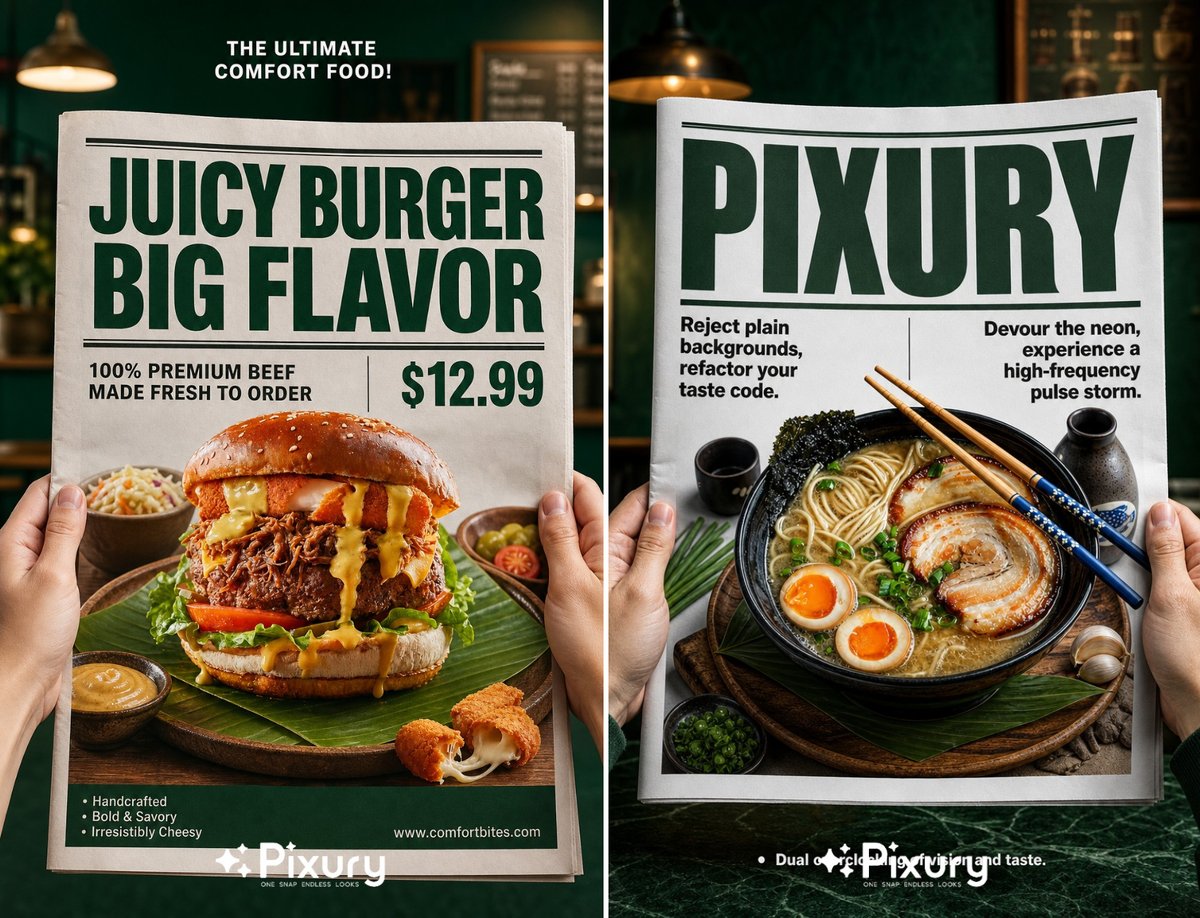
Newspaper Layout Food Poster Template
A professional food photography prompt that frames a product within a realistic newspaper layout, ideal for F&B marketing.
This is a GPT Image 2 prompt case for Graphic & Poster. Use the copy-ready prompt below to generate similar visuals, and review Awesome GPT Image 2 Prompts attribution plus commercial-use rights before reuse.
Free 1K preview
Generate one preview image instantly, no sign-up required.
Prompt
Copy-ready prompt
Photorealistic high-end commercial food product photography, adjustable aspect ratio according to target setting, first-person POV shot, two fair-skinned human hands holding the left and right edges of a large crisp white newspaper. At the center of the newspaper, a {argument name="product" default="hyper-realistic glossy 3D pop-out display of the exact uploaded featured item"}, the product is placed on a {argument name="serving style" default="rustic wooden plate paved with green leaf decorations"}, matched with small side dishes and delicate garnishes. The {argument name="background" default="background behind the newspaper is a softly blurred dark emerald green cafe interior environment"}. Strict standardized typography layout rules: 1. Small bold white text wrapped in "" placed at top center of dark green background area; 2. Two-line ultra-bold dark green thick sans-serif headline text wrapped in "" at the top of newspaper page, decorated with horizontal dividing lines above and below the headline; 3. Medium-weight black sans-serif text wrapped in "" on the left lower part of the newspaper, separated by a thin vertical line from large bold green price text wrapped in "" on the right side; 4. Small white bullet point text wrapped in "" on the left bottom of green background, small white URL text wrapped in "" on the right bottom of green background. Bright directional studio soft lighting, sharp focal point locked on newspaper and the popped-out product, clear layered depth of field, 8K ultra high resolution, exquisite material texture rendering, cinematic color grading, neat and standardized typography hierarchical layout, clean commercial advertising aesthetic, no redundant messy elements, no distorted product shape.Prompt variables
Editable argument placeholders found in the prompt, with their default values.
Best for
- - Graphic & Poster visual exploration
- - Image generation and reference-image edits
- - Reusable briefs that keep source attribution visible
Change these parts
- - Subject, product, character, or scene
- - Aspect ratio, camera, lighting, and background
- - Brand, text, color, and output constraints
Recommended model and settings
- - Model: gpt-image-2
- - Input mode: Text to Image
- - Aspect ratio: source
- - Commercial status: review original source
How to use this prompt
- 1. Copy the prompt and preserve its structure for the first test.
- 2. Replace the subject, context, and publishing channel.
- 3. Change one camera, lighting, or style variable per iteration.
- 4. Inspect the output, source, text, and rights before reuse.
Limitations, source, and reuse cautions
- - Generated output is an editable draft, not factual, legal, or rights evidence.
- - Review the linked source, people, brands, logos, text, and third-party media before commercial use.
More cases in this category
Prioritized by category, input mode compatibility, quality, and lower risk.


Reuse and source notes
Use this prompt safely after previewing the case.
- 1.Copy the prompt or open it directly in Dovoo with the generation button.
- 2.Adjust variables, aspect ratio, and reference images for your own use case.
- 3.Before publishing or paid usage, verify source rights, attribution requirements, and brand or likeness risks.
Can I use this prompt commercially?
Commercial-use status is allowed. Review the original source, license, brand constraints, and legal requirements before paid usage.
Where does this case come from?
This case is imported from Awesome GPT Image 2 Prompts; keep attribution visible and check the source URL before reuse.