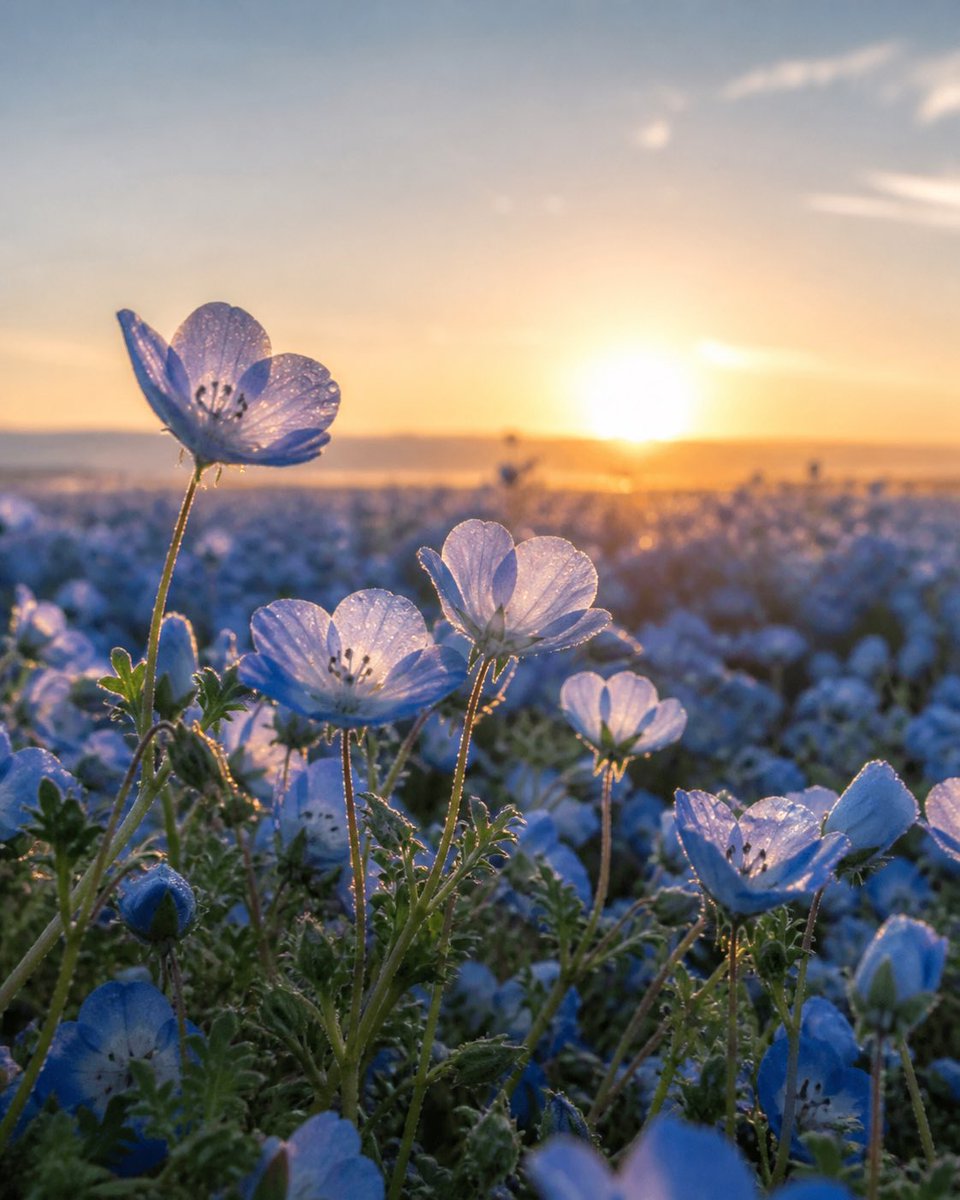
Dewy Nemophila Sunrise Macro
A photorealistic close-up prompt for creating dreamy backlit nemophila flower field imagery at golden-hour sunrise.
Prompt
Copy-ready prompt
Create a vertical close-up photorealistic macro image of a vast {argument name="flower type" default="nemophila baby blue eyes"} field at sunrise. The camera is placed very low among the plants, focusing on exactly 5 prominent open pale-blue flowers in the foreground: 1 tall blossom on the upper left with translucent petals, 1 open blossom near the lower center-left, 1 backlit blossom in the center, 1 smaller glowing blossom mid-right, and 1 larger open blossom on the lower right; include exactly 2 visible closed blue buds near the lower left and lower right. The petals are delicate, semi-transparent, softly veined, and covered with tiny sparkling dew droplets; thin green stems and fuzzy serrated leaves catch golden rim light. The background is a wide sea of blurred blue flowers stretching to a distant horizon, with a warm orange sun sitting low near the center-right, creating strong backlighting, lens glow, and dreamy bokeh. Use a shallow depth of field, cinematic golden-hour lighting, natural colors, gentle haze, and a serene spring atmosphere. Shot as if with a macro lens, intimate foreground detail, soft distant landscape, no people, no buildings, no text. Aspect ratio {argument name="aspect ratio" default="3:4 vertical"}, mood {argument name="mood" default="peaceful and ethereal"}.Prompt variables
Editable argument placeholders found in the prompt, with their default values.
Variable
flower type
Default
nemophila baby blue eyes
Variable
aspect ratio
Default
3:4 vertical
Variable
mood
Default
peaceful and ethereal
More cases in this category
Prioritized by category, input mode compatibility, quality, and lower risk.
Reuse and source notes
Use this prompt safely after previewing the case.
- 1.Copy the prompt or open it directly in Dovoo with the generation button.
- 2.Adjust variables, aspect ratio, and reference images for your own use case.
- 3.Before publishing or paid usage, verify source rights, attribution requirements, and brand or likeness risks.
Can I use this prompt commercially?
Commercial-use status is unknown. Review the original source, license, brand constraints, and legal requirements before paid usage.
Where does this case come from?
This case is imported from GPT Image 2 OpenLab gpt-image-2-prompts; keep attribution visible and check the source URL before reuse.