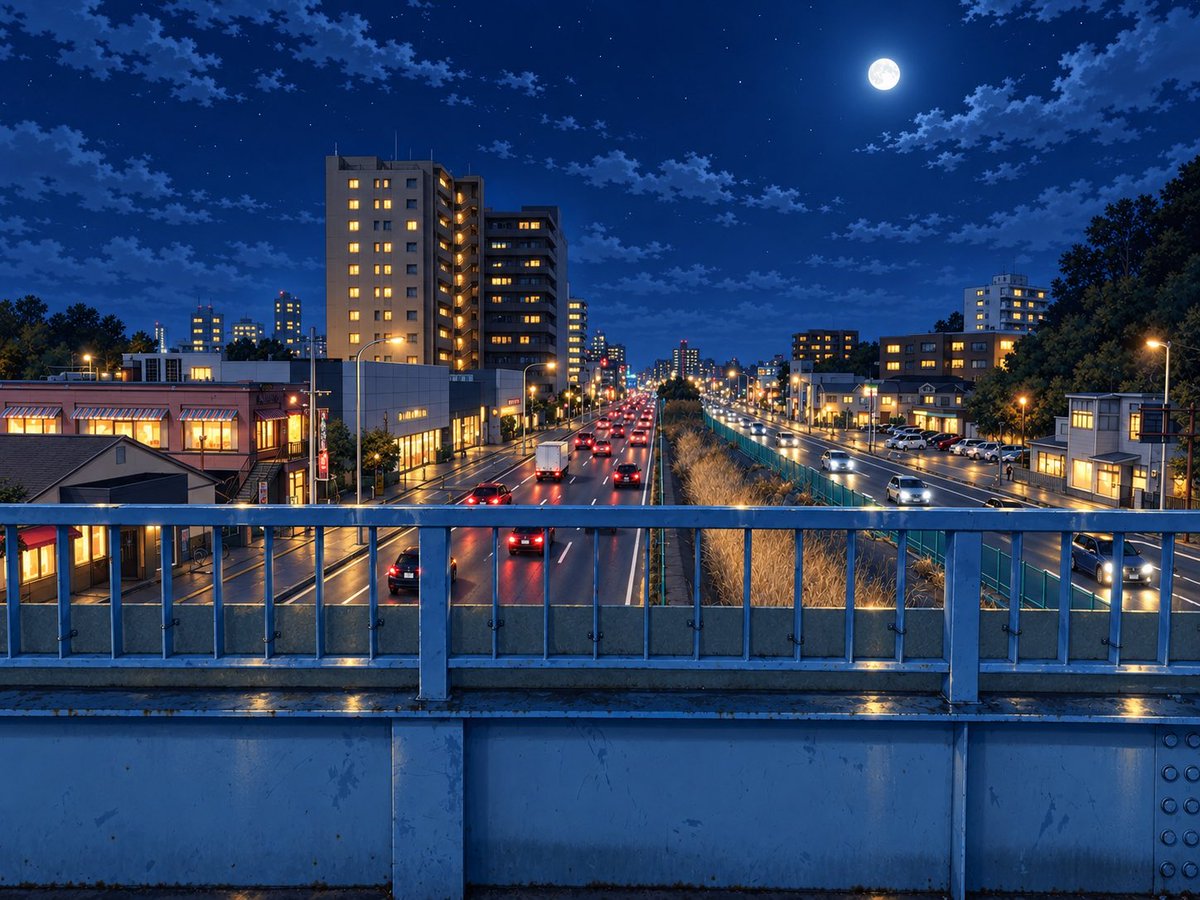
Moonlit Rainy City Overpass
Generates a cinematic Japanese-style nighttime urban road scene viewed from a pedestrian bridge, ideal for atmospheric background art.
This is a GPT Image 2 prompt case for Landscape & Nature. Use the copy-ready prompt below to generate similar visuals, and review Awesome GPT Image 2 Prompts attribution plus commercial-use rights before reuse.
Free 1K preview
Generate one preview image instantly, no sign-up required.
Prompt
Copy-ready prompt
Create a wide 4:3 cinematic night cityscape from the viewpoint of a pedestrian overpass, looking straight down a wet multi-lane urban road in {argument name="city" default="a quiet Japanese suburb"}. The foreground is dominated by a blue-gray metal bridge railing with vertical bars, bolts, a concrete lower wall, and rain-slick reflections along the ledge. Beyond the railing, show exactly two separated directions of traffic: the left roadway carrying cars away from the viewer with red taillights and one white box truck, and the right roadway carrying cars toward the viewer with white headlights; place a planted median or drainage strip between them with tall dry grasses and a teal fence. On both sides of the road, include mid-rise apartment buildings, small shops, streetlamps, parked cars, and warm yellow-lit windows, with the tallest apartment block on the left side near the foreground. Use {argument name="time of night" default="late evening after rain"}, a deep cobalt blue sky, scattered clouds, many small stars, and a bright full moon high in the upper right. Lighting should mix cool moonlit blue ambience with warm orange streetlights and window glow, with glossy wet pavement reflections, crisp perspective lines receding to a vanishing point in the center, realistic architectural detail, and a polished high-resolution anime-background / photoreal illustration style. No people, no text, no signs that are readable, no watermark.Prompt variables
Editable argument placeholders found in the prompt, with their default values.
Best for
- - Landscape & Nature visual exploration
- - Image generation and reference-image edits
- - Reusable briefs that keep source attribution visible
Change these parts
- - Subject, product, character, or scene
- - Aspect ratio, camera, lighting, and background
- - Brand, text, color, and output constraints
Recommended model and settings
- - Model: gpt-image-2
- - Input mode: Text to Image
- - Aspect ratio: source
- - Commercial status: review original source
How to use this prompt
- 1. Copy the prompt and preserve its structure for the first test.
- 2. Replace the subject, context, and publishing channel.
- 3. Change one camera, lighting, or style variable per iteration.
- 4. Inspect the output, source, text, and rights before reuse.
Limitations, source, and reuse cautions
- - Generated output is an editable draft, not factual, legal, or rights evidence.
- - Review the linked source, people, brands, logos, text, and third-party media before commercial use.
More cases in this category
Prioritized by category, input mode compatibility, quality, and lower risk.

Reuse and source notes
Use this prompt safely after previewing the case.
- 1.Copy the prompt or open it directly in Dovoo with the generation button.
- 2.Adjust variables, aspect ratio, and reference images for your own use case.
- 3.Before publishing or paid usage, verify source rights, attribution requirements, and brand or likeness risks.
Can I use this prompt commercially?
Commercial-use status is allowed. Review the original source, license, brand constraints, and legal requirements before paid usage.
Where does this case come from?
This case is imported from Awesome GPT Image 2 Prompts; keep attribution visible and check the source URL before reuse.