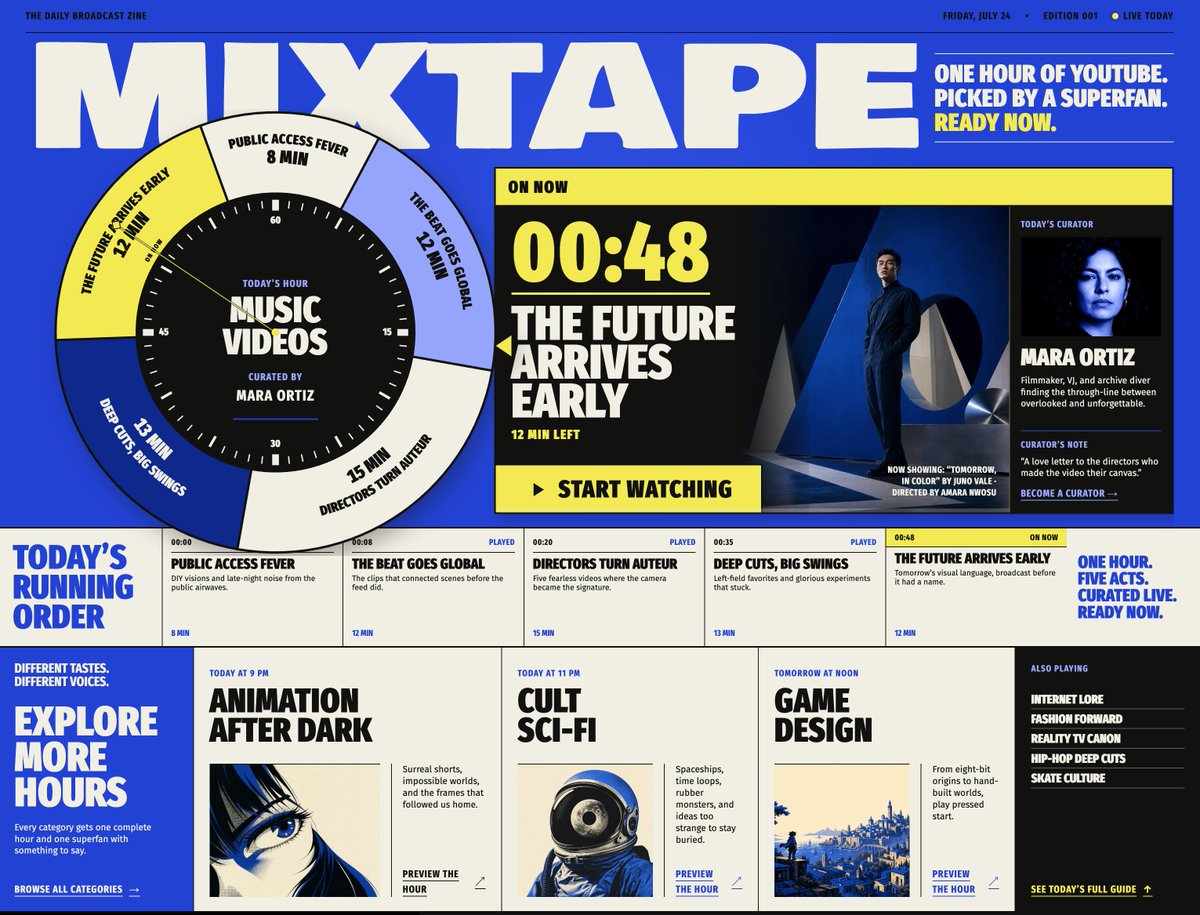
Mixtape Zine Webpage Redesign
Transforms a reference Mixtape broadcast-zine layout into a refreshed issue mockup with updated program timing, feature art, and bottom preview cards.
This is a GPT Image 2 prompt case for Graphic & Poster. Use the copy-ready prompt below to generate similar visuals, and review Awesome GPT Image 2 Prompts attribution plus commercial-use rights before reuse.
Free 1K preview
Generate one preview image instantly, no sign-up required.
Prompt
Copy-ready prompt
Using REFERENCE_0 as the design/style base, regenerate the same Mixtape broadcast-zine webpage as a revised issue mockup. Keep the bold retro editorial layout, electric blue/cream/yellow/black palette, oversized block typography, circular clock-selector motif, curator panel, running-order strip, and bottom category-card structure, but update the page to look like a new edition with changed content and slightly cleaner spacing.

Key changes to apply:
- Change the top metadata to a new issue: Friday, July 24, Edition 001, with a small “Live Today” indicator.
- Update the top-right headline to: “One hour of YouTube. Picked by a superfan. Ready now.”
- Reposition the large circular hour dial farther left so it overlaps the main title more dramatically. Keep the center label “Today’s Hour / Music Videos / Curated by Mara Ortiz,” but rotate the outer five segments to match the new active order.
- Make the active “On Now” feature the final act, with large timecode {argument name="current timecode" default="00:48"}, headline {argument name="featured act title" default="The Future Arrives Early"}, and “12 min left.” Replace the feature artwork with a cinematic dark blue scene of a suited man standing in a modern architectural setting, with small now-showing/director credit text in the lower-right.
- Preserve the curator as Mara Ortiz, but use a darker blue-black portrait crop and keep the curator-card structure: portrait, name, short bio, curator’s note, and “Become a curator →”.

Running order strip: create exactly 5 act cells, left to right:
1. “Public Access Fever” — 00:00, played, 8 min
2. “The Beat Goes Global” — 00:08, played, 12 min
3. “Directors Turn Auteur” — 00:20, played, 15 min
4. “Deep Cuts, Big Swings” — 00:35, played, 13 min
5. “The Future Arrives Early” — 00:48, on now, 12 min
Keep the bold left label “Today’s Running Order” and the right slogan “One hour. Five acts. Curated live. Ready now.”

Bottom section: replace the previous lower grid with a cleaner set of exactly 3 large preview cards plus a side list.
1. {argument name="first preview card" default="Animation After Dark"} — labeled “Today at 9 PM,” with a blue-toned anime eye image.
2. {argument name="second preview card" default="Cult Sci-Fi"} — labeled “Today at 11 PM,” with a retro astronaut/space helmet image.
3. {argument name="third preview card" default="Game Design"} — labeled “Tomorrow at Noon,” with a blue pixel-art landscape image.
Add a left blue panel reading “Explore More Hours” with short supporting copy and “Browse all categories →”. Add a right black “Also Playing” panel listing exactly 5 items: Internet Lore, Fashion Forward, Reality TV Canon, Hip-Hop Deep Cuts, Skate Culture, plus a yellow “See today’s full guide →” link.

Style constraints: preserve the reference’s high-contrast zine aesthetic, sharp grid, thick borders, condensed uppercase type, imperfect print-like texture, and screen-poster feel. Do not add extra sections, watermarks, browser chrome, or unrelated UI.
Prompt variables
Editable argument placeholders found in the prompt, with their default values.
Best for
- - Graphic & Poster visual exploration
- - Image generation and reference-image edits
- - Reusable briefs that keep source attribution visible
Change these parts
- - Subject, product, character, or scene
- - Aspect ratio, camera, lighting, and background
- - Brand, text, color, and output constraints
Recommended model and settings
- - Model: gpt-image-2
- - Input mode: Text to Image
- - Aspect ratio: source
- - Commercial status: review original source
How to use this prompt
- 1. Copy the prompt and preserve its structure for the first test.
- 2. Replace the subject, context, and publishing channel.
- 3. Change one camera, lighting, or style variable per iteration.
- 4. Inspect the output, source, text, and rights before reuse.
Limitations, source, and reuse cautions
- - Generated output is an editable draft, not factual, legal, or rights evidence.
- - Review the linked source, people, brands, logos, text, and third-party media before commercial use.
More cases in this category
Prioritized by category, input mode compatibility, quality, and lower risk.





Reuse and source notes
Use this prompt safely after previewing the case.
- 1.Copy the prompt or open it directly in Dovoo with the generation button.
- 2.Adjust variables, aspect ratio, and reference images for your own use case.
- 3.Before publishing or paid usage, verify source rights, attribution requirements, and brand or likeness risks.
Can I use this prompt commercially?
Commercial-use status is allowed. Review the original source, license, brand constraints, and legal requirements before paid usage.
Where does this case come from?
This case is imported from Awesome GPT Image 2 Prompts; keep attribution visible and check the source URL before reuse.