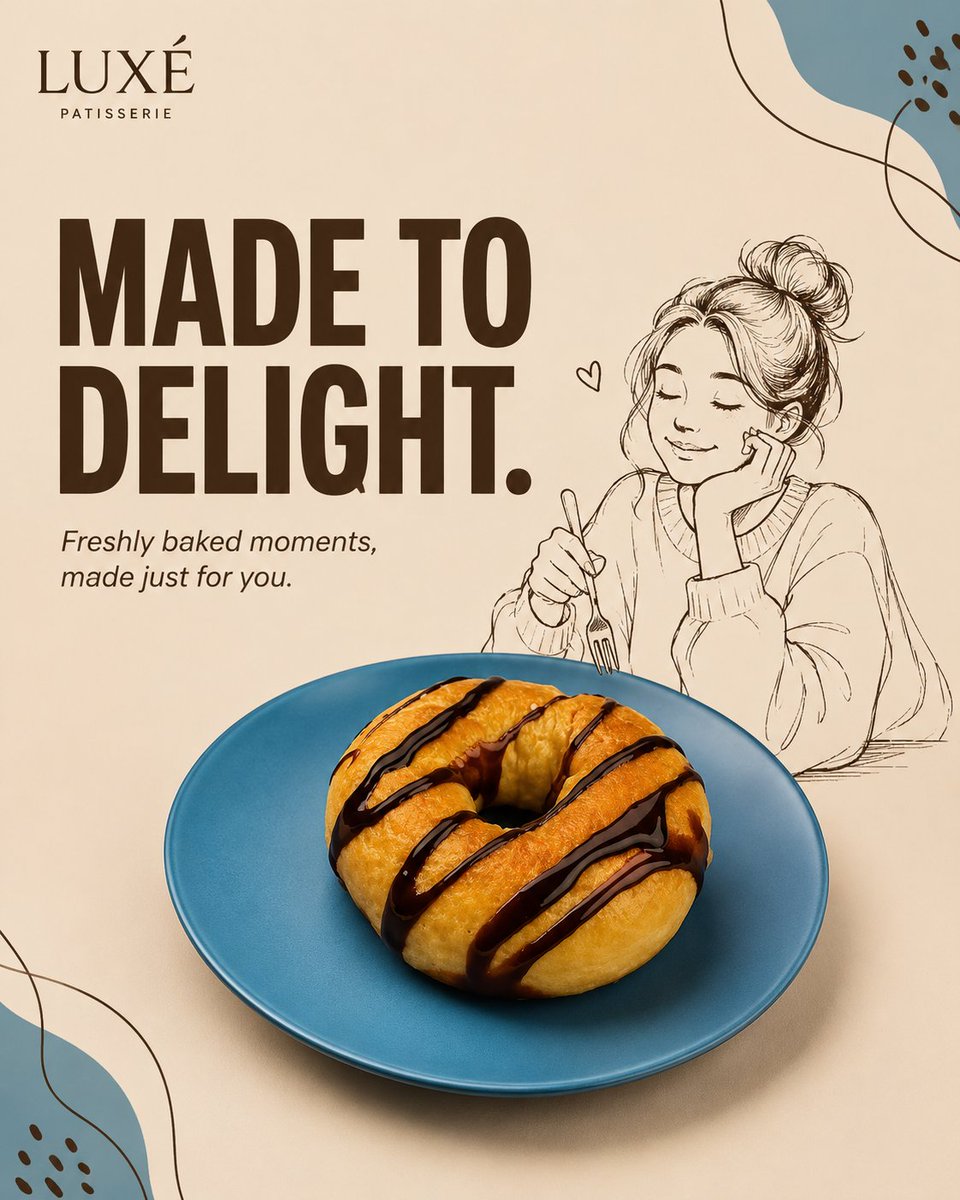
Mixed-Media Advertising Template
A comprehensive template for creating professional mixed-media product advertisements with GPT Image 2.
This is a GPT Image 2 prompt case for Product & Commercial. Use the copy-ready prompt below to generate similar visuals, and review Awesome GPT Image 2 Prompts attribution plus commercial-use rights before reuse.
Free 1K preview
Generate one preview image instantly, no sign-up required.
Prompt
Copy-ready prompt
Brand Name: {argument name="brand name" default="[BRAND NAME]"}
Hero Product: {argument name="hero product" default="[HERO PRODUCT]"}
Product Arrangement: [PRODUCT ARRANGEMENT]
Illustrated Character: [ILLUSTRATED CHARACTER]
Character Action: [CHARACTER ACTION]
Primary Headline: [PRIMARY HEADLINE]
Supporting Line: [SUPPORTING LINE]
Color Palette: [COLOR PALETTE]
Illustration Color: [ILLUSTRATION COLOR]
Background Color: {argument name="background color" default="[BACKGROUND COLOR]"}
Graphic Motif: [GRAPHIC MOTIF]
Image Ratio: [IMAGE RATIO]

Create a premium mixed-media product advertisement in [IMAGE RATIO], combining photorealistic commercial product photography with one original hand-drawn editorial character.

If a product image is provided, preserve its shape, proportions, colors, materials, textures, packaging, labels, logo placement, and distinctive details. Remove the original background without redesigning the product.

If a person's photo is provided, preserve their recognizable features while translating them into a simplified editorial line illustration.

If no references are provided, generate [HERO PRODUCT] and [ILLUSTRATED CHARACTER] from the written specifications.

Create an original campaign for "[BRAND NAME]" featuring [HERO PRODUCT] as the hero object. Introduce [ILLUSTRATED CHARACTER] performing [CHARACTER ACTION] naturally on, beside, or around the product.

Use a minimal asymmetrical composition with generous negative space. Place [HERO PRODUCT] in the lower-center foreground using [PRODUCT ARRANGEMENT], occupying approximately 40–55% of the canvas. Position the illustrated character interacting naturally with the product.

Use [BACKGROUND COLOR] as the primary background and frame the composition with oversized cropped forms inspired by [GRAPHIC MOTIF].

Render [HERO PRODUCT] with premium commercial realism, preserving realistic textures, highlights, shadows, proportions, and subtle imperfections. Multiple products should vary naturally in angle and position.

Create [ILLUSTRATED CHARACTER] in refined editorial line-art using [ILLUSTRATION COLOR] with subtle fills derived from [COLOR PALETTE]. Ensure anatomically correct interaction with the product.

Write the headline exactly:
"[PRIMARY HEADLINE]"

Write the supporting line exactly:
"[SUPPORTING LINE]"

Display the headline in oversized bold geometric typography, arranged across one or two lines without covering the product. Use coordinated colors from [COLOR PALETTE]. Display the supporting line nearby using a clean sans-serif or subtle italic typeface.

Display the brand name exactly:
"[BRAND NAME]"

Place it subtly within the upper or lower margin. Do not add extra logos, websites, prices, or social media elements unless provided.

Use [GRAPHIC MOTIF] only as cropped edge graphics without intersecting the headline, character, or product.

Apply soft directional studio lighting with realistic tonal depth and grounding shadows. Maintain clear separation between photorealistic and illustrated elements while preserving a unified campaign aesthetic.

Style: Premium mixed-media advertising, photorealistic hero product, editorial hand-drawn character, modern typography, minimal negative-space composition, contemporary lifestyle branding, Behance-quality commercial art direction
Prompt variables
Editable argument placeholders found in the prompt, with their default values.
Best for
- - Product & Commercial visual exploration
- - Image generation and reference-image edits
- - Reusable briefs that keep source attribution visible
Change these parts
- - Subject, product, character, or scene
- - Aspect ratio, camera, lighting, and background
- - Brand, text, color, and output constraints
Recommended model and settings
- - Model: gpt-image-2
- - Input mode: Text to Image
- - Aspect ratio: source
- - Commercial status: review original source
How to use this prompt
- 1. Copy the prompt and preserve its structure for the first test.
- 2. Replace the subject, context, and publishing channel.
- 3. Change one camera, lighting, or style variable per iteration.
- 4. Inspect the output, source, text, and rights before reuse.
Limitations, source, and reuse cautions
- - Generated output is an editable draft, not factual, legal, or rights evidence.
- - Review the linked source, people, brands, logos, text, and third-party media before commercial use.
More cases in this category
Prioritized by category, input mode compatibility, quality, and lower risk.

Reuse and source notes
Use this prompt safely after previewing the case.
- 1.Copy the prompt or open it directly in Dovoo with the generation button.
- 2.Adjust variables, aspect ratio, and reference images for your own use case.
- 3.Before publishing or paid usage, verify source rights, attribution requirements, and brand or likeness risks.
Can I use this prompt commercially?
Commercial-use status is allowed. Review the original source, license, brand constraints, and legal requirements before paid usage.
Where does this case come from?
This case is imported from Awesome GPT Image 2 Prompts; keep attribution visible and check the source URL before reuse.