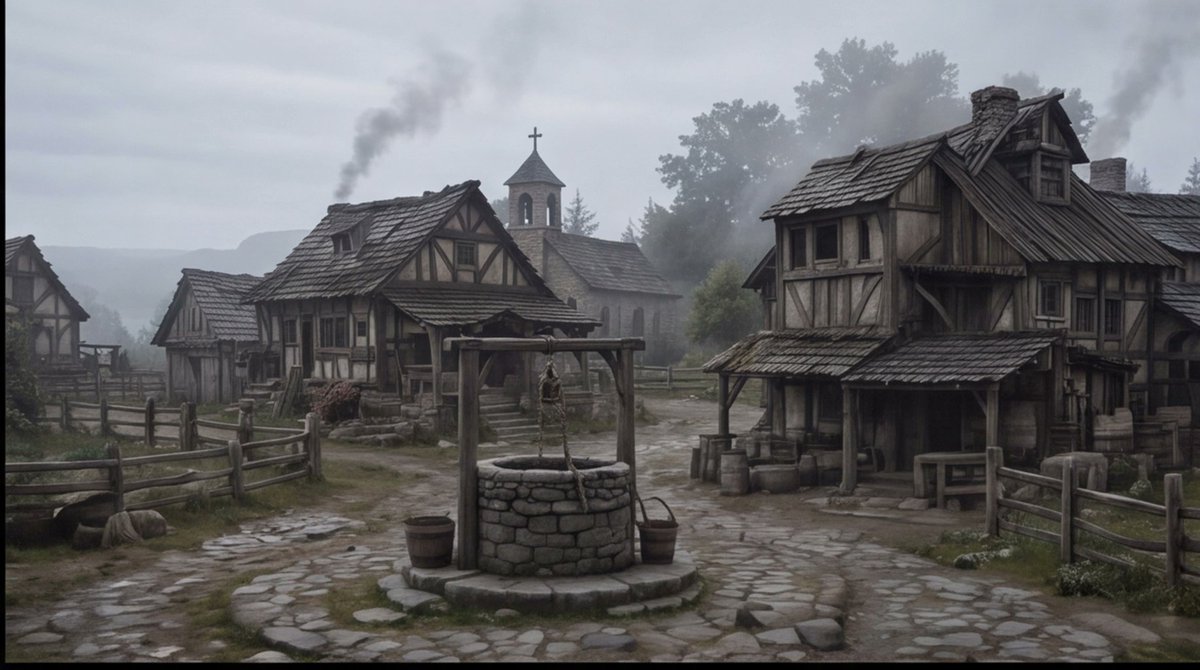
Misty Medieval Village Establishing Shot
Generates a cinematic dark-fantasy medieval village square suitable for storyboard, concept art, or scene-setting visuals.
This is a GPT Image 2 prompt case for Landscape & Nature. Use the copy-ready prompt below to generate similar visuals, and review Awesome GPT Image 2 Prompts attribution plus commercial-use rights before reuse.
Free 1K preview
Generate one preview image instantly, no sign-up required.
Prompt
Copy-ready prompt
Create a cinematic wide establishing shot of a quiet {argument name="setting" default="medieval European village square"} on a cold misty morning, rendered in realistic dark fantasy style. The scene centers on a circular stone well with a wooden frame, hanging rope, bucket, and small barrels beside it, placed on an uneven cobblestone path that forks between rustic half-timbered houses. Show at least four visible timber-and-plaster buildings: a large weathered two-story house on the right with a sagging shingled roof, porch, barrels, crates, and a small table; two smaller cottages on the left and midground with fenced yards; and a stone church in the background with a bell tower and cross. Add wooden split-rail fences, muddy grass patches, scattered stones, worn steps, smoke rising from chimneys, and distant tree silhouettes fading into fog. Use a muted palette of gray, brown, moss green, and charcoal, with overcast sky, damp ground, soft diffuse light, low contrast, subtle haze, and a slightly desaturated film look. No people are visible, making the village feel abandoned or early before dawn. Compose as a wide 16:9 storyboard frame with the well in the lower center foreground, buildings framing both sides, the church tower near the central background, and atmospheric depth created by mist and smoke. Overall mood: {argument name="mood" default="somber, quiet, and ominous"}.Prompt variables
Editable argument placeholders found in the prompt, with their default values.
Best for
- - Landscape & Nature visual exploration
- - Image generation and reference-image edits
- - Reusable briefs that keep source attribution visible
Change these parts
- - Subject, product, character, or scene
- - Aspect ratio, camera, lighting, and background
- - Brand, text, color, and output constraints
Recommended model and settings
- - Model: gpt-image-2
- - Input mode: Text to Image
- - Aspect ratio: source
- - Commercial status: review original source
How to use this prompt
- 1. Copy the prompt and preserve its structure for the first test.
- 2. Replace the subject, context, and publishing channel.
- 3. Change one camera, lighting, or style variable per iteration.
- 4. Inspect the output, source, text, and rights before reuse.
Limitations, source, and reuse cautions
- - Generated output is an editable draft, not factual, legal, or rights evidence.
- - Review the linked source, people, brands, logos, text, and third-party media before commercial use.
More cases in this category
Prioritized by category, input mode compatibility, quality, and lower risk.
Reuse and source notes
Use this prompt safely after previewing the case.
- 1.Copy the prompt or open it directly in Dovoo with the generation button.
- 2.Adjust variables, aspect ratio, and reference images for your own use case.
- 3.Before publishing or paid usage, verify source rights, attribution requirements, and brand or likeness risks.
Can I use this prompt commercially?
Commercial-use status is allowed. Review the original source, license, brand constraints, and legal requirements before paid usage.
Where does this case come from?
This case is imported from Awesome GPT Image 2 Prompts; keep attribution visible and check the source URL before reuse.