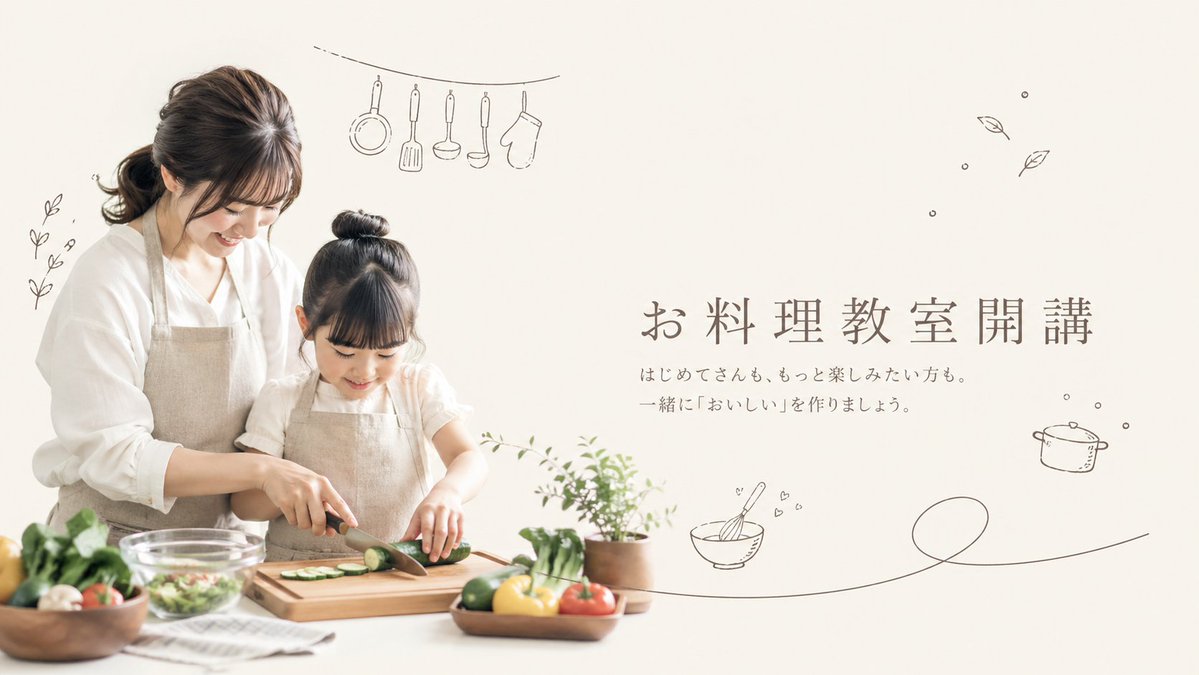
Minimal Japanese Cooking Class Hero Image
This prompt generates a soft lifestyle-style promotional banner showing a mother and child cooking together with Japanese text and hand-drawn kitchen doodles, ideal for cooking class ads or website headers.
This is a GPT Image 2 prompt case for Graphic & Poster. Use the copy-ready prompt below to generate similar visuals, and review Awesome GPT Image 2 Prompts attribution plus commercial-use rights before reuse.
Free 1K preview
Generate one preview image instantly, no sign-up required.
Prompt
Copy-ready prompt
A soft, airy promotional hero image for a {argument name="class theme" default="Japanese home cooking class"} on a warm off-white background, styled like a minimalist lifestyle flyer. On the left half, show 2 people: an adult woman and a young girl cooking together at a white kitchen counter, both with calm, natural poses and gentle body language. The woman stands slightly behind and to the left of the child, leaning in supportively while helping guide the girl's hands as she slices a cucumber on a wooden cutting board with a kitchen knife. Show every face clearly with natural, detailed facial features. The woman has dark brown hair tied in a low ponytail and wears a loose white blouse with a natural linen apron. The girl has dark hair in a high bun and wears a light short-sleeve top with a matching beige linen apron. On the counter, include a clear glass mixing bowl with salad, a folded striped kitchen towel, a wooden bowl of vegetables on the far left, a small wooden tray or plate with colorful vegetables in front, and a small potted green herb plant near the center-right edge of the cooking area. Visible produce should include sliced cucumber on the board and whole vegetables such as tomatoes, leafy greens, mushrooms, lemons or yellow citrus, and green peppers or cucumbers, arranged in a fresh, wholesome way. On the right half, leave generous negative space and place elegant Japanese headline text in a refined serif style: {argument name="headline text" default="お料理教室開講"}. Beneath it, add 2 lines of smaller Japanese body text: {argument name="subtext" default="はじめてさんも、もっと楽しみたい方も。 一緒に『おいしい』を作りましょう。"}. Surround the composition with 7 delicate hand-drawn dark gray doodle elements: 1 small leafy sprig on the far left, 1 hanging line at the upper left with 5 kitchen tools suspended from it (a frying pan, a spatula, a ladle, a peeler or slim utensil, and an oven mitt), 1 cluster of 2 floating leaves in the upper right, 1 small cooking pot icon on the right, 1 whisking bowl icon with tiny hearts near the lower middle-right, and 1 long single-line flourish sweeping across the lower right. Use soft natural daylight, muted beige and cream tones, shallow depth of field, clean editorial photography, gentle shadows, and a calm family-friendly premium aesthetic suitable for a cooking class landing page or poster.Prompt variables
Editable argument placeholders found in the prompt, with their default values.
Best for
- - Graphic & Poster visual exploration
- - Image generation and reference-image edits
- - Reusable briefs that keep source attribution visible
Change these parts
- - Subject, product, character, or scene
- - Aspect ratio, camera, lighting, and background
- - Brand, text, color, and output constraints
Recommended model and settings
- - Model: gpt-image-2
- - Input mode: Text to Image
- - Aspect ratio: source
- - Commercial status: review original source
How to use this prompt
- 1. Copy the prompt and preserve its structure for the first test.
- 2. Replace the subject, context, and publishing channel.
- 3. Change one camera, lighting, or style variable per iteration.
- 4. Inspect the output, source, text, and rights before reuse.
Limitations, source, and reuse cautions
- - Generated output is an editable draft, not factual, legal, or rights evidence.
- - Review the linked source, people, brands, logos, text, and third-party media before commercial use.
More cases in this category
Prioritized by category, input mode compatibility, quality, and lower risk.






Reuse and source notes
Use this prompt safely after previewing the case.
- 1.Copy the prompt or open it directly in Dovoo with the generation button.
- 2.Adjust variables, aspect ratio, and reference images for your own use case.
- 3.Before publishing or paid usage, verify source rights, attribution requirements, and brand or likeness risks.
Can I use this prompt commercially?
Commercial-use status is allowed. Review the original source, license, brand constraints, and legal requirements before paid usage.
Where does this case come from?
This case is imported from Awesome GPT Image 2 Prompts; keep attribution visible and check the source URL before reuse.