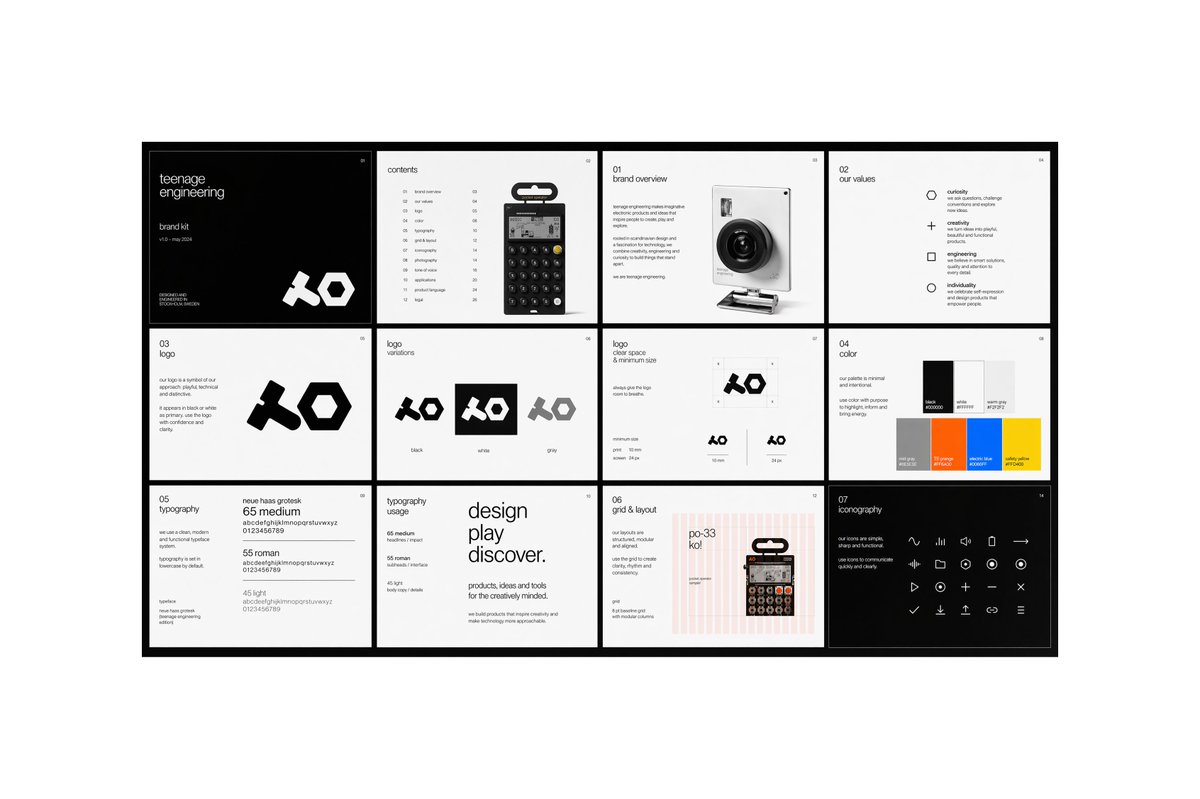
Minimal Brand Guideline Board
A sleek multi-panel brand identity presentation board for showcasing a modern tech brand's logo, values, typography, colors, layout system, and iconography.
This is a GPT Image 2 prompt case for Graphic & Poster. Use the copy-ready prompt below to generate similar visuals, and review Awesome GPT Image 2 Prompts attribution plus commercial-use rights before reuse.
Free 1K preview
Generate one preview image instantly, no sign-up required.
Prompt
Copy-ready prompt
{
  "type": "modern brand guideline presentation board",
  "style": "minimal Swiss editorial design, monochrome with selective accent colors, clean grid system, lots of white space, thin sans-serif typography, crisp product-render aesthetic",
  "brand": {
    "name": "{argument name=\"brand name\" default=\"teenage engineering\"}",
    "subtitle": "brand kit",
    "issue": "v18 - may 2024",
    "logo_style": "bold geometric abstract wordmark with chunky angular forms"
  },
  "canvas": {
    "aspect_ratio": "16:9",
    "background": "light gray outer background with a centered presentation board framed by a thick black border"
  },
  "layout": {
    "structure": "4 columns by 3 rows",
    "total_panels": 12,
    "sections": [
      {
        "title": "cover",
        "position": "row 1, column 1",
        "count": 1,
        "theme": "black background cover page with small white text and oversized white logo at bottom right"
      },
      {
        "title": "contents",
        "position": "row 1, column 2",
        "count": 1,
        "theme": "table of contents page with a centered handheld calculator product image and a vertical list of sections with page numbers"
      },
      {
        "title": "01 brand overview",
        "position": "row 1, column 3",
        "count": 1,
        "theme": "introductory text block on the left and a realistic compact camera render on the right"
      },
      {
        "title": "02 our values",
        "position": "row 1, column 4",
        "count": 1,
        "theme": "four-value list with simple outline icons",
        "labels": [
          "curiosity",
          "creativity",
          "engineering",
          "individuality"
        ]
      },
      {
        "title": "03 Logo",
        "position": "row 2, column 1",
        "count": 1,
        "theme": "logo explanation text on the left and one large black logo on white background"
      },
      {
        "title": "logo variations",
        "position": "row 2, column 2",
        "count": 1,
        "theme": "three logo tiles shown side by side",
        "labels": [
          "black",
          "white",
          "grey"
        ]
      },
      {
        "title": "logo clear space & minimum size",
        "position": "row 2, column 3",
        "count": 1,
        "theme": "diagram page showing protected area around logo and two minimum-size examples"
      },
      {
        "title": "04 color",
        "position": "row 2, column 4",
        "count": 1,
        "theme": "color palette page with 6 rectangular swatches arranged in two rows of three",
        "labels": [
          "black",
          "white",
          "light gray",
          "mid grey",
          "orange",
          "blue",
          "yellow"
        ]
      },
      {
        "title": "05 typography",
        "position": "row 3, column 1",
        "count": 1,
        "theme": "font specimen page showing three weights with sample alphabet and numerals",
        "labels": [
          "65 medium",
          "55 roman",
          "45 light"
        ]
      },
      {
        "title": "typography usage",
        "position": "row 3, column 2",
        "count": 1,
        "theme": "large editorial type composition with stacked words and smaller supporting body copy"
      },
      {
        "title": "06 grid & layout",
        "position": "row 3, column 3",
        "count": 1,
        "theme": "page showing a pink vertical-column grid overlay, alignment notes, and a product image placed on the right"
      },
      {
        "title": "07 iconography",
        "position": "row 3, column 4",
        "count": 1,
        "theme": "black background page with a matrix of 24 minimalist line icons in white",
        "labels": [
          "wave",
          "pause",
          "speaker",
          "stop",
          "arrow right",
          "rewind",
          "volume down",
          "circle",
          "plus",
          "record",
          "play",
          "download",
          "close",
          "check",
          "minus",
          "upload",
          "link",
          "menu",
          "and 6 more simple media/system icons"
        ]
      }
    ]
  },
  "visual_details": {
    "products": [
      {
        "type": "calculator/synth-style handheld device",
        "appearance": "small black rectangular device with circular buttons and a hanging retail tab"
      },
      {
        "type": "compact camera",
        "appearance": "white body with a large black lens, photographed at a slight angle"
      }
    ],
    "typography": "neutral grotesk sans serif, very small captions, neat alignment, magazine-like hierarchy",
    "color_palette": "primarily black and white, with accents of light gray, orange, blue, yellow, and faint pink grid lines",
    "rendering": "high-resolution presentation mockup, perfectly straight-on view, sharp edges, professional branding case-study aesthetic"
  },
  "text_treatment": "use mostly small editorial placeholder text and concise branding copy, preserving the minimalist corporate design language",
  "quality": "clean, premium, contemporary, design-award presentation board"
}
Prompt variables
Editable argument placeholders found in the prompt, with their default values.
Best for
- - Graphic & Poster visual exploration
- - Image generation and reference-image edits
- - Reusable briefs that keep source attribution visible
Change these parts
- - Subject, product, character, or scene
- - Aspect ratio, camera, lighting, and background
- - Brand, text, color, and output constraints
Recommended model and settings
- - Model: gpt-image-2
- - Input mode: Text to Image
- - Aspect ratio: source
- - Commercial status: review original source
How to use this prompt
- 1. Copy the prompt and preserve its structure for the first test.
- 2. Replace the subject, context, and publishing channel.
- 3. Change one camera, lighting, or style variable per iteration.
- 4. Inspect the output, source, text, and rights before reuse.
Limitations, source, and reuse cautions
- - Generated output is an editable draft, not factual, legal, or rights evidence.
- - Review the linked source, people, brands, logos, text, and third-party media before commercial use.
More cases in this category
Prioritized by category, input mode compatibility, quality, and lower risk.






Reuse and source notes
Use this prompt safely after previewing the case.
- 1.Copy the prompt or open it directly in Dovoo with the generation button.
- 2.Adjust variables, aspect ratio, and reference images for your own use case.
- 3.Before publishing or paid usage, verify source rights, attribution requirements, and brand or likeness risks.
Can I use this prompt commercially?
Commercial-use status is allowed. Review the original source, license, brand constraints, and legal requirements before paid usage.
Where does this case come from?
This case is imported from Awesome GPT Image 2 Prompts; keep attribution visible and check the source URL before reuse.