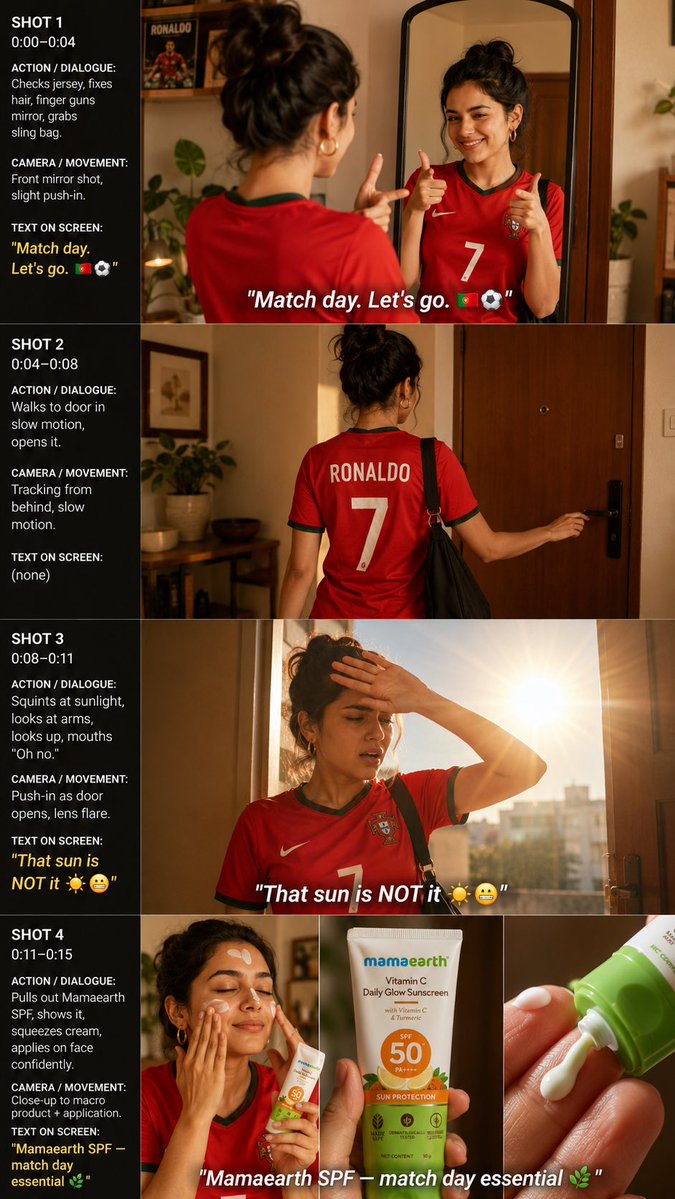
Match Day Sunscreen Storyboard
A vertical four-shot cinematic storyboard for a football fan sunscreen ad set in a warm apartment.
This is a GPT Image 2 prompt case for Product & Commercial. Use the copy-ready prompt below to generate similar visuals, and review Awesome GPT Image 2 Prompts attribution plus commercial-use rights before reuse.
Free 1K preview
Generate one preview image instantly, no sign-up required.
Prompt
Copy-ready prompt
Goal: Create a vertical social-media storyboard image for a short video ad about a football fan getting ready on match day and applying sunscreen.

Canvas: Vertical 9:16 composition, warm cinematic apartment lighting, realistic lifestyle photography look. Split the image into exactly 4 horizontal storyboard rows labeled SHOT 1, SHOT 2, SHOT 3, and SHOT 4. Each row has a black instruction sidebar on the left taking about one quarter of the width, with the corresponding cinematic frame on the right. Use thin divider lines between rows. Add bold white italic subtitle-style text over the bottom of the video frames where specified.

Subject details: A young woman with medium skin tone, dark hair in a messy bun, small gold hoop earrings, wearing a red Portugal football jersey with green trim and a large white number 7. The back of the jersey reads RONALDO above the number 7. Show every face clearly with natural, detailed facial features. She carries a black sling bag in the leaving-home scene.

Shot count and exact content:
1. SHOT 1, time 0:00–0:04: Interior apartment mirror shot. The woman stands in front of a tall rounded mirror, checking her {argument name="jersey text" default="Portugal #7 Ronaldo jersey"}, fixing her hair, and making finger-guns at her reflection with a grin. Warm bedroom/apartment decor, plants, a framed Ronaldo poster in the background. On-frame subtitle: {argument name="opening subtitle" default="Match day. Let’s go. 🇵🇹⚽"}
2. SHOT 2, time 0:04–0:08: Rear tracking shot from behind as she walks to the apartment door in slow motion, wearing the jersey with RONALDO and 7 visible, black sling bag on shoulder, right hand opening the door handle. No on-frame subtitle.
3. SHOT 3, time 0:08–0:11: Door opens to extremely bright sunlight. She squints, raises one hand to block the sun, looks upward, and mouths “Oh no.” Strong lens flare and sunburst from outside, city buildings faintly visible. On-frame subtitle: {argument name="sun subtitle" default="That sun is NOT it ☀️😬"}
4. SHOT 4, time 0:11–0:15: Sunscreen application sequence composed of exactly 3 side-by-side visuals within the right frame: left visual shows her holding sunscreen and applying cream to her face confidently; middle visual is a clear product close-up of a tube labeled {argument name="product name" default="mamaearth Vitamin C Daily Glow Sunscreen"}, SPF 50 PA+++; right visual is a macro close-up of a green-capped sunscreen tube squeezing white cream onto fingertips. On-frame subtitle across the bottom: {argument name="product subtitle" default="Mamaearth SPF — match day essential 🌿"}

Left sidebar text: For each row, include white uppercase headings and compact production notes. SHOT 1 sidebar: “SHOT 1”, “0:00–0:04”, “ACTION / DIALOGUE: Checks jersey, fixes hair, finger guns mirror, grabs sling bag.” “CAMERA / MOVEMENT: Front mirror shot, slight push-in.” “TEXT ON SCREEN: ‘Match day. Let’s go. 🇵🇹⚽’”. SHOT 2 sidebar: “SHOT 2”, “0:04–0:08”, “ACTION / DIALOGUE: Walks to door in slow motion, opens it.” “CAMERA / MOVEMENT: Tracking from behind, slow motion.” “TEXT ON SCREEN: (none)”. SHOT 3 sidebar: “SHOT 3”, “0:08–0:11”, “ACTION / DIALOGUE: Squints at sunlight, looks at arms, looks up, mouths ‘Oh no.’” “CAMERA / MOVEMENT: Push-in as door opens, lens flare.” “TEXT ON SCREEN: ‘That sun is NOT it ☀️😬’”. SHOT 4 sidebar: “SHOT 4”, “0:11–0:15”, “ACTION / DIALOGUE: Pulls out Mamaearth SPF, shows it, squeezes cream, applies on face confidently.” “CAMERA / MOVEMENT: Close-up to macro product + application.” “TEXT ON SCREEN: ‘Mamaearth SPF — match day essential 🌿’”. Highlight the text-on-screen quotes in warm yellow.

Visual style: Realistic ad storyboard, sharp but cinematic, warm golden light, cozy apartment plants and wooden furniture, shallow depth of field, natural skin tones, high-quality product photography for the sunscreen tube. Keep the layout clean and readable, with no watermark and no extra shots beyond the 4 specified rows.
Prompt variables
Editable argument placeholders found in the prompt, with their default values.
Best for
- - Product & Commercial visual exploration
- - Image generation and reference-image edits
- - Reusable briefs that keep source attribution visible
Change these parts
- - Subject, product, character, or scene
- - Aspect ratio, camera, lighting, and background
- - Brand, text, color, and output constraints
Recommended model and settings
- - Model: gpt-image-2
- - Input mode: Text to Image
- - Aspect ratio: source
- - Commercial status: review original source
How to use this prompt
- 1. Copy the prompt and preserve its structure for the first test.
- 2. Replace the subject, context, and publishing channel.
- 3. Change one camera, lighting, or style variable per iteration.
- 4. Inspect the output, source, text, and rights before reuse.
Limitations, source, and reuse cautions
- - Generated output is an editable draft, not factual, legal, or rights evidence.
- - Review the linked source, people, brands, logos, text, and third-party media before commercial use.
More cases in this category
Prioritized by category, input mode compatibility, quality, and lower risk.


Reuse and source notes
Use this prompt safely after previewing the case.
- 1.Copy the prompt or open it directly in Dovoo with the generation button.
- 2.Adjust variables, aspect ratio, and reference images for your own use case.
- 3.Before publishing or paid usage, verify source rights, attribution requirements, and brand or likeness risks.
Can I use this prompt commercially?
Commercial-use status is allowed. Review the original source, license, brand constraints, and legal requirements before paid usage.
Where does this case come from?
This case is imported from Awesome GPT Image 2 Prompts; keep attribution visible and check the source URL before reuse.