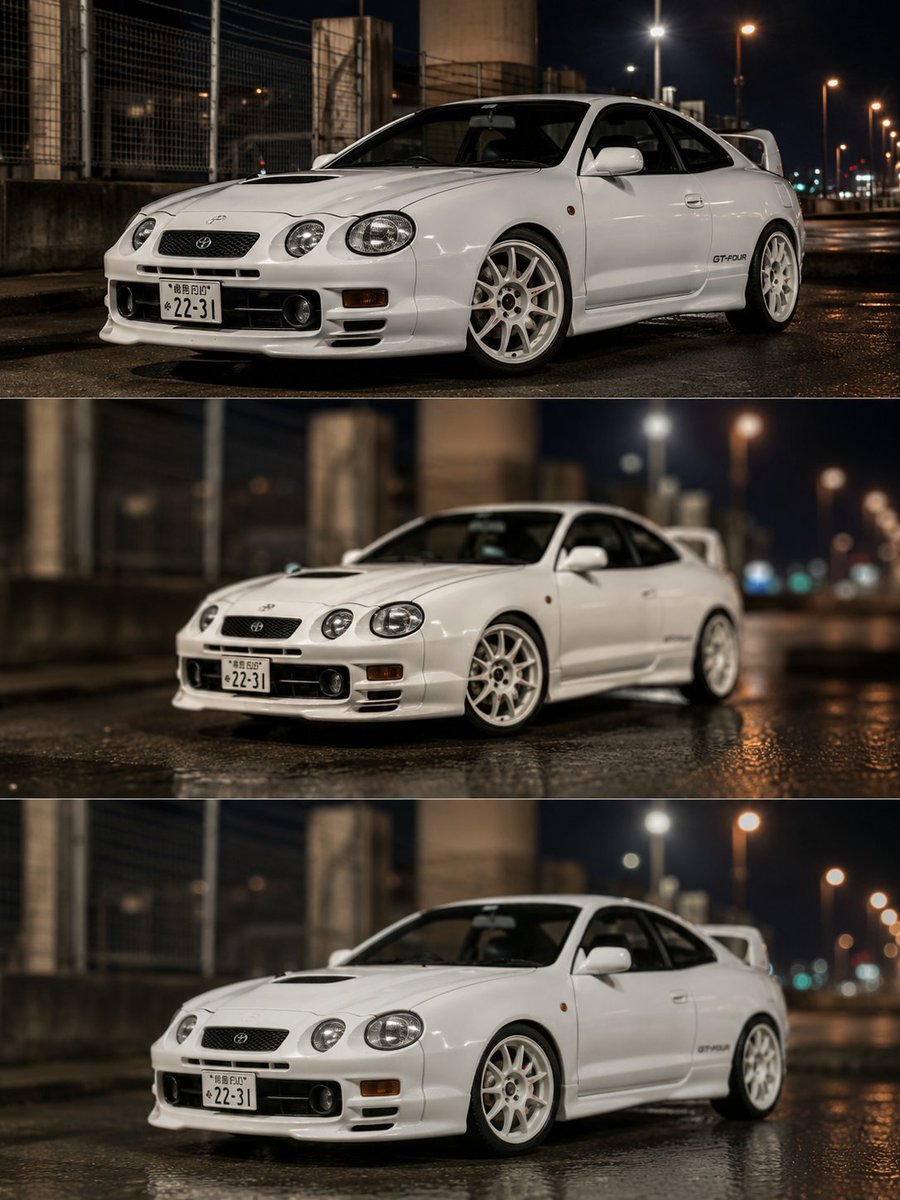
Celica Real vs Miniature Comparison
Generates a three-panel photorealistic comparison of a white Toyota Celica GT-Four as a real car, a miniature-looking real car, and a realistic plastic model.
This is a GPT Image 2 prompt case for Product & Commercial. Use the copy-ready prompt below to generate similar visuals, and review Awesome GPT Image 2 Prompts attribution plus commercial-use rights before reuse.
Free 1K preview
Generate one preview image instantly, no sign-up required.
Prompt
Copy-ready prompt
Goal: Create a vertical comparison image showing the same white Toyota Celica GT-Four in three stacked photographic panels, comparing three realism styles: a real car, a real car photographed to look like a miniature, and a plastic model photographed to look like a real car.

Canvas: Portrait 3:4 composition, 768 × 1024 style, divided into exactly 3 equal horizontal panels separated by thin white divider lines. No captions or overlay text outside the car details.

Subject: A {argument name="car model" default="white Toyota Celica GT-Four ST205"} shown from a front-left three-quarter angle, low stance, white multi-spoke wheels, large rear wing, hood vent, round twin headlamps, front bumper fog lights, side decal reading “GT-FOUR,” and a Japanese license plate with the visible number {argument name="license plate number" default="22-31"}. The car should remain visually consistent across all three panels.

Setting: Nighttime urban industrial road scene in {argument name="location style" default="Japan"}, wet asphalt after rain, reflective puddles, concrete pillars, chain-link fencing, bridge or elevated roadway structures, and warm streetlights receding into the background with bokeh.

Panel 1: Top panel shows the real full-size car photographed naturally. Sharp, realistic automotive photography, crisp body details, accurate proportions, deep reflections on wet pavement, moderate background blur, cinematic night lighting.

Panel 2: Middle panel shows the same real car but photographed to look miniature. Use tilt-shift depth of field, stronger blur at foreground and background, slightly toy-like scale illusion, softened details, shiny wet road reflections, and a more diorama-like feel while still using the same viewpoint.

Panel 3: Bottom panel shows a plastic scale model of the same car photographed to look like a real full-size car. Keep the car highly realistic but subtly model-like in the surface finish and fine details; use shallow depth of field, realistic reflections, convincing low-angle automotive composition, and the same wet night street environment.

Visual style: High-quality photorealistic comparison, cinematic contrast, glossy white paint, warm orange and cool blue night tones, realistic lens bokeh, no people, no extra vehicles, no logos or watermarks. Maintain exactly 3 panels and exactly 1 car per panel.
Prompt variables
Editable argument placeholders found in the prompt, with their default values.
Best for
- - Product & Commercial visual exploration
- - Image generation and reference-image edits
- - Reusable briefs that keep source attribution visible
Change these parts
- - Subject, product, character, or scene
- - Aspect ratio, camera, lighting, and background
- - Brand, text, color, and output constraints
Recommended model and settings
- - Model: gpt-image-2
- - Input mode: Text to Image
- - Aspect ratio: source
- - Commercial status: review original source
How to use this prompt
- 1. Copy the prompt and preserve its structure for the first test.
- 2. Replace the subject, context, and publishing channel.
- 3. Change one camera, lighting, or style variable per iteration.
- 4. Inspect the output, source, text, and rights before reuse.
Limitations, source, and reuse cautions
- - Generated output is an editable draft, not factual, legal, or rights evidence.
- - Review the linked source, people, brands, logos, text, and third-party media before commercial use.
More cases in this category
Prioritized by category, input mode compatibility, quality, and lower risk.


Reuse and source notes
Use this prompt safely after previewing the case.
- 1.Copy the prompt or open it directly in Dovoo with the generation button.
- 2.Adjust variables, aspect ratio, and reference images for your own use case.
- 3.Before publishing or paid usage, verify source rights, attribution requirements, and brand or likeness risks.
Can I use this prompt commercially?
Commercial-use status is allowed. Review the original source, license, brand constraints, and legal requirements before paid usage.
Where does this case come from?
This case is imported from Awesome GPT Image 2 Prompts; keep attribution visible and check the source URL before reuse.