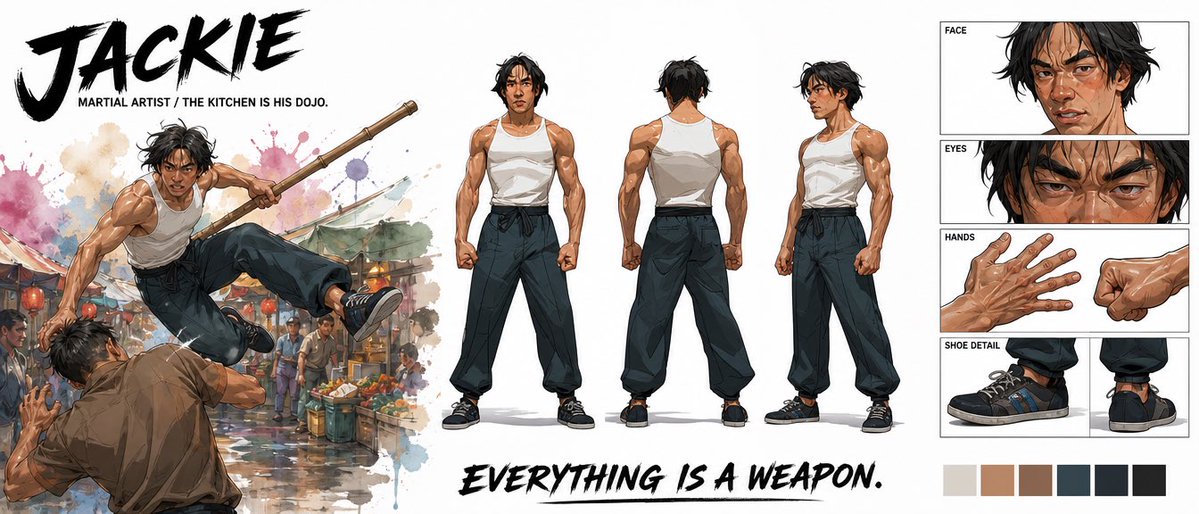
Cinematic Martial Artist Character Bible
Generates a wide premium character design sheet with action art, turnaround poses, detail panels, typography, and palette swatches for a martial artist hero.
This is a GPT Image 2 prompt case for Anime & Game. Use the copy-ready prompt below to generate similar visuals, and review Awesome GPT Image 2 Prompts attribution plus commercial-use rights before reuse.
Free 1K preview
Generate one preview image instantly, no sign-up required.
Prompt
Copy-ready prompt
Goal: Create a premium cinematic character bible sheet for a martial artist named {argument name="character name" default="JACKIE"}, presented as a wide professional concept-art reference board.

Canvas: Extra-wide horizontal white canvas, roughly 21:9 aspect ratio, clean negative space, polished entertainment-design layout.

Visual style: High-end illustrated character design, semi-realistic anime/comic concept art with painterly shading, crisp ink accents, athletic anatomy, dramatic brush textures, watercolor splashes, and cinematic action energy. Use a mostly neutral palette with warm skin tones, black hair, white tank top, dark loose pants, black sneakers, and subtle market-scene colors.

Top-left text: Huge black dry-brush title reading {argument name="character name" default="JACKIE"}. Beneath it, small uppercase subtitle: {argument name="subtitle text" default="MARTIAL ARTIST / THE KITCHEN IS HIS DOJO."}

Left action illustration: One large dynamic action scene of the same martial artist leaping through the air in a crowded wet street market, holding a long wooden staff with both hands, kicking over an opponent in a brown shirt. Add colorful produce stalls, hanging market lights, blurred bystanders, puddle reflections, and watercolor splashes behind the action. The pose should feel explosive and acrobatic.

Center character turnaround: Show exactly 3 full-body standing reference poses of the martial artist on a white background: 1 front view, 1 back view, and 1 three-quarter side view. He is lean but muscular, with tousled medium-length black hair, tan skin, a serious focused expression, a white sleeveless tank top, dark high-waisted loose martial-arts pants tied with a black sash, and black low-top sneakers. Keep proportions and outfit consistent across all three views.

Right-side detail panels: Create exactly 4 boxed detail sections stacked vertically with thin black borders and small uppercase labels: 1 FACE panel showing a close-up of his head and shoulders with sweat, cuts, messy hair, and intense expression; 1 EYES panel showing an extreme close-up of narrowed eyes and brows; 1 HANDS panel showing two hand studies, one open veiny hand and one clenched fist; 1 SHOE DETAIL panel showing two sneaker studies, one side view and one rear/heel view.

Bottom text: Large black dry-brush slogan across the lower middle reading {argument name="slogan text" default="EVERYTHING IS A WEAPON."}

Color swatches: Add exactly 6 square palette swatches along the bottom right: 1 light warm gray, 1 tan skin tone, 1 medium brown, 1 dark blue-gray, 1 near-black navy, and 1 black.

Constraints: Maintain a clean premium character-sheet composition, no extra characters outside the left action scene, no additional labels beyond the specified title, subtitle, panel labels, slogan, and swatches. Make the image look like a finished studio character bible page.
Prompt variables
Editable argument placeholders found in the prompt, with their default values.
Best for
- - Anime & Game visual exploration
- - Image generation and reference-image edits
- - Reusable briefs that keep source attribution visible
Change these parts
- - Subject, product, character, or scene
- - Aspect ratio, camera, lighting, and background
- - Brand, text, color, and output constraints
Recommended model and settings
- - Model: gpt-image-2
- - Input mode: Text to Image
- - Aspect ratio: source
- - Commercial status: review original source
How to use this prompt
- 1. Copy the prompt and preserve its structure for the first test.
- 2. Replace the subject, context, and publishing channel.
- 3. Change one camera, lighting, or style variable per iteration.
- 4. Inspect the output, source, text, and rights before reuse.
Limitations, source, and reuse cautions
- - Generated output is an editable draft, not factual, legal, or rights evidence.
- - Review the linked source, people, brands, logos, text, and third-party media before commercial use.
More cases in this category
Prioritized by category, input mode compatibility, quality, and lower risk.

Reuse and source notes
Use this prompt safely after previewing the case.
- 1.Copy the prompt or open it directly in Dovoo with the generation button.
- 2.Adjust variables, aspect ratio, and reference images for your own use case.
- 3.Before publishing or paid usage, verify source rights, attribution requirements, and brand or likeness risks.
Can I use this prompt commercially?
Commercial-use status is allowed. Review the original source, license, brand constraints, and legal requirements before paid usage.
Where does this case come from?
This case is imported from Awesome GPT Image 2 Prompts; keep attribution visible and check the source URL before reuse.