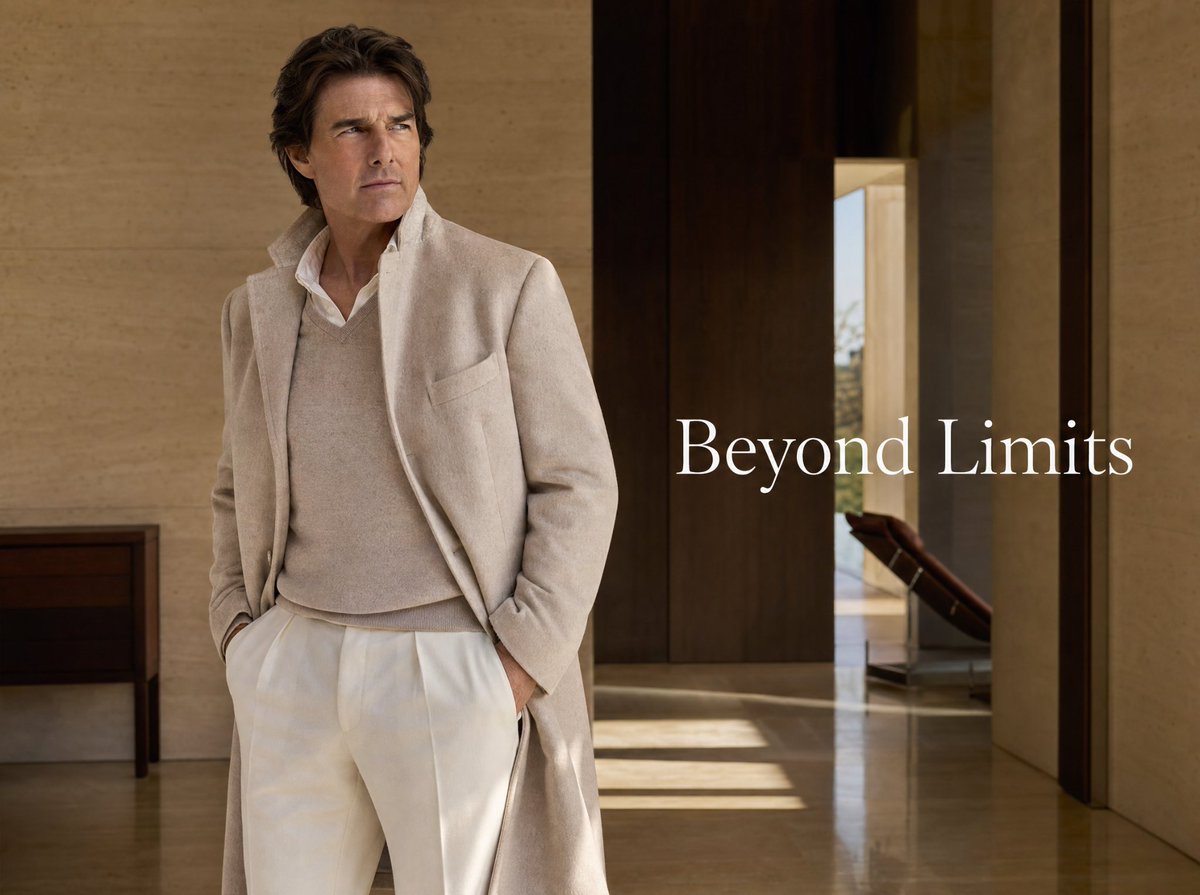
Luxury Menswear Campaign
A photorealistic luxury fashion ad featuring an elegant man in cream tailoring inside a warm modern villa interior.
This is a GPT Image 2 prompt case for Fashion & Beauty. Use the copy-ready prompt below to generate similar visuals, and review Awesome GPT Image 2 Prompts attribution plus commercial-use rights before reuse.
Free 1K preview
Generate one preview image instantly, no sign-up required.
Prompt
Copy-ready prompt
Create a refined luxury fashion advertising image in a cinematic editorial photography style. Show a mature, handsome man resembling a high-end menswear model standing slightly left of center in a minimalist modern villa interior, full body cropped near the lower legs, hands tucked into trouser pockets, posture relaxed but confident, looking off to the left with a serious contemplative expression. He wears an elegant monochrome cream outfit: a long soft wool overcoat with an open front and popped collar, a beige cashmere V-neck sweater over a crisp white collared shirt, and high-waisted ivory pleated trousers. Use warm natural light, polished stone floors with subtle reflections, beige travertine walls, dark wood vertical wall panels and doorway, a small dark console table on the far left, and a glimpse of a lounge chair and outdoor brightness through an opening on the right. Add large white serif campaign text reading {argument name="headline text" default="Beyond Limits"} positioned mid-right over the darker wood area, elegant and spacious with no other copy. Color palette: cream, ivory, taupe, warm beige, dark walnut brown, soft sunlight. Composition should feel like a premium magazine spread or luxury menswear brand campaign, photorealistic, sharp fabric texture, tasteful depth of field, no logos, no watermark.Prompt variables
Editable argument placeholders found in the prompt, with their default values.
Best for
- - Fashion & Beauty visual exploration
- - Image generation and reference-image edits
- - Reusable briefs that keep source attribution visible
Change these parts
- - Subject, product, character, or scene
- - Aspect ratio, camera, lighting, and background
- - Brand, text, color, and output constraints
Recommended model and settings
- - Model: gpt-image-2
- - Input mode: Text to Image
- - Aspect ratio: source
- - Commercial status: review original source
How to use this prompt
- 1. Copy the prompt and preserve its structure for the first test.
- 2. Replace the subject, context, and publishing channel.
- 3. Change one camera, lighting, or style variable per iteration.
- 4. Inspect the output, source, text, and rights before reuse.
Limitations, source, and reuse cautions
- - Generated output is an editable draft, not factual, legal, or rights evidence.
- - Review the linked source, people, brands, logos, text, and third-party media before commercial use.
More cases in this category
Prioritized by category, input mode compatibility, quality, and lower risk.

Reuse and source notes
Use this prompt safely after previewing the case.
- 1.Copy the prompt or open it directly in Dovoo with the generation button.
- 2.Adjust variables, aspect ratio, and reference images for your own use case.
- 3.Before publishing or paid usage, verify source rights, attribution requirements, and brand or likeness risks.
Can I use this prompt commercially?
Commercial-use status is allowed. Review the original source, license, brand constraints, and legal requirements before paid usage.
Where does this case come from?
This case is imported from Awesome GPT Image 2 Prompts; keep attribution visible and check the source URL before reuse.