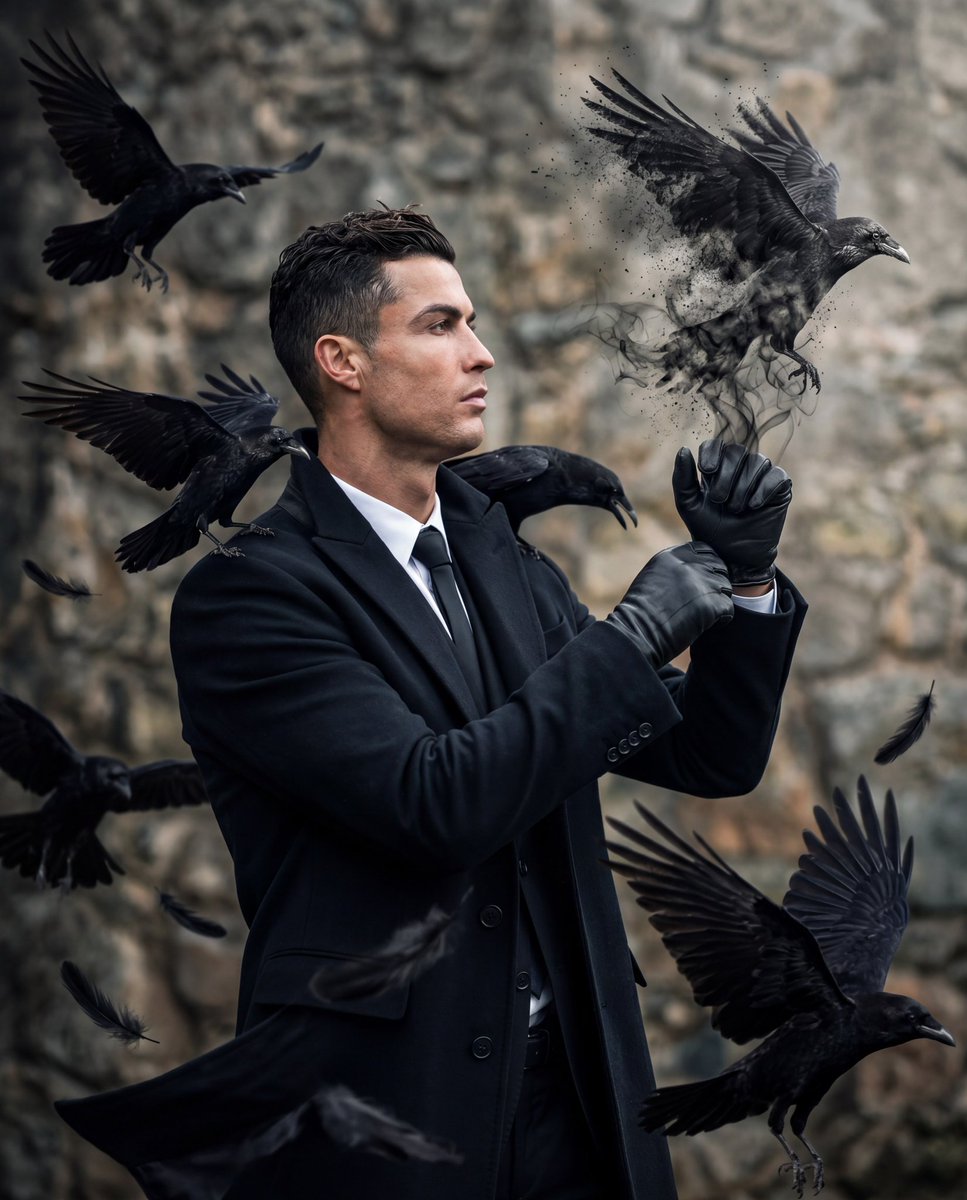
Gothic Raven Fashion Portrait
A hyperrealistic cinematic portrait of a suited man conjuring ravens from smoke, ideal for dark luxury editorial imagery.
This is a GPT Image 2 prompt case for Fashion & Beauty. Use the copy-ready prompt below to generate similar visuals, and review Awesome GPT Image 2 Prompts attribution plus commercial-use rights before reuse.
Free 1K preview
Generate one preview image instantly, no sign-up required.
Prompt
Copy-ready prompt
Create a hyperrealistic, ultra-detailed cinematic fashion editorial portrait of a handsome man from the waist up, in left-facing profile, with neatly styled dark hair and a serious calm expression, wearing a black formal suit, white dress shirt, black tie, long black overcoat, and glossy black leather gloves. He holds both gloved hands raised in front of his chest, with his right index finger extended upward as if performing a mysterious gesture, and his gaze follows the direction of his raised hand. From the fingertip emerges one black raven formed from smoky black vapor, ash, and dissolving particles, wings spread, partially materializing in midair. Surround him with exactly 6 black ravens: 1 large raven materializing from smoke above his raised fingertip on the upper right, 1 flying raven in the upper left, 1 flying raven at left-center near his shoulder, 1 raven close behind his neck and shoulder with wings tucked forward, 1 partially visible raven entering from the lower left edge, and 1 large flying raven in the lower right foreground. Add scattered black feathers drifting through the air. Use a dramatic shallow-depth-of-field rocky cliff or stone wall background in muted gray and beige tones, natural overcast lighting, crisp facial detail, glossy leather texture, sharp raven feathers, dark gothic atmosphere, high contrast, realistic motion, 8K detail, vertical portrait composition. Use {argument name="subject identity" default="a handsome man resembling Cristiano Ronaldo"}, {argument name="outfit color" default="black"}, {argument name="bird species" default="black raven"}, {argument name="background setting" default="blurred rocky cliff wall"}, and {argument name="mood" default="dark mysterious cinematic"}.Prompt variables
Editable argument placeholders found in the prompt, with their default values.
Best for
- - Fashion & Beauty visual exploration
- - Image generation and reference-image edits
- - Reusable briefs that keep source attribution visible
Change these parts
- - Subject, product, character, or scene
- - Aspect ratio, camera, lighting, and background
- - Brand, text, color, and output constraints
Recommended model and settings
- - Model: gpt-image-2
- - Input mode: Text to Image
- - Aspect ratio: source
- - Commercial status: review original source
How to use this prompt
- 1. Copy the prompt and preserve its structure for the first test.
- 2. Replace the subject, context, and publishing channel.
- 3. Change one camera, lighting, or style variable per iteration.
- 4. Inspect the output, source, text, and rights before reuse.
Limitations, source, and reuse cautions
- - Generated output is an editable draft, not factual, legal, or rights evidence.
- - Review the linked source, people, brands, logos, text, and third-party media before commercial use.
More cases in this category
Prioritized by category, input mode compatibility, quality, and lower risk.
Reuse and source notes
Use this prompt safely after previewing the case.
- 1.Copy the prompt or open it directly in Dovoo with the generation button.
- 2.Adjust variables, aspect ratio, and reference images for your own use case.
- 3.Before publishing or paid usage, verify source rights, attribution requirements, and brand or likeness risks.
Can I use this prompt commercially?
Commercial-use status is allowed. Review the original source, license, brand constraints, and legal requirements before paid usage.
Where does this case come from?
This case is imported from Awesome GPT Image 2 Prompts; keep attribution visible and check the source URL before reuse.