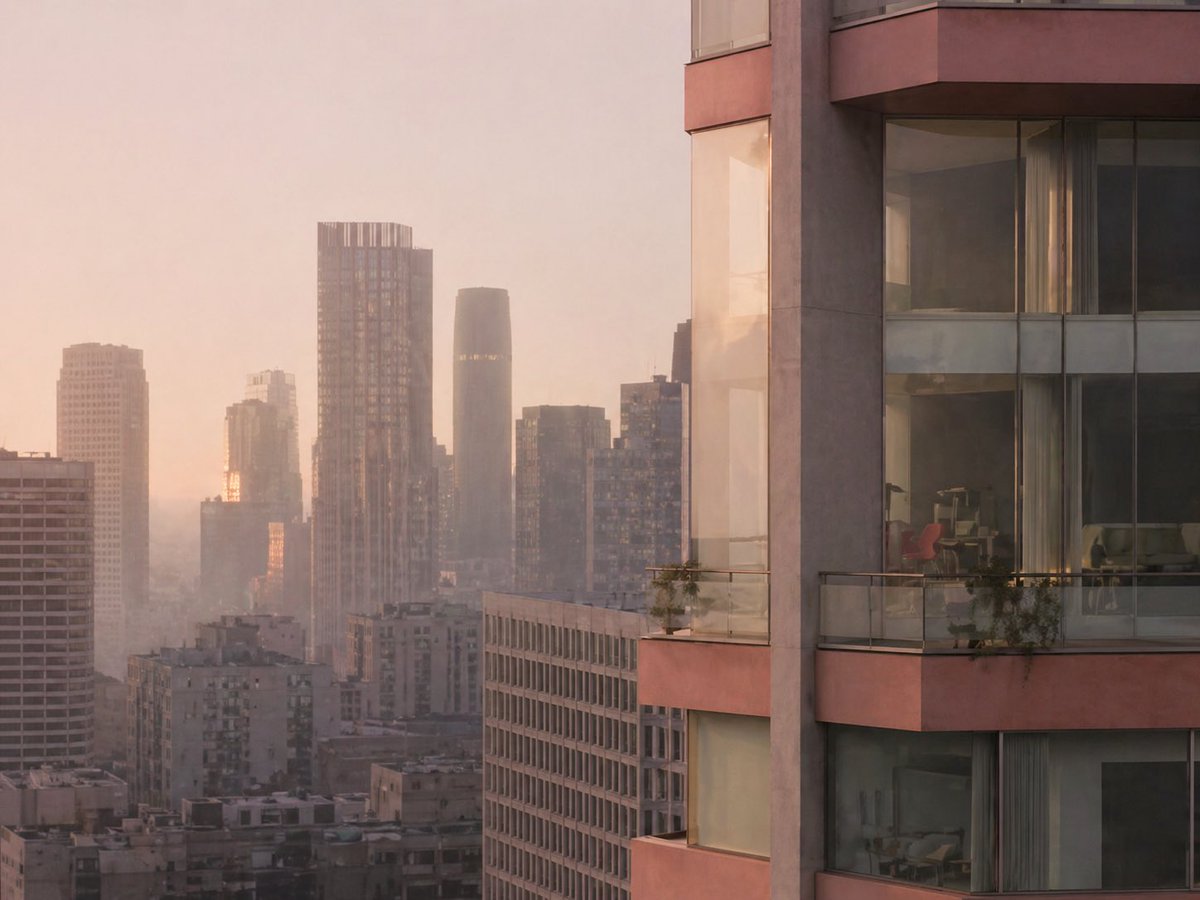
Luxury High-Rise at Hazy Sunrise
This prompt generates a photorealistic sunrise cityscape featuring a close modern apartment tower and a hazy downtown skyline, ideal for architectural visualization or luxury real-estate imagery.
This is a GPT Image 2 prompt case for Interior & Architecture. Use the copy-ready prompt below to generate similar visuals, and review Awesome GPT Image 2 Prompts attribution plus commercial-use rights before reuse.
Free 1K preview
Generate one preview image instantly, no sign-up required.
Prompt
Copy-ready prompt
A cinematic architectural cityscape at sunrise, viewed from a high vantage point over a dense modern downtown skyline softened by pale haze. Warm peach, blush, and dusty gold morning light fills the scene, with the sun low behind the buildings and subtle reflections glowing on glass facades. The composition is asymmetrical: the right third of the image is dominated by the close exterior corner of a luxury high-rise residential tower with curved glass windows, muted rose-beige concrete bands, and 3 visible balcony levels. Each balcony has transparent glass railings and a few small potted plants trailing over the edge. Through the large windows, faint interior details are visible, including contemporary furniture and a distinctive red chair in one room. The left and center background show a layered urban skyline with exactly 8 clearly distinguishable high-rise buildings of varying heights and shapes, including a tall rectangular tower with a gridded facade and crown-like top, a dark rounded cylindrical tower near center, and several boxy residential and office buildings fading into atmospheric perspective. The mood is quiet, elegant, and slightly dreamy, like a luxury real-estate editorial photograph. Ultra-realistic, soft contrast, telephoto compression, fine architectural detail, subtle window reflections, no people, no text.
Best for
- - Interior & Architecture visual exploration
- - Image generation and reference-image edits
- - Reusable briefs that keep source attribution visible
Change these parts
- - Subject, product, character, or scene
- - Aspect ratio, camera, lighting, and background
- - Brand, text, color, and output constraints
Recommended model and settings
- - Model: gpt-image-2
- - Input mode: Text to Image
- - Aspect ratio: source
- - Commercial status: review original source
How to use this prompt
- 1. Copy the prompt and preserve its structure for the first test.
- 2. Replace the subject, context, and publishing channel.
- 3. Change one camera, lighting, or style variable per iteration.
- 4. Inspect the output, source, text, and rights before reuse.
Limitations, source, and reuse cautions
- - Generated output is an editable draft, not factual, legal, or rights evidence.
- - Review the linked source, people, brands, logos, text, and third-party media before commercial use.
More cases in this category
Prioritized by category, input mode compatibility, quality, and lower risk.
Reuse and source notes
Use this prompt safely after previewing the case.
- 1.Copy the prompt or open it directly in Dovoo with the generation button.
- 2.Adjust variables, aspect ratio, and reference images for your own use case.
- 3.Before publishing or paid usage, verify source rights, attribution requirements, and brand or likeness risks.
Can I use this prompt commercially?
Commercial-use status is allowed. Review the original source, license, brand constraints, and legal requirements before paid usage.
Where does this case come from?
This case is imported from Awesome GPT Image 2 Prompts; keep attribution visible and check the source URL before reuse.