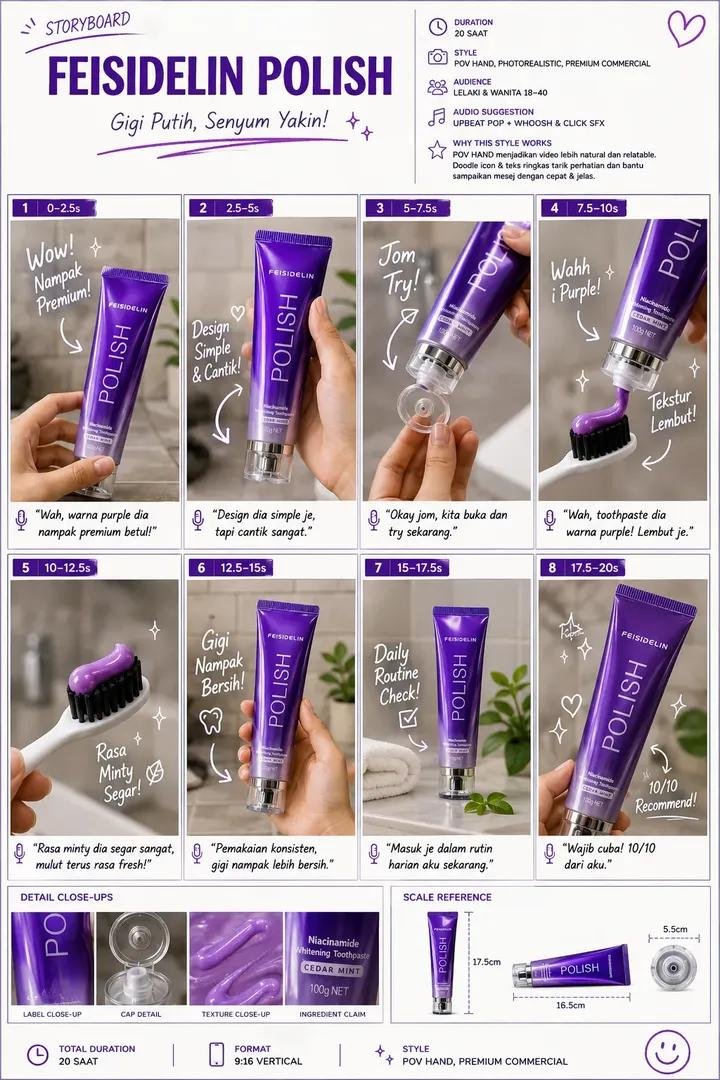
Luxury Storyboard Presentation Layout
A professional advertising storyboard prompt that generates a clean grid layout for luxury product campaigns, including technical metadata and visual frames.
This is a GPT Image 2 prompt case for Graphic & Poster. Use the copy-ready prompt below to generate similar visuals, and review Awesome GPT Image 2 Prompts attribution plus commercial-use rights before reuse.
Free 1K preview
Generate one preview image instantly, no sign-up required.
Prompt
Copy-ready prompt
Create a premium commercial storyboard sheet for a {argument name="product type" default="luxury toothpaste"} advertisement in a clean A4 portrait layout. White background with elegant {argument name="branding color" default="purple"} branding, minimal editorial design, premium typography, and creative agency presentation style.

Top Header:
• Title: {argument name="brand name" default="FEISIDELIN POLISH"}
• Subtitle: Bright White Teeth, Confident Smile!
• Right info panel showing Duration (20s), Style (POV Hand, Photorealistic, Premium Commercial), Audience (18–40), Audio (Upbeat Pop), and Why This Style Works.

Main Layout:
• 8 storyboard frames arranged in a 4×2 grid.
• Each frame has a purple number tab, timecode, realistic product photo, white handwritten notes, curved arrows, sparkle doodles, and a small voice-over caption.
• Show: holding the toothpaste, front beauty shot, opening the cap, squeezing purple toothpaste onto a toothbrush, macro texture shot, product in a luxury bathroom, daily routine hero shot, and final recommendation shot.

Bottom Section:
• Detail Close-ups: Label, Cap, Texture, Ingredients.
• Scale Reference with product dimensions.
• Footer: Total Duration 20s • Format 9:16 • Style: POV Hand Premium Commercial.

Style: Ultra-realistic, luxury product photography, premium bathroom lighting, shallow depth of field, clean grid layout, Apple-style presentation, Behance-quality storyboard, 8K, highly detailed, professional advertising pitch board, purple and white color palette.
Prompt variables
Editable argument placeholders found in the prompt, with their default values.
Best for
- - Graphic & Poster visual exploration
- - Image generation and reference-image edits
- - Reusable briefs that keep source attribution visible
Change these parts
- - Subject, product, character, or scene
- - Aspect ratio, camera, lighting, and background
- - Brand, text, color, and output constraints
Recommended model and settings
- - Model: gpt-image-2
- - Input mode: Text to Image
- - Aspect ratio: source
- - Commercial status: review original source
How to use this prompt
- 1. Copy the prompt and preserve its structure for the first test.
- 2. Replace the subject, context, and publishing channel.
- 3. Change one camera, lighting, or style variable per iteration.
- 4. Inspect the output, source, text, and rights before reuse.
Limitations, source, and reuse cautions
- - Generated output is an editable draft, not factual, legal, or rights evidence.
- - Review the linked source, people, brands, logos, text, and third-party media before commercial use.
More cases in this category
Prioritized by category, input mode compatibility, quality, and lower risk.






Reuse and source notes
Use this prompt safely after previewing the case.
- 1.Copy the prompt or open it directly in Dovoo with the generation button.
- 2.Adjust variables, aspect ratio, and reference images for your own use case.
- 3.Before publishing or paid usage, verify source rights, attribution requirements, and brand or likeness risks.
Can I use this prompt commercially?
Commercial-use status is allowed. Review the original source, license, brand constraints, and legal requirements before paid usage.
Where does this case come from?
This case is imported from Awesome GPT Image 2 Prompts; keep attribution visible and check the source URL before reuse.