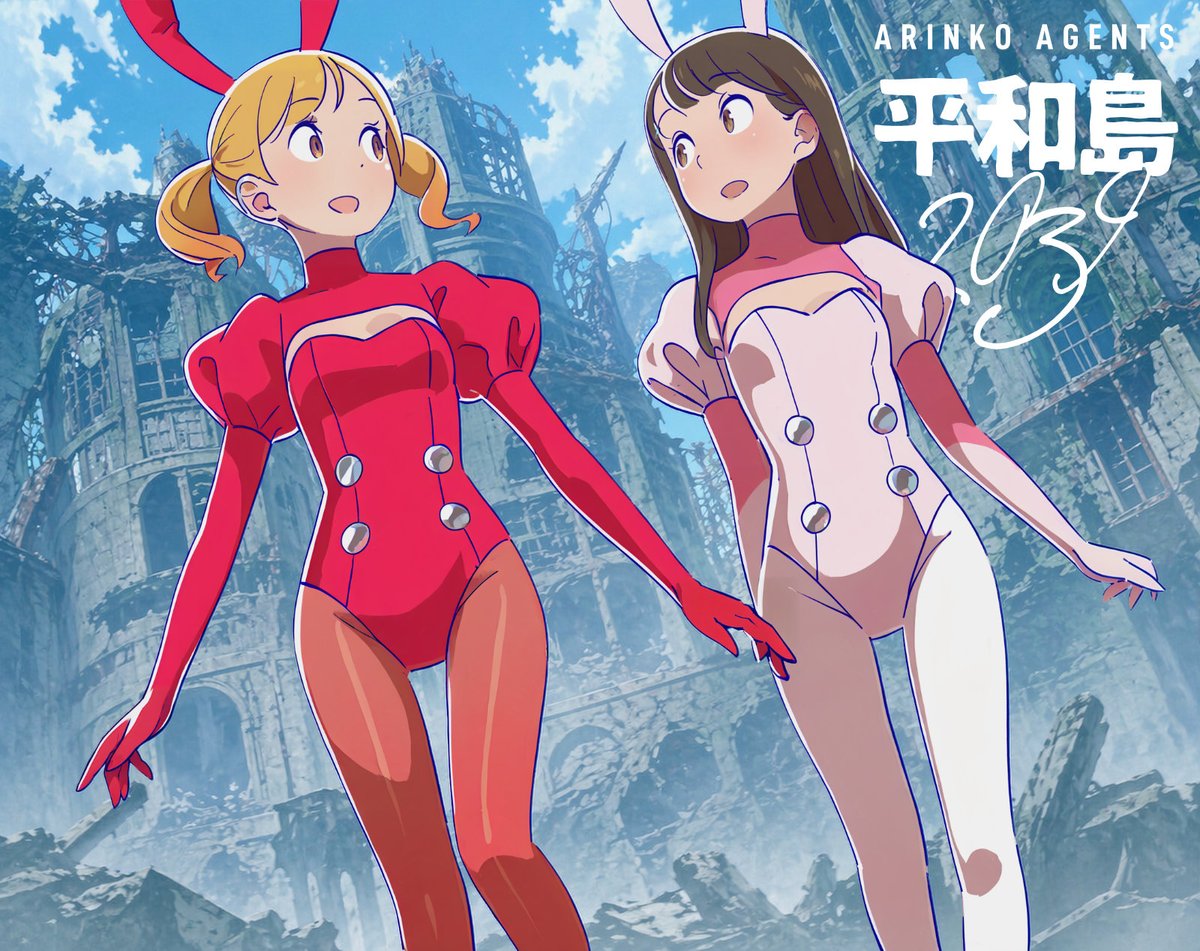
Low-Angle Anime Bunny Girls in Ruins
This prompt generates a tilted low-angle anime poster of two bunny-suited girls against a ruined cathedral background, useful for recreating stylized character-and-background compositions with dramatic perspective.
This is a GPT Image 2 prompt case for Anime & Game. Use the copy-ready prompt below to generate similar visuals, and review Awesome GPT Image 2 Prompts attribution plus commercial-use rights before reuse.
Free 1K preview
Generate one preview image instantly, no sign-up required.
Prompt
Copy-ready prompt
A dynamic, low-angle anime-style illustration featuring two young women dressed in rabbit-themed bodysuits. The perspective is from below, looking up as they slightly lower their heads towards the viewer. The girl on the left has {argument name="hair color" default="blonde"} short twin tails, with curled ends, and wears large red rabbit ears, a shiny, bright red high-slit bodysuit with puff sleeves, long opera gloves, and a heart-shaped chest piece with 4 circular silver button-like discs on the front. The girl on the right has long, straight brown hair and wears light-colored rabbit ears, a shiny white and light pink bodysuit of the same design, also with puff sleeves, long gloves, a heart-shaped chest piece, and 4 circular silver discs. Both girls are slender with long legs and expressive anime eyes, with a slightly surprised and curious expression, their gazes meeting and slightly directed towards the viewer. Their hands hang naturally at their sides, almost touching in the center. Place them in front of a vast ruined cathedral or a dilapidated grand stone building, with a background including broken arches, skeletal metal frames, shattered windows, and collapsed rubble, rendered in a soft anime background style. Employ a dramatic Dutch angle and strong perspective, causing the building to tilt with the camera, making the characters appear tall and close to the lens. Behind the ruins is a clear blue sky and large white clouds. The characters feature clean cel-shading, while the background details are rich and painterly, with clear lines, vibrant but slightly weathered colors, and a highly cinematic composition. Add 3 text elements as graphic design overlays in the upper right corner: small, uppercase text “ARINKO AGENTS”, large, bold Japanese text “平和島”, and a large, white handwritten-style font overlaying the background.Prompt variables
Editable argument placeholders found in the prompt, with their default values.
Best for
- - Anime & Game visual exploration
- - Image generation and reference-image edits
- - Reusable briefs that keep source attribution visible
Change these parts
- - Subject, product, character, or scene
- - Aspect ratio, camera, lighting, and background
- - Brand, text, color, and output constraints
Recommended model and settings
- - Model: gpt-image-2
- - Input mode: Text to Image
- - Aspect ratio: source
- - Commercial status: review original source
How to use this prompt
- 1. Copy the prompt and preserve its structure for the first test.
- 2. Replace the subject, context, and publishing channel.
- 3. Change one camera, lighting, or style variable per iteration.
- 4. Inspect the output, source, text, and rights before reuse.
Limitations, source, and reuse cautions
- - Generated output is an editable draft, not factual, legal, or rights evidence.
- - Review the linked source, people, brands, logos, text, and third-party media before commercial use.
More cases in this category
Prioritized by category, input mode compatibility, quality, and lower risk.



Reuse and source notes
Use this prompt safely after previewing the case.
- 1.Copy the prompt or open it directly in Dovoo with the generation button.
- 2.Adjust variables, aspect ratio, and reference images for your own use case.
- 3.Before publishing or paid usage, verify source rights, attribution requirements, and brand or likeness risks.
Can I use this prompt commercially?
Commercial-use status is allowed. Review the original source, license, brand constraints, and legal requirements before paid usage.
Where does this case come from?
This case is imported from Awesome GPT Image 2 Prompts; keep attribution visible and check the source URL before reuse.