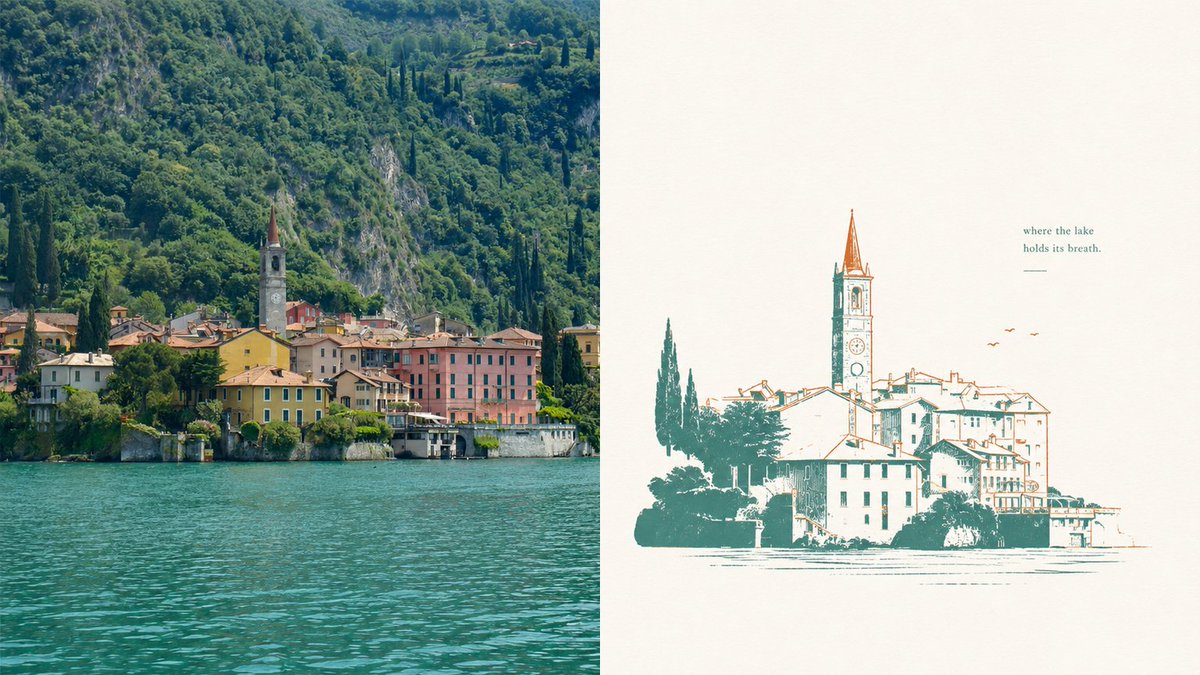
Lake Como Two-Color Print Diptych
Generates a split-screen travel composition pairing a realistic lakeside village photograph with a minimalist two-color vintage print version.
This is a GPT Image 2 prompt case for Graphic & Poster. Use the copy-ready prompt below to generate similar visuals, and review Awesome GPT Image 2 Prompts attribution plus commercial-use rights before reuse.
Free 1K preview
Generate one preview image instantly, no sign-up required.
Prompt
Copy-ready prompt
Goal: Create a two-panel horizontal composition comparing a real lakeside village photo with a simplified two-color misregistered print illustration of the same scene.

Canvas: Wide 16:9 landscape canvas, split exactly into 2 equal vertical panels.

Layout: Left panel is a realistic travel photograph; right panel is a minimalist poster-style illustration on warm off-white paper. No border between panels except the clean vertical split.

Left panel: Show a picturesque European lakeside village at the base of a steep, densely forested mountain. Include turquoise lake water filling the lower third, a row of pastel waterfront buildings in yellow, pink, cream, and terracotta, and one prominent church bell tower with a pointed reddish spire near the center-left. The mountain behind is lush deep green with rocky patches and tall dark cypress trees. Lighting is natural daylight, crisp but slightly softened, like a travel photo of Lake Como.

Right panel: Recreate the same village as a vintage two-color screenprint / risograph-style illustration. Use exactly 2 ink colors: teal-green for shadows, trees, outlines, and water marks; rusty orange for roof accents, tower spire, birds, and selective line details. Background is mostly empty warm ivory paper with subtle grain. The village illustration sits in the lower half, slightly right of center, with a tall church tower rising above the roofs. Lines are intentionally imperfect with slight color misregistration, sparse hatching, and broken ink texture. Add exactly 3 small orange birds to the upper right of the village. Add exactly 1 short quote above the illustration on the upper right reading {argument name="quote" default="where the lake\nholds its breath."} and exactly 1 small horizontal teal line underneath it.

Style: Editorial travel-poster aesthetic, quiet negative space, elegant imperfect printmaking, two-color ink, calm lake atmosphere, refined minimalism, nostalgic European village mood.

Parameters: The scene is {argument name="location" default="a Lake Como waterfront village"}; the main ink colors are {argument name="primary ink color" default="deep teal-green"} and {argument name="accent ink color" default="rusty orange"}; the paper background is {argument name="paper color" default="warm ivory"}.

Constraints: Use exactly 2 panels, exactly 2 ink colors in the right panel, exactly 3 birds, exactly 1 quote block, and exactly 1 underline. Do not add logos, watermarks, extra captions, people, boats, or modern objects.
Prompt variables
Editable argument placeholders found in the prompt, with their default values.
Best for
- - Graphic & Poster visual exploration
- - Image generation and reference-image edits
- - Reusable briefs that keep source attribution visible
Change these parts
- - Subject, product, character, or scene
- - Aspect ratio, camera, lighting, and background
- - Brand, text, color, and output constraints
Recommended model and settings
- - Model: gpt-image-2
- - Input mode: Text to Image
- - Aspect ratio: source
- - Commercial status: review original source
How to use this prompt
- 1. Copy the prompt and preserve its structure for the first test.
- 2. Replace the subject, context, and publishing channel.
- 3. Change one camera, lighting, or style variable per iteration.
- 4. Inspect the output, source, text, and rights before reuse.
Limitations, source, and reuse cautions
- - Generated output is an editable draft, not factual, legal, or rights evidence.
- - Review the linked source, people, brands, logos, text, and third-party media before commercial use.
More cases in this category
Prioritized by category, input mode compatibility, quality, and lower risk.

Reuse and source notes
Use this prompt safely after previewing the case.
- 1.Copy the prompt or open it directly in Dovoo with the generation button.
- 2.Adjust variables, aspect ratio, and reference images for your own use case.
- 3.Before publishing or paid usage, verify source rights, attribution requirements, and brand or likeness risks.
Can I use this prompt commercially?
Commercial-use status is allowed. Review the original source, license, brand constraints, and legal requirements before paid usage.
Where does this case come from?
This case is imported from Awesome GPT Image 2 Prompts; keep attribution visible and check the source URL before reuse.