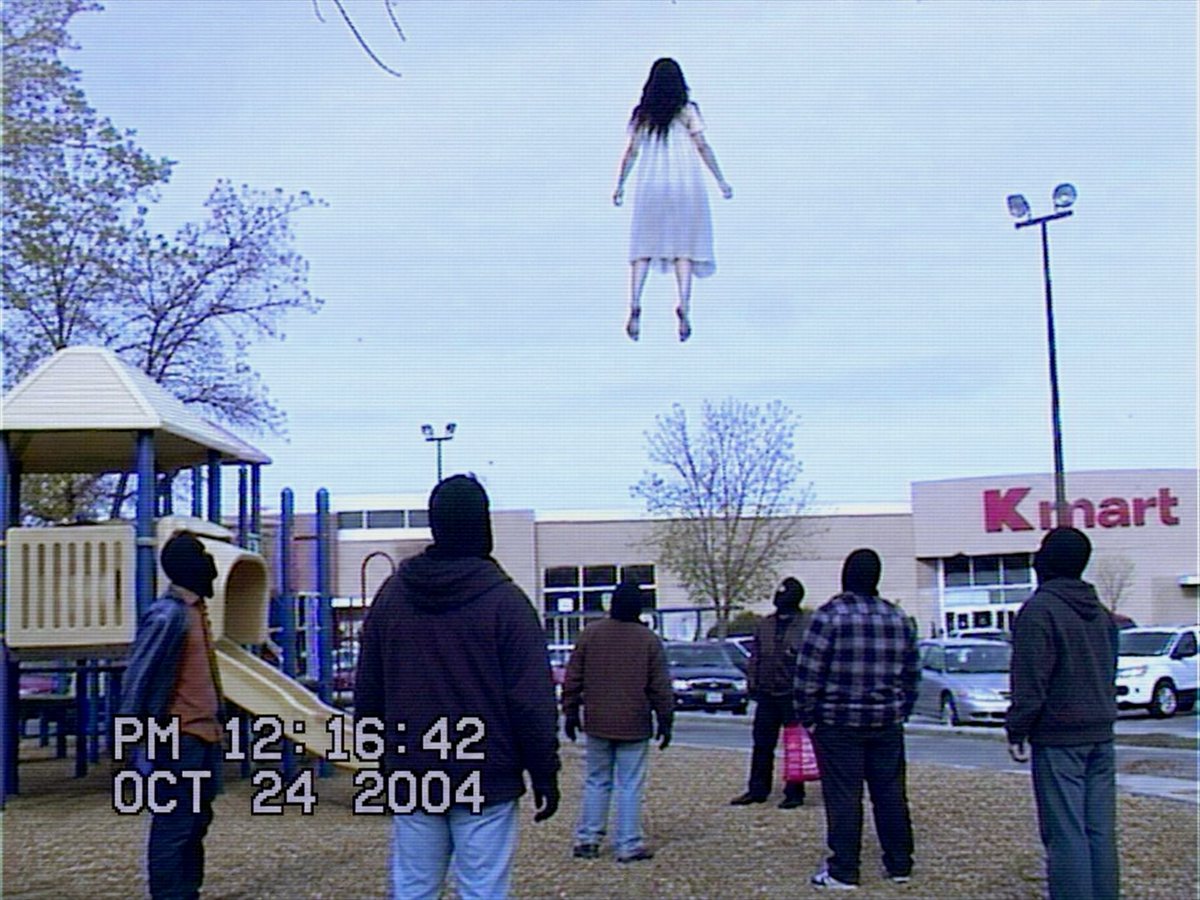
VHS Kmart Levitation Incident
A found-footage style VHS still of onlookers watching a girl levitate above a Kmart parking lot, useful for eerie paranormal scene generation.
This is a GPT Image 2 prompt case for Other Inspiration. Use the copy-ready prompt below to generate similar visuals, and review Awesome GPT Image 2 Prompts attribution plus commercial-use rights before reuse.
Free 1K preview
Generate one preview image instantly, no sign-up required.
Prompt
Copy-ready prompt
Create a low-resolution VHS camcorder still from 2004 showing a strange paranormal event in a suburban Kmart parking lot beside a playground. The scene is shot from behind at eye level on an overcast day, with a pale blue-gray sky, leafless trees, parked cars, beige big-box store facade, and a large red “Kmart” sign on the right. In the upper center of the frame, a young girl with long dark hair wearing a plain white knee-length dress floats unnaturally high above the ground, viewed from behind, arms slightly away from her sides and feet dangling. On the ground there are exactly 7 adult onlookers facing her: 1 person in a beanie near the yellow playground slide on the left, 1 large hooded figure in the foreground center, 1 person in a tan jacket near center, 1 dark-clothed person farther back near the cars, 1 person holding a bright pink shopping bag, 1 person in a blue plaid shirt, and 1 hooded person on the far right. Include a playground structure on the left with a cream roof, yellow slide, blue posts, gravel or mulch ground, parking lot light poles, and cars in the background. Add authentic analog video artifacts: horizontal scan lines, interlacing, slight blur, muted colors, blue tint, compression noise, mild chromatic aberration, and a black-bordered camcorder feel. Overlay large white blocky VHS timestamp text in the lower left reading “PM 12:16:42” on the first line and “OCT 24 2004” on the second line. Make the image feel like found footage of a supernatural levitation incident, realistic and unsettling, not cinematic or polished. Customizable elements: levitating subject is {argument name="levitating subject" default="a young girl with long dark hair in a white dress"}, store sign is {argument name="store sign" default="Kmart"}, timestamp is {argument name="timestamp" default="PM 12:16:42 / OCT 24 2004"}, setting is {argument name="setting" default="suburban Kmart parking lot beside a playground"}, visual format is {argument name="visual format" default="low-resolution 2004 VHS camcorder still"}.Prompt variables
Editable argument placeholders found in the prompt, with their default values.
Best for
- - Other Inspiration visual exploration
- - Image generation and reference-image edits
- - Reusable briefs that keep source attribution visible
Change these parts
- - Subject, product, character, or scene
- - Aspect ratio, camera, lighting, and background
- - Brand, text, color, and output constraints
Recommended model and settings
- - Model: gpt-image-2
- - Input mode: Text to Image
- - Aspect ratio: source
- - Commercial status: review original source
How to use this prompt
- 1. Copy the prompt and preserve its structure for the first test.
- 2. Replace the subject, context, and publishing channel.
- 3. Change one camera, lighting, or style variable per iteration.
- 4. Inspect the output, source, text, and rights before reuse.
Limitations, source, and reuse cautions
- - Generated output is an editable draft, not factual, legal, or rights evidence.
- - Review the linked source, people, brands, logos, text, and third-party media before commercial use.
More cases in this category
Prioritized by category, input mode compatibility, quality, and lower risk.


Reuse and source notes
Use this prompt safely after previewing the case.
- 1.Copy the prompt or open it directly in Dovoo with the generation button.
- 2.Adjust variables, aspect ratio, and reference images for your own use case.
- 3.Before publishing or paid usage, verify source rights, attribution requirements, and brand or likeness risks.
Can I use this prompt commercially?
Commercial-use status is allowed. Review the original source, license, brand constraints, and legal requirements before paid usage.
Where does this case come from?
This case is imported from Awesome GPT Image 2 Prompts; keep attribution visible and check the source URL before reuse.