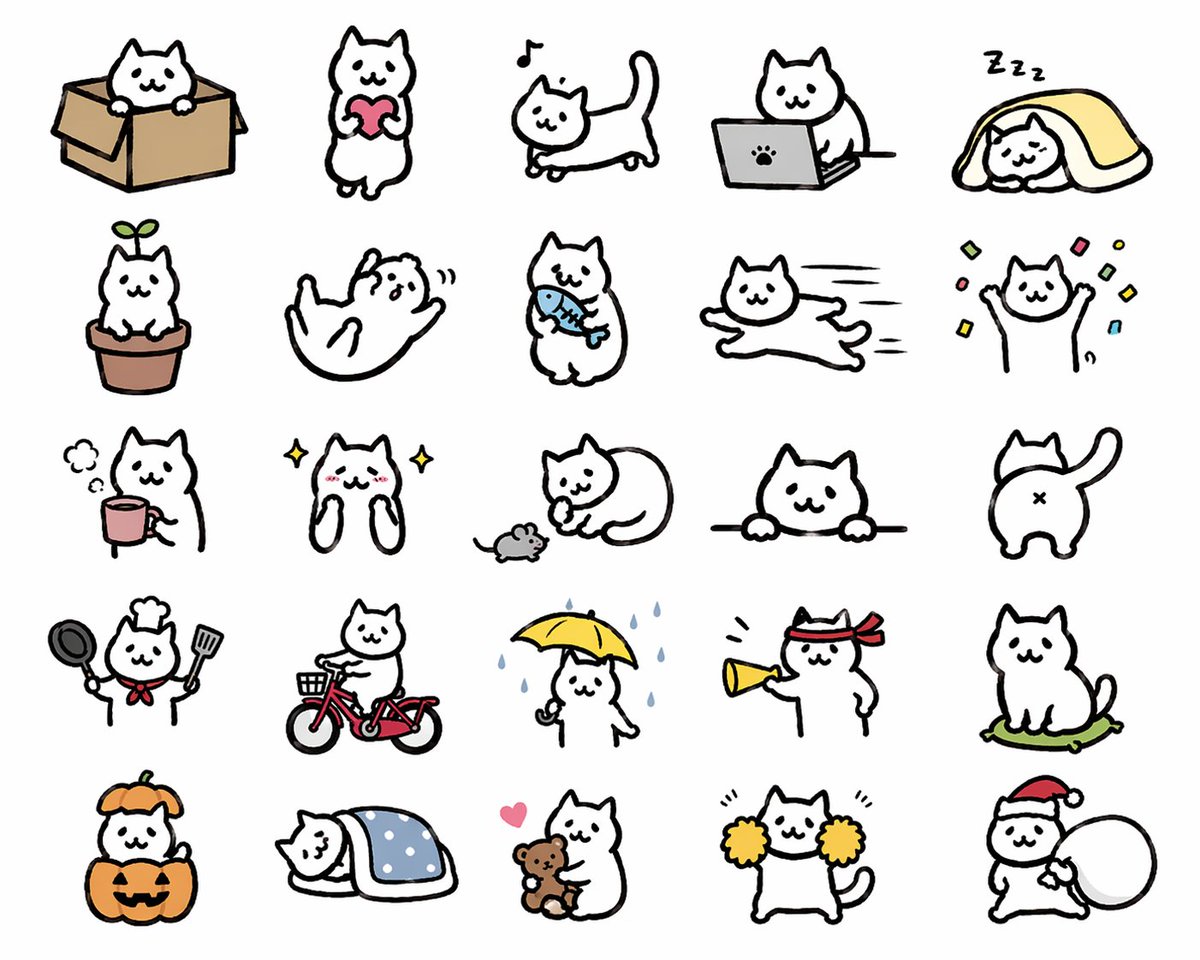
Kawaii Cat Sticker Sheet
This prompt generates a 25-pose kawaii white cat sticker sheet suitable for chat stickers, emoji packs, and mascot expression sets.
This is a GPT Image 2 prompt case for Illustration & Art. Use the copy-ready prompt below to generate similar visuals, and review Awesome GPT Image 2 Prompts attribution plus commercial-use rights before reuse.
Free 1K preview
Generate one preview image instantly, no sign-up required.
Prompt
Copy-ready prompt
{
  "type": "cute sticker sheet illustration",
  "style": "simple hand-drawn kawaii cat doodles, thick black outlines, minimal flat colors, white cat character, clean light gray background, LINE sticker style, playful and expressive",
  "subject": {
    "character": "a chubby white cartoon cat with tiny dot eyes, small smiling mouth, triangular ears, rounded body, short limbs, and a consistent simple mascot design"
  },
  "layout": {
    "grid": {
      "rows": 5,
      "columns": 5,
      "count": 25
    },
    "sections": [
      {
        "title": "row 1",
        "position": "top",
        "count": 5,
        "labels": [
          "cat sitting in a cardboard box",
          "cat standing and holding a pink heart",
          "cat walking with a musical note above its head",
          "cat using a gray laptop with a paw-print logo",
          "cat sleeping under a yellow blanket with Zzz marks"
        ]
      },
      {
        "title": "row 2",
        "position": "upper middle",
        "count": 5,
        "labels": [
          "cat sitting in a flowerpot with a green sprout on its head",
          "cat rolling on its back playfully",
          "cat standing and holding a blue fish",
          "cat running stretched out at high speed",
          "cat raising both paws with colorful confetti around it"
        ]
      },
      {
        "title": "row 3",
        "position": "middle",
        "count": 5,
        "labels": [
          "cat beside a pink mug with steam",
          "sparkly happy cat with blushing cheeks and paws up near its face",
          "cat curled around a small gray mouse",
          "cat peeking over a horizontal ledge with both paws visible",
          "rear view of cat with tail raised and X-shaped butt mark"
        ]
      },
      {
        "title": "row 4",
        "position": "lower middle",
        "count": 5,
        "labels": [
          "cat dressed as a chef holding a frying pan and spatula with a red neckerchief and chef hat",
          "cat riding a red bicycle with a front basket",
          "cat standing in rain holding a yellow umbrella with blue raindrops falling",
          "cat wearing a red hachimaki headband and shouting through a yellow megaphone",
          "cat sitting on a green cushion"
        ]
      },
      {
        "title": "row 5",
        "position": "bottom",
        "count": 5,
        "labels": [
          "cat inside a jack-o'-lantern pumpkin costume with an orange hood",
          "cat sleeping under a blue polka-dot blanket",
          "cat hugging a brown teddy bear with a pink heart nearby",
          "cat cheering with yellow pom-poms",
          "cat wearing a Santa hat and carrying a large white sack"
        ]
      }
    ],
    "spacing": "evenly spaced icons with generous margins, no borders, no text"
  },
  "color_palette": {
    "background": "{argument name=\"background color\" default=\"light gray\"}",
    "accent_colors": [
      "pink",
      "yellow",
      "blue",
      "red",
      "orange",
      "green",
      "brown",
      "gray"
    ]
  },
  "quality": "clean sticker-sheet composition, consistent proportions across all 25 poses, charming and commercially usable for messaging stickers",
  "size": "1024x1024"
}
Prompt variables
Editable argument placeholders found in the prompt, with their default values.
Best for
- - Illustration & Art visual exploration
- - Image generation and reference-image edits
- - Reusable briefs that keep source attribution visible
Change these parts
- - Subject, product, character, or scene
- - Aspect ratio, camera, lighting, and background
- - Brand, text, color, and output constraints
Recommended model and settings
- - Model: gpt-image-2
- - Input mode: Text to Image
- - Aspect ratio: source
- - Commercial status: review original source
How to use this prompt
- 1. Copy the prompt and preserve its structure for the first test.
- 2. Replace the subject, context, and publishing channel.
- 3. Change one camera, lighting, or style variable per iteration.
- 4. Inspect the output, source, text, and rights before reuse.
Limitations, source, and reuse cautions
- - Generated output is an editable draft, not factual, legal, or rights evidence.
- - Review the linked source, people, brands, logos, text, and third-party media before commercial use.
More cases in this category
Prioritized by category, input mode compatibility, quality, and lower risk.





Reuse and source notes
Use this prompt safely after previewing the case.
- 1.Copy the prompt or open it directly in Dovoo with the generation button.
- 2.Adjust variables, aspect ratio, and reference images for your own use case.
- 3.Before publishing or paid usage, verify source rights, attribution requirements, and brand or likeness risks.
Can I use this prompt commercially?
Commercial-use status is allowed. Review the original source, license, brand constraints, and legal requirements before paid usage.
Where does this case come from?
This case is imported from Awesome GPT Image 2 Prompts; keep attribution visible and check the source URL before reuse.