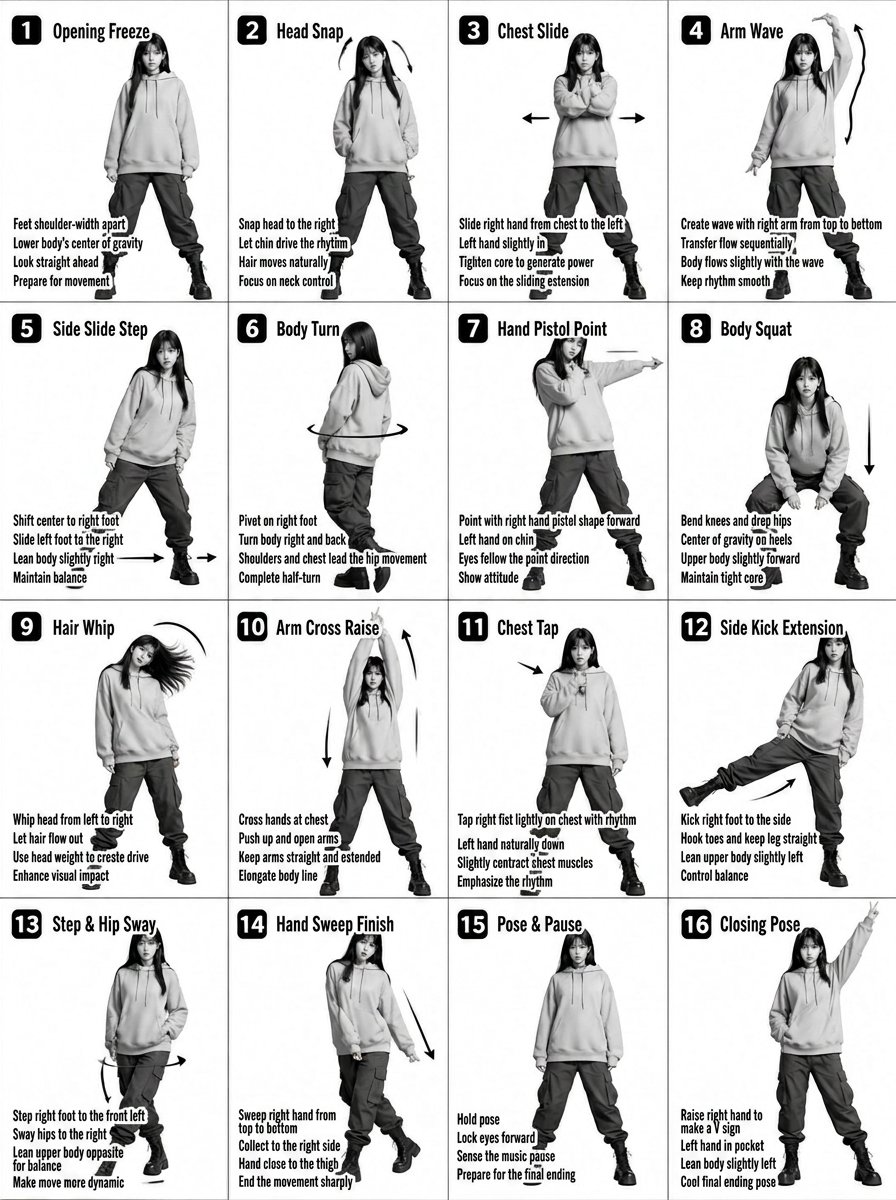
K-pop Dance Tutorial Poster Generator
Transforms a 4x4 movement sheet into a high-fashion K-pop idol tutorial poster with neon accents and modern graphics.
This is a GPT Image 2 prompt case for Graphic & Poster. Use the copy-ready prompt below to generate similar visuals, and review Awesome GPT Image 2 Prompts attribution plus commercial-use rights before reuse.
Free 1K preview
Generate one preview image instantly, no sign-up required.
Free text preview doesn’t preserve reference-image consistency.
Prompt
Copy-ready prompt
Transform the input image into a stylized {argument name="style" default="K-pop dance tutorial poster"} with a fashion-forward streetwear aesthetic, keeping the exact 4x4 grid layout (16 panels) and choreography structure.
Core Composition
Maintain a 16-panel grid (4 columns × 4 rows) with clean spacing

Each panel shows the same female dancer performing sequential choreography

Preserve panel numbering (1–16) in bold, modern UI-style labels

Keep step titles and instructional captions, but redesign typography to feel like K-pop album graphics / dance practice overlays

Subject Styling (K-pop Idol Inspired)

Young female dancer with soft glam K-pop makeup (dewy skin, subtle shimmer, defined eyes)

Hair: long, sleek, slightly dynamic (motion-friendly, flowing during moves)

Expression: confident, charismatic stage presence

Outfit (streetwear-inspired):

{argument name="clothing" default="Cropped hoodie or oversized zip-up jacket with cargo pants"}

Chunky sneakers or platform boots

Optional accessories: chain necklace, ear cuffs, fingerless gloves

Visual Style

Switch from plain grayscale → high-contrast + soft neon accents

Base palette: {argument name="colors" default="black, white, gray"}

Accent colors: neon pink, electric blue, or violet glow (subtle, not overpowering)

Lighting:

Studio lighting with a soft glow + rim light effect

Slight stage-light vibe, like a K-pop dance practice video

Graphics & Effects

Add dynamic motion trails and glow accents on arms, legs, and hair movement

Replace basic arrows with stylized motion graphics (neon strokes, swooshes)

Subtle light streaks or particle effects for energy

Optional faint floor reflection or glossy surface

Typography

Titles: bold, modern, slightly condensed sans-serif (K-pop album style)

Add subtle glow or gradient to titles

Instruction text: clean, minimal, slightly futuristic UI style

Panel numbers: inside rounded squares or pill shapes with neon outline

Camera & Framing

Full-body framing in each panel (consistent scale)

Straight-on angle, but with slight dynamic tilt or perspective energy

Maintain clarity of movement for instructional purpose

Mood & Energy

Feels like a K-pop dance practice meets fashion editorial

Clean but energetic

Stylish, rhythmic, performance-driven

Important Constraints

Keep choreography readable and sequential

Do NOT merge panels or change layout

Maintain consistency of dancer identity across all panels
Prompt variables
Editable argument placeholders found in the prompt, with their default values.
Best for
- - Graphic & Poster visual exploration
- - Image generation and reference-image edits
- - Reusable briefs that keep source attribution visible
Change these parts
- - Subject, product, character, or scene
- - Aspect ratio, camera, lighting, and background
- - Brand, text, color, and output constraints
Recommended model and settings
- - Model: gpt-image-2
- - Input mode: Image to Image
- - Aspect ratio: source
- - Commercial status: review original source
How to use this prompt
- 1. Copy the prompt and preserve its structure for the first test.
- 2. Replace the subject, context, and publishing channel.
- 3. Change one camera, lighting, or style variable per iteration.
- 4. Inspect the output, source, text, and rights before reuse.
Limitations, source, and reuse cautions
- - Generated output is an editable draft, not factual, legal, or rights evidence.
- - Review the linked source, people, brands, logos, text, and third-party media before commercial use.
More cases in this category
Prioritized by category, input mode compatibility, quality, and lower risk.




Reuse and source notes
Use this prompt safely after previewing the case.
- 1.Copy the prompt or open it directly in Dovoo with the generation button.
- 2.Adjust variables, aspect ratio, and reference images for your own use case.
- 3.Before publishing or paid usage, verify source rights, attribution requirements, and brand or likeness risks.
Can I use this prompt commercially?
Commercial-use status is allowed. Review the original source, license, brand constraints, and legal requirements before paid usage.
Where does this case come from?
This case is imported from Awesome GPT Image 2 Prompts; keep attribution visible and check the source URL before reuse.