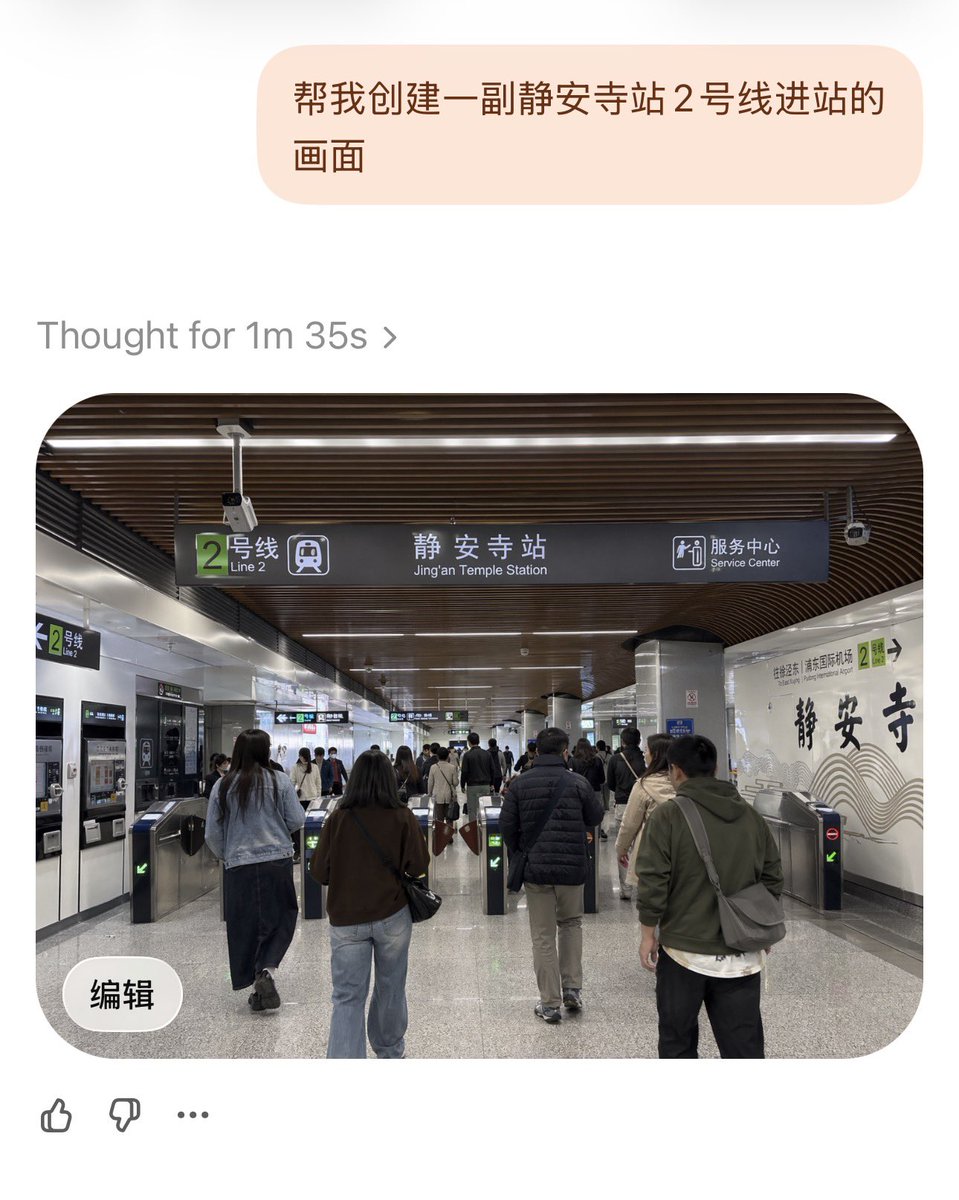
Jing'an Temple Line 2 Station Entrance
This prompt generates a realistic smartphone-style photo of commuters entering Shanghai Metro Jing'an Temple Station on Line 2, suitable for transit, urban realism, or location-based scene generation.
This is a GPT Image 2 prompt case for 室内建筑. Use the copy-ready prompt below to generate similar visuals, and review Awesome GPT Image 2 Prompts attribution plus commercial-use rights before reuse.
Prompt
Copy-ready prompt
A realistic documentary-style photo showcasing the Shanghai Metro{argument name="station name" default="Jing'an Temple Station"}{argument name="subway line" default="Line 2"} The entrance area of the station is shown from a passenger's eye level as they approach the turnstiles. The scene is a spacious indoor station hall with a modern-style dark brown curved wooden ceiling decorated with long, linear white lights. A large, dark-colored directional sign hangs in the center, featuring a green square icon for Line 2, the text "Line 2," the main station name "Jing'an Temple Station," and an icon with the bilingual text "Service Center." Below the sign are several stainless steel turnstiles; six turnstile lanes are visible in the foreground, some marked with green arrows, and at least one displaying a red "No Entry" symbol. The scene depicts a busy yet orderly flow of commuters, with approximately 10 to 15 adults dressed in casual autumn attire, mostly shown from behind, passing through the turnstiles to enter the station; their clothing includes jackets, jeans, backpacks, and shoulder bags, in neutral tones. On the left wall are automatic ticket machines or vending machines, as well as another smaller green Line 2 sign. The right-hand wall is a decorative white platform wall, prominently featuring the words "Jing'an Temple" in black calligraphy and subtle wavy lines. Nearby is a small green Line 2 marker. The materials used need to convey realism: polished gray speckled stone flooring, metal pillars, tiled walls, and realistic transportation facilities. The lighting is bright and even, creating a clean public transportation atmosphere. The composition uses a slightly wide-angle mobile phone photography perspective, centering on the overhead signage and turnstile area, achieving a highly realistic, natural, and detailed rendering of the authentic interior environment of a Shanghai subway station.Prompt variables
Editable argument placeholders found in the prompt, with their default values.
More cases in this category
Prioritized by category, input mode compatibility, quality, and lower risk.
Reuse and source notes
Use this prompt safely after previewing the case.
- 1.Copy the prompt or open it directly in Dovoo with the generation button.
- 2.Adjust variables, aspect ratio, and reference images for your own use case.
- 3.Before publishing or paid usage, verify source rights, attribution requirements, and brand or likeness risks.
Can I use this prompt commercially?
Commercial-use status is allowed. Review the original source, license, brand constraints, and legal requirements before paid usage.
Where does this case come from?
This case is imported from Awesome GPT Image 2 Prompts; keep attribution visible and check the source URL before reuse.