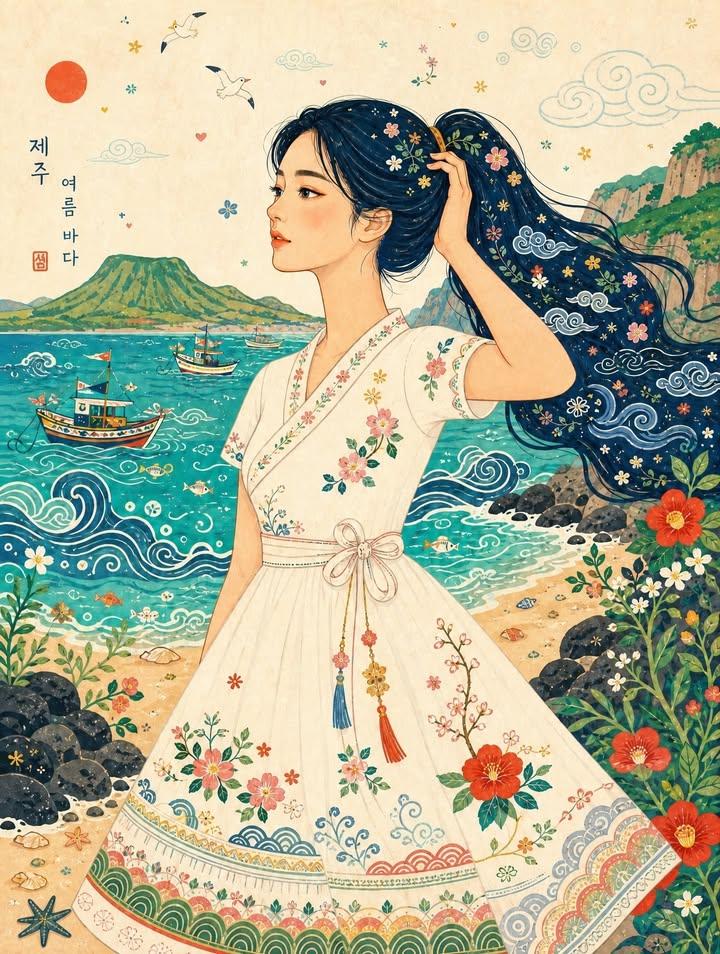
Jeju Island Naive Folk-Art Illustration
Transform a seaside photo into a Korean-inspired naive folk-art illustration featuring Jeju Island vibes, traditional motifs, and a warm summer mood.
This is a GPT Image 2 prompt case for Illustration & Art. Use the copy-ready prompt below to generate similar visuals, and review Awesome GPT Image 2 Prompts attribution plus commercial-use rights before reuse.
Free 1K preview
Generate one preview image instantly, no sign-up required.
Free text preview doesn’t preserve reference-image consistency.
Prompt
Copy-ready prompt
Use the bottom photograph as the main content and composition reference, and use the top image only as the illustration-style reference.

Transform the woman and the entire seaside scene into a bright, playful, {argument name="style" default="Korean-inspired naïve folk-art"} editorial illustration. Preserve the original woman’s side-profile pose, body proportions, hand holding her long ponytail, three-quarter body framing, and the overall camera composition, but reinterpret the setting with the atmosphere of a serene {argument name="location" default="Korean summer coast"}.

Set the scene on a dreamy Korean seaside inspired by Jeju Island or the South Coast of Korea. Replace the tropical-exotic mood with a warm and lyrical Korean summer mood: clear emerald-blue water, a gentle sandy shoreline, soft sea breeze, calm waves, and dark volcanic rocks or softly rounded coastal cliffs reminiscent of Jeju. The background should feel peaceful, nostalgic, and distinctly Korean rather than tropical resort-like.

Illustrate the woman with a warm peach skin tone, an elegant simplified side-profile face, minimal facial details, gently elongated proportions, and clean five-finger hands. Keep her long dark ponytail, but reinterpret it as a flowing deep indigo or navy graphic hair shape decorated with delicate Korean-inspired decorative motifs such as stars, cloud swirls, leaves, tiny flowers, and subtle patterns inspired by minhwa and traditional folk ornament.

Keep the original white halter crop top and flowing summer skirt silhouette, but reinterpret the outfit as a charming Korean summer folk-style resort dress inspired by modernized hanbok details. Add decorative embroidery and pattern accents inspired by Korean aesthetics: small mugunghwa, camellia, wildflowers, plum blossoms, simplified dancheong-like borders, wave motifs, and hand-drawn stitched details. The outfit should remain light, feminine, and summery, while feeling rooted in Korean visual sensibility.

Simplify the entire environment into flat, colorful graphic shapes with a handmade look. Render the sea as a vivid jade-turquoise or blue-green color field with hand-drawn white and indigo wave lines inspired by traditional decorative patterns. Replace the tropical boats with small Korean fishing boats, simple leisure boats, or stylized boats inspired by the Korean coast, rendered in colorful folk-art form with playful geometric decoration. Turn the cliffs and shoreline into rounded green hills, basalt rocks, coastal plants, and simplified seaside vegetation that feel natural to Korea.

Add small decorative details that evoke Korean summer by the sea: tiny fish, shells, bubbles, wild coastal flowers, seabirds, hearts, stars, stylized seaweed, and a few whimsical minhwa-like elements, but keep the composition airy and not overcrowded. Avoid overly exotic tropical creatures; instead, focus on a gentle Korean coastal atmosphere.

Use a cheerful but refined color palette inspired by Korean folk painting and summer landscapes: jade turquoise, ce
Prompt variables
Editable argument placeholders found in the prompt, with their default values.
Best for
- - Illustration & Art visual exploration
- - Image generation and reference-image edits
- - Reusable briefs that keep source attribution visible
Change these parts
- - Subject, product, character, or scene
- - Aspect ratio, camera, lighting, and background
- - Brand, text, color, and output constraints
Recommended model and settings
- - Model: gpt-image-2
- - Input mode: Image to Image
- - Aspect ratio: source
- - Commercial status: review original source
How to use this prompt
- 1. Copy the prompt and preserve its structure for the first test.
- 2. Replace the subject, context, and publishing channel.
- 3. Change one camera, lighting, or style variable per iteration.
- 4. Inspect the output, source, text, and rights before reuse.
Limitations, source, and reuse cautions
- - Generated output is an editable draft, not factual, legal, or rights evidence.
- - Review the linked source, people, brands, logos, text, and third-party media before commercial use.
More cases in this category
Prioritized by category, input mode compatibility, quality, and lower risk.


Reuse and source notes
Use this prompt safely after previewing the case.
- 1.Copy the prompt or open it directly in Dovoo with the generation button.
- 2.Adjust variables, aspect ratio, and reference images for your own use case.
- 3.Before publishing or paid usage, verify source rights, attribution requirements, and brand or likeness risks.
Can I use this prompt commercially?
Commercial-use status is allowed. Review the original source, license, brand constraints, and legal requirements before paid usage.
Where does this case come from?
This case is imported from Awesome GPT Image 2 Prompts; keep attribution visible and check the source URL before reuse.