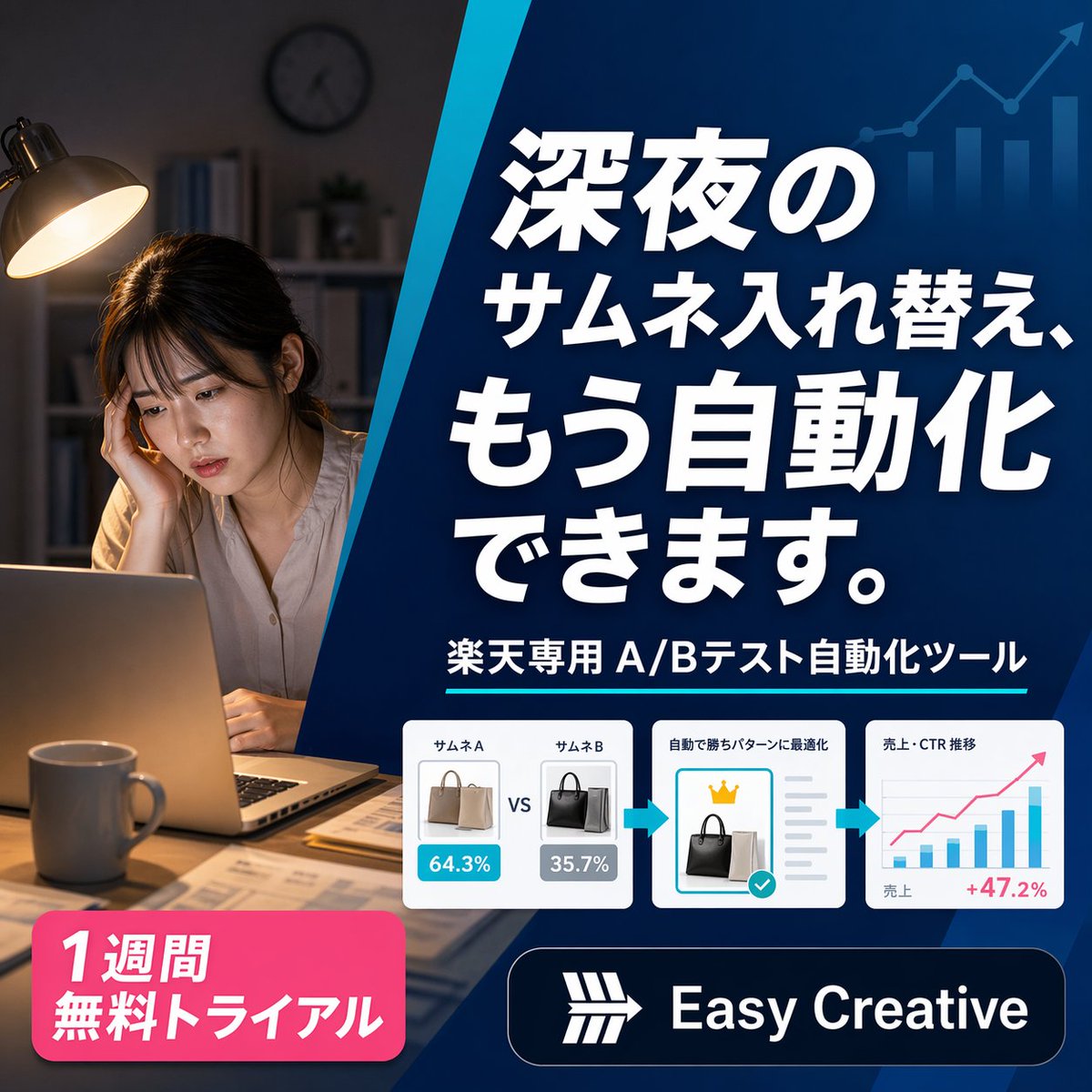
Japanese SaaS Ad Banner at Night
A square Japanese promotional banner for an e-commerce A/B testing automation tool, ideal for ads, landing pages, and social media marketing creatives.
This is a GPT Image 2 prompt case for Product & Commercial. Use the copy-ready prompt below to generate similar visuals, and review Awesome GPT Image 2 Prompts attribution plus commercial-use rights before reuse.
Free 1K preview
Generate one preview image instantly, no sign-up required.
Prompt
Copy-ready prompt
A polished square Japanese digital advertising banner for an AI e-commerce optimization tool, split into 2 main visual zones by a bold diagonal blue divider running from upper center to lower center-left. On the left third, show a realistic nighttime home-office scene with 1 tired young woman sitting at a desk, Show every face clearly with natural, detailed facial features, resting her head on one hand while looking at an open laptop. Warm desk-lamp lighting illuminates her and the desk, with a mug in the foreground, scattered papers, shelves and a wall clock softly out of focus in the dark background, creating a late-night overwork mood. On the right two-thirds, place a deep blue gradient promotional panel with subtle financial-growth graphics in the background: 1 ascending line chart with arrow and 4 vertical bar-chart columns in a lighter transparent blue near the top right. Fill this panel with bold oversized Japanese headline text in white with strong drop shadow, stacked across 4 lines: {argument name="headline text" default="深夜の\nサムネ入れ替え、\nもう自動化\nできます。"}. Beneath it, add 1 subheadline line in white reading {argument name="subheadline text" default="楽天専用 A/Bテスト自動化ツール"}, accented by a thin cyan underline. Below that, place a horizontal process strip containing 3 white rounded-corner cards connected by 2 cyan right-pointing arrows. Card 1 shows 2 handbag thumbnails side by side labeled exactly 2 items: "サムネA" and "サムネB", with blue and gray percentage badges reading "64.3%" and "35.7%", and a centered "VS" between them. Card 2 shows 1 selected black handbag thumbnail, a small gold crown icon above it, gray checklist lines to the right, and a turquoise confirmation checkmark badge, with a small Japanese heading indicating automatic optimization. Card 3 shows 1 simple analytics chart with axes, several blue bars, 1 pink upward trend line, small Japanese labels for sales and CTR trend, and a pink result figure "+47.2%" at the lower right. At the bottom left, add 1 bright pink rounded promotional badge with bold white Japanese text on 2 lines: {argument name="offer text" default="1週間\n無料トライアル"}. At the bottom right, add 1 dark navy rounded logo bar containing a simple white geometric emblem and the brand name {argument name="brand name" default="Easy Creative"} in bold white sans-serif. Use a clean modern SaaS-ad aesthetic, high contrast, crisp typography, glossy UI cards, subtle shadows, and a professional conversion-focused layout sized 1:1.Prompt variables
Editable argument placeholders found in the prompt, with their default values.
Best for
- - Product & Commercial visual exploration
- - Image generation and reference-image edits
- - Reusable briefs that keep source attribution visible
Change these parts
- - Subject, product, character, or scene
- - Aspect ratio, camera, lighting, and background
- - Brand, text, color, and output constraints
Recommended model and settings
- - Model: gpt-image-2
- - Input mode: Text to Image
- - Aspect ratio: source
- - Commercial status: review original source
How to use this prompt
- 1. Copy the prompt and preserve its structure for the first test.
- 2. Replace the subject, context, and publishing channel.
- 3. Change one camera, lighting, or style variable per iteration.
- 4. Inspect the output, source, text, and rights before reuse.
Limitations, source, and reuse cautions
- - Generated output is an editable draft, not factual, legal, or rights evidence.
- - Review the linked source, people, brands, logos, text, and third-party media before commercial use.
More cases in this category
Prioritized by category, input mode compatibility, quality, and lower risk.

Reuse and source notes
Use this prompt safely after previewing the case.
- 1.Copy the prompt or open it directly in Dovoo with the generation button.
- 2.Adjust variables, aspect ratio, and reference images for your own use case.
- 3.Before publishing or paid usage, verify source rights, attribution requirements, and brand or likeness risks.
Can I use this prompt commercially?
Commercial-use status is allowed. Review the original source, license, brand constraints, and legal requirements before paid usage.
Where does this case come from?
This case is imported from Awesome GPT Image 2 Prompts; keep attribution visible and check the source URL before reuse.