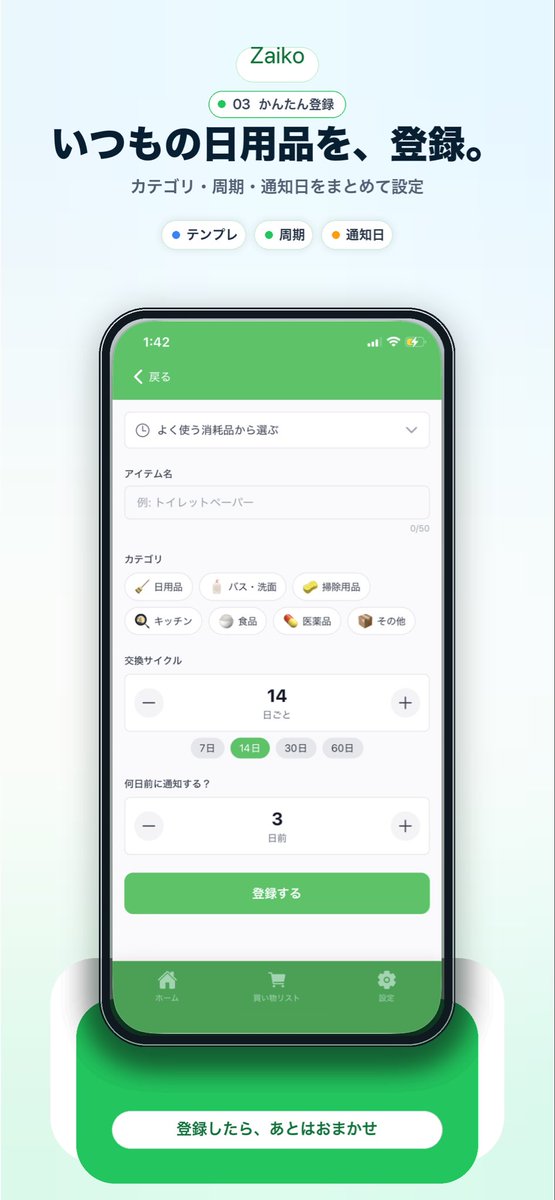
Japanese Inventory App Promo Mockup
Generates a polished vertical marketing visual for a Japanese household inventory app with a centered smartphone UI, headline copy, and a strong bottom call-to-action.
This is a GPT Image 2 prompt case for Graphic & Poster. Use the copy-ready prompt below to generate similar visuals, and review Awesome GPT Image 2 Prompts attribution plus commercial-use rights before reuse.
Free 1K preview
Generate one preview image instantly, no sign-up required.
Prompt
Copy-ready prompt
{
  "type": "mobile app promotional screenshot poster",
  "app": {
    "name": "{argument name=\"app name\" default=\"Zaiko\"}",
    "platform": "iPhone-style inventory and household supplies management app",
    "theme": {
      "primary": "fresh green",
      "background": "very light mint gray gradient",
      "accent": "soft white",
      "text": "dark navy"
    }
  },
  "layout": {
    "orientation": "vertical",
    "composition": "single centered smartphone mockup with marketing copy above and CTA card below",
    "sections": [
      {
        "title": "brand header",
        "position": "top center",
        "count": 2,
        "labels": [
          "Zaiko",
          "03 かんたん登録"
        ]
      },
      {
        "title": "hero text",
        "position": "upper center",
        "count": 2,
        "labels": [
          "いつもの日用品を、登録。",
          "カテゴリ・周期・通知日をまとめて設定"
        ]
      },
      {
        "title": "feature chips",
        "position": "below hero text",
        "count": 3,
        "labels": [
          "テンプレ",
          "Cycle",
          "Reminder date"
        ]
      },
      {
        "title": "app screen form",
        "position": "inside phone center",
        "count": 10,
        "labels": [
          "戻る",
          "よく使う消耗品から選ぶ",
          "アイテム名",
          "カテゴリ",
          "交換サイクル",
          "何日前に通知する?",
          "登録する",
          "ホーム",
          "買い物リスト",
          "Settings"
        ]
      },
      {
        "title": "category chips",
        "position": "mid screen inside phone",
        "count": 7,
        "labels": [
          "Daily necessities",
          "バス・洗面",
          "Cleaning supplies",
          "キッチン",
          "Food",
          "Medicine",
          "その他"
        ]
      },
      {
        "title": "cycle options",
        "position": "lower-mid screen inside phone",
        "count": 4,
        "labels": [
          "7 days",
          "14 days",
          "30 days",
          "60 days"
        ]
      },
      {
        "title": "bottom callout",
        "position": "bottom center",
        "count": 1,
        "labels": [
          "登録したら、あとはおまかせ"
        ]
      }
    ]
  },
  "visuals": {
    "style": "clean modern Japanese startup landing page screenshot, polished UI mockup, soft shadows, rounded cards, minimal interface, App Store marketing aesthetic",
    "background": "pale mint vertical canvas with subtle glow behind the device",
    "top_badge": "small rounded white pill with green outline and green text",
    "phone": {
      "color": "black bezel",
      "angle": "front view",
      "size": "large and centered",
      "screen": {
        "header": "green app bar",
        "status_time": "1:42",
        "form_fields": [
          "dropdown selector",
          "text input with placeholder 例: トイレットペーパー",
          "category chip grid",
          "stepper for replacement cycle showing 14",
          "stepper for notification days showing 3",
          "green submit button"
        ],
        "selected_states": [
          "14 days highlighted in green",
          "green primary button",
          "green bottom tab bar"
        ]
      },
      "shadow": "soft diffuse shadow under phone"
    },
    "bottom_card": {
      "shape": "large rounded green rectangle behind a white pill button",
      "text": "{argument name=\"cta text\" default=\"登録したら、あとはおまかせ\"}",
      "effect": "soft glow and layered rounded white side panels"
    }
  },
  "text_customization": {
    "headline": "{argument name=\"headline text\" default=\"いつもの日用品を、登録。\"}",
    "subheadline": "{argument name=\"subheadline text\" default=\"カテゴリ・周期・通知日をまとめて設定\"}"
  },
  "color_customization": {
    "primary": "{argument name=\"primary color\" default=\"fresh green\"}"
  }
}
Prompt variables
Editable argument placeholders found in the prompt, with their default values.
Best for
- - Graphic & Poster visual exploration
- - Image generation and reference-image edits
- - Reusable briefs that keep source attribution visible
Change these parts
- - Subject, product, character, or scene
- - Aspect ratio, camera, lighting, and background
- - Brand, text, color, and output constraints
Recommended model and settings
- - Model: gpt-image-2
- - Input mode: Text to Image
- - Aspect ratio: source
- - Commercial status: review original source
How to use this prompt
- 1. Copy the prompt and preserve its structure for the first test.
- 2. Replace the subject, context, and publishing channel.
- 3. Change one camera, lighting, or style variable per iteration.
- 4. Inspect the output, source, text, and rights before reuse.
Limitations, source, and reuse cautions
- - Generated output is an editable draft, not factual, legal, or rights evidence.
- - Review the linked source, people, brands, logos, text, and third-party media before commercial use.
More cases in this category
Prioritized by category, input mode compatibility, quality, and lower risk.






Reuse and source notes
Use this prompt safely after previewing the case.
- 1.Copy the prompt or open it directly in Dovoo with the generation button.
- 2.Adjust variables, aspect ratio, and reference images for your own use case.
- 3.Before publishing or paid usage, verify source rights, attribution requirements, and brand or likeness risks.
Can I use this prompt commercially?
Commercial-use status is allowed. Review the original source, license, brand constraints, and legal requirements before paid usage.
Where does this case come from?
This case is imported from Awesome GPT Image 2 Prompts; keep attribution visible and check the source URL before reuse.