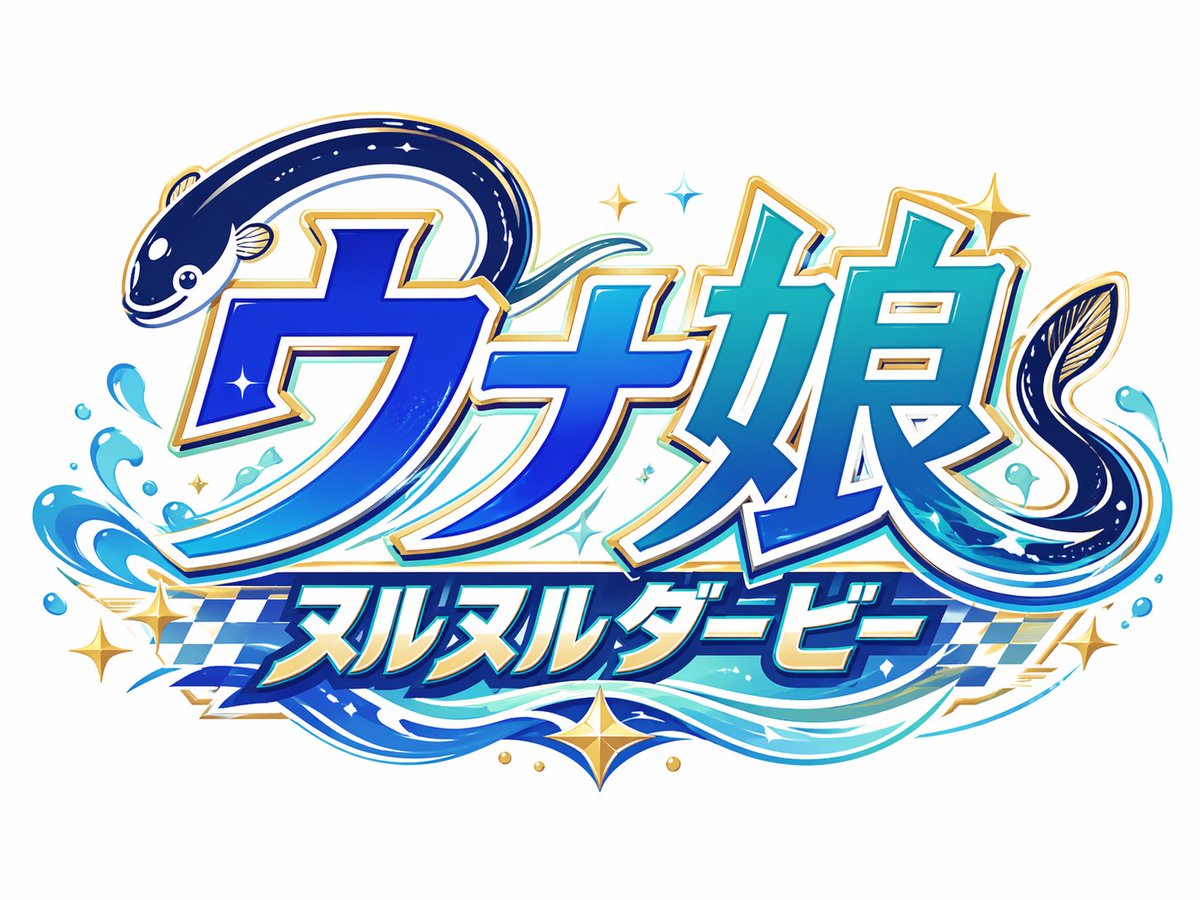
Japanese Eel Derby Logo
This prompt generates a polished Japanese mascot logo with eel-integrated lettering, water effects, and racing-inspired accents for branding or social media visuals.
This is a GPT Image 2 prompt case for Graphic & Poster. Use the copy-ready prompt below to generate similar visuals, and review Awesome GPT Image 2 Prompts attribution plus commercial-use rights before reuse.
Free 1K preview
Generate one preview image instantly, no sign-up required.
Prompt
Copy-ready prompt
Create a bold Japanese logo on a clean light gray background for a fictional racing-themed eel character brand. The main text should be large stylized katakana/kanji reading {argument name="main logo text" default="ウナ娘"}, with a smaller subtitle banner below reading {argument name="subtitle text" default="ヌルヌルダービー"}. Integrate exactly 2 eel illustrations into the lettering: one dark navy eel curling over the top left of the first character with a cute smiling face and pale belly markings, and one second eel forming a sweeping curl around the right side of the final character. Use a vivid aquatic palette with deep cobalt blue, electric blue, cyan, teal, white highlights, and metallic gold edging. The lettering should have thick white inner borders, gold outer trim, subtle drop shadows, and a glossy high-energy arcade mascot style. Add dynamic water splash effects around the bottom left and lower right, flowing wave ribbons beneath the text, exactly 6 gold star-shaped sparkles scattered around the logo, and exactly 4 small blue diamond-like sparkle accents near the center and top. Behind the subtitle, include a blue-and-white checkered racing flag pattern stretching horizontally. The overall composition should feel playful, premium, and fast-paced, combining marine motifs with horse-racing or derby energy, rendered as crisp vector-like logo art with polished gradients and strong sticker-style outlines.Prompt variables
Editable argument placeholders found in the prompt, with their default values.
Best for
- - Graphic & Poster visual exploration
- - Image generation and reference-image edits
- - Reusable briefs that keep source attribution visible
Change these parts
- - Subject, product, character, or scene
- - Aspect ratio, camera, lighting, and background
- - Brand, text, color, and output constraints
Recommended model and settings
- - Model: gpt-image-2
- - Input mode: Text to Image
- - Aspect ratio: source
- - Commercial status: review original source
How to use this prompt
- 1. Copy the prompt and preserve its structure for the first test.
- 2. Replace the subject, context, and publishing channel.
- 3. Change one camera, lighting, or style variable per iteration.
- 4. Inspect the output, source, text, and rights before reuse.
Limitations, source, and reuse cautions
- - Generated output is an editable draft, not factual, legal, or rights evidence.
- - Review the linked source, people, brands, logos, text, and third-party media before commercial use.
More cases in this category
Prioritized by category, input mode compatibility, quality, and lower risk.





Reuse and source notes
Use this prompt safely after previewing the case.
- 1.Copy the prompt or open it directly in Dovoo with the generation button.
- 2.Adjust variables, aspect ratio, and reference images for your own use case.
- 3.Before publishing or paid usage, verify source rights, attribution requirements, and brand or likeness risks.
Can I use this prompt commercially?
Commercial-use status is allowed. Review the original source, license, brand constraints, and legal requirements before paid usage.
Where does this case come from?
This case is imported from Awesome GPT Image 2 Prompts; keep attribution visible and check the source URL before reuse.