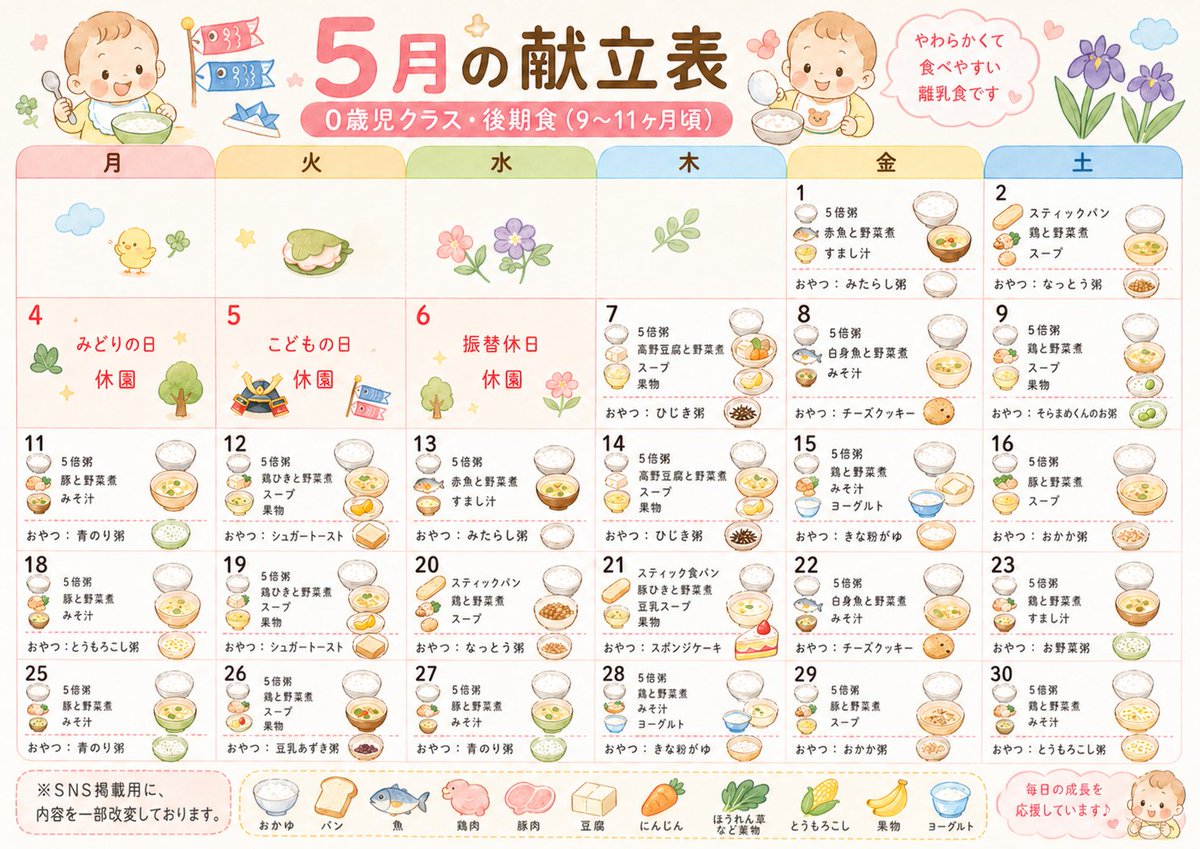
Cute Japanese Nursery Menu Calendar
A pastel illustrated Japanese daycare meal calendar poster for babies, ideal for redesigning plain nursery menu schedules into friendly printable handouts.
This is a GPT Image 2 prompt case for Graphic & Poster. Use the copy-ready prompt below to generate similar visuals, and review Awesome GPT Image 2 Prompts attribution plus commercial-use rights before reuse.
Free 1K preview
Generate one preview image instantly, no sign-up required.
Prompt
Copy-ready prompt
A cute pastel Japanese nursery school monthly meal calendar poster, styled like a soft watercolor children’s print on a clean white background. The design is landscape and highly organized like a printable daycare menu sheet. At the top center, a large headline in playful rounded Japanese typography reads {argument name="headline text" default="5月の献立表"}, with a smaller pink ribbon-style subtitle underneath reading {argument name="subtitle text" default="0歳児クラス・後期食(9〜11ヶ月頃)"}. Decorate the header with 2 smiling baby illustrations holding bowls, 2 carp streamer flags, 1 small blue origami boat, a pink speech bubble on the upper right with Japanese text {argument name="note text" default="やわらかくて 食べやすい 離乳食です"}, and 2 purple flowers beside it. Create a 6-column monthly calendar grid with rounded pastel tab headers for the weekdays in Japanese: 月, 火, 水, 木, 金, 土. Fill 25 dated cells for the visible month layout, covering dates 1, 2, 4, 5, 6, 7, 8, 9, 11, 12, 13, 14, 15, 16, 18, 19, 20, 21, 22, 23, 25, 26, 27, 28, 29, 30, with some blank leading cells at the beginning of the month. Use thin pink grid lines and a gentle pastel palette. Mark 3 holiday cells in red Japanese text: 4 with "みどりの日" and "休園", 5 with "こどもの日" and "休園", and 6 with "振替休日" and "休園". Add small seasonal illustrations in the early empty and holiday cells: 1 chick with a clover, 1 sandwich, 1 flower cluster, 1 leaf sprig, 1 clover and tree, 1 samurai helmet with a flag, 1 tree with a flower. In each meal day cell, show tiny menu text in Japanese with miniature food illustrations such as bowls of porridge, soup, vegetables, fruit, yogurt, bread, cookies, and snacks. Include visible snack lines beginning with "おやつ:" on the meal days. Along the bottom, add a horizontal legend row with 10 labeled food icons: おかゆ, パン, 魚, 鶏肉, 豚肉, 豆腐, にんじん, ほうれん草, とうもろこし, 果物, ヨーグルト. At bottom left, place a rounded note box with the Japanese disclaimer {argument name="footer note" default="※SNS掲載用に、内容を一部改変しております。"}. At bottom right, add a small pink encouragement bubble reading {argument name="encouragement text" default="毎日の成長を応援しています♪"} with a tiny smiling baby illustration. Overall look: heartwarming, easy to read, child-friendly, kawaii daycare handout, soft watercolor texture, rounded shapes, pastel pink, cream, yellow, blue, and green accents, polished editorial poster quality.Prompt variables
Editable argument placeholders found in the prompt, with their default values.
Best for
- - Graphic & Poster visual exploration
- - Image generation and reference-image edits
- - Reusable briefs that keep source attribution visible
Change these parts
- - Subject, product, character, or scene
- - Aspect ratio, camera, lighting, and background
- - Brand, text, color, and output constraints
Recommended model and settings
- - Model: gpt-image-2
- - Input mode: Text to Image
- - Aspect ratio: source
- - Commercial status: review original source
How to use this prompt
- 1. Copy the prompt and preserve its structure for the first test.
- 2. Replace the subject, context, and publishing channel.
- 3. Change one camera, lighting, or style variable per iteration.
- 4. Inspect the output, source, text, and rights before reuse.
Limitations, source, and reuse cautions
- - Generated output is an editable draft, not factual, legal, or rights evidence.
- - Review the linked source, people, brands, logos, text, and third-party media before commercial use.
More cases in this category
Prioritized by category, input mode compatibility, quality, and lower risk.






Reuse and source notes
Use this prompt safely after previewing the case.
- 1.Copy the prompt or open it directly in Dovoo with the generation button.
- 2.Adjust variables, aspect ratio, and reference images for your own use case.
- 3.Before publishing or paid usage, verify source rights, attribution requirements, and brand or likeness risks.
Can I use this prompt commercially?
Commercial-use status is allowed. Review the original source, license, brand constraints, and legal requirements before paid usage.
Where does this case come from?
This case is imported from Awesome GPT Image 2 Prompts; keep attribution visible and check the source URL before reuse.