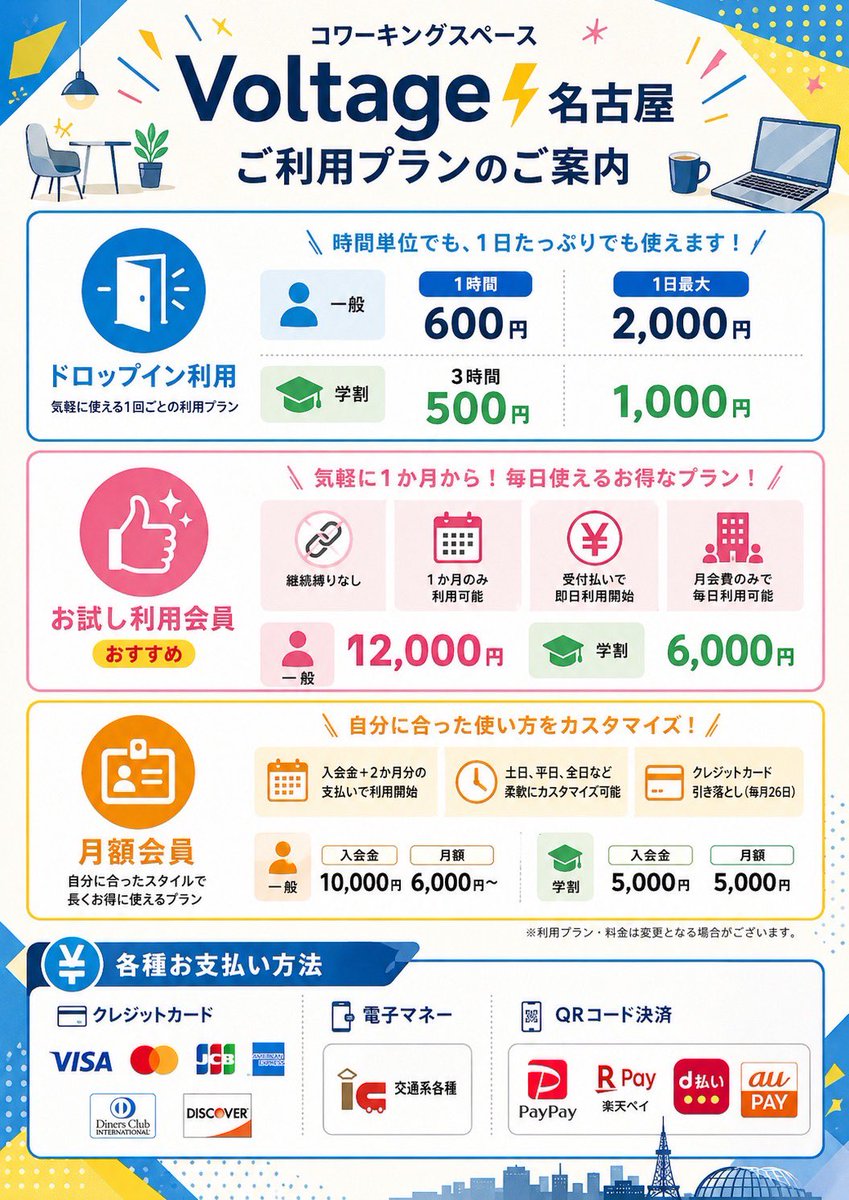
Japanese Coworking Pricing Flyer
This prompt generates a polished Japanese coworking-space pricing poster with multiple plan sections, payment methods, and storefront-ready infographic styling.
This is a GPT Image 2 prompt case for Graphic & Poster. Use the copy-ready prompt below to generate similar visuals, and review Awesome GPT Image 2 Prompts attribution plus commercial-use rights before reuse.
Free 1K preview
Generate one preview image instantly, no sign-up required.
Prompt
Copy-ready prompt
{
  "type": "Japanese coworking space pricing flyer",
  "style": "clean flat vector infographic, corporate promotional poster, white background with bright blue, yellow, pink, green, and orange accent colors, rounded boxes, friendly icons, bold Japanese typography, high readability, print-ready vertical A4 poster design",
  "brand": {
    "name": "{argument name=\"brand name\" default=\"Voltage Nagoya\"}",
    "category": "coworking space",
    "headline": "coworking space",
    "subheadline": "ご利用プランのご案内"
  },
  "layout": {
    "orientation": "portrait",
    "sections": [
      {
        "title": "header",
        "position": "top",
        "count": 6,
        "labels": [
          "coworking space",
          "Voltage Nagoya",
          "ご利用プランのご案内",
          "small cafe table and chair illustration",
          "coffee mug icon",
          "open laptop icon"
        ]
      },
      {
        "title": "ドロップイン利用",
        "position": "upper middle",
        "count": 6,
        "labels": [
          "door icon",
          "General",
          "Student",
          "1 hour 600 JPY",
          "Up to 2,000 yen per day",
          "500 yen / 1,000 yen for 3 hours"
        ]
      },
      {
        "title": "お試し利用会員",
        "position": "middle",
        "count": 8,
        "labels": [
          "thumbs up icon",
          "おすすめ",
          "継続縛りなし",
          "1か月のみ利用可能",
          "受付払いで即日利用開始",
          "月会費のみで毎日利用可能",
          "General: 12,000 yen",
          "Student: 6,000 yen"
        ]
      },
      {
        "title": "Monthly membership",
        "position": "lower middle",
        "count": 9,
        "labels": [
          "ID card icon",
          "入会金+2か月分の支払いで利用開始",
          "土日、平日、全日など柔軟にカスタマイズ可能",
          "クレジットカード引き落とし(毎月26日)",
          "General",
          "Membership fee: 10,000 JPY",
          "Monthly fee: starting from 6,000 JPY",
          "Student",
          "Membership fee: 5,000 JPY / Monthly fee: 5,000 JPY"
        ]
      },
      {
        "title": "各種お支払い方法",
        "position": "bottom",
        "count": 12,
        "labels": [
          "クレジットカード",
          "電子マネー",
          "QRコード決済",
          "VISA",
          "Mastercard",
          "JCB",
          "AMERICAN EXPRESS",
          "Diners Club INTERNATIONAL",
          "DISCOVER",
          "Various transportation cards",
          "PayPay",
          "R Pay / d払い / au PAY"
        ]
      }
    ],
    "footer": "small disclaimer text and Nagoya skyline silhouette with tower and dome"
  },
  "visuals": {
    "background_elements": [
      "blue diagonal corner shapes",
      "yellow geometric confetti",
      "small starbursts and lines",
      "light dotted patterns",
      "city skyline silhouette at bottom"
    ],
    "icon_style": "simple flat rounded icons inside colored circles or soft rectangular cards",
    "section_colors": [
      "blue drop-in section",
      "pink trial membership section",
      "orange monthly membership section",
      "blue payment methods section"
    ]
  },
  "text_language": "Japanese",
  "image_goal": "a polished promotional price guide poster for a coworking space branch in Nagoya, suitable for storefront display or social media announcement",
  "customizable_fields": {
    "location": "{argument name=\"location name\" default=\"Nagoya\"}",
    "main headline": "{argument name=\"main headline\" default=\"ご利用プランのご案内\"}",
    "accent color": "{argument name=\"accent color\" default=\"bright blue and yellow\"}",
    "poster size": "{argument name=\"poster size\" default=\"vertical A4\"}"
  }
}
Prompt variables
Editable argument placeholders found in the prompt, with their default values.
Best for
- - Graphic & Poster visual exploration
- - Image generation and reference-image edits
- - Reusable briefs that keep source attribution visible
Change these parts
- - Subject, product, character, or scene
- - Aspect ratio, camera, lighting, and background
- - Brand, text, color, and output constraints
Recommended model and settings
- - Model: gpt-image-2
- - Input mode: Text to Image
- - Aspect ratio: source
- - Commercial status: review original source
How to use this prompt
- 1. Copy the prompt and preserve its structure for the first test.
- 2. Replace the subject, context, and publishing channel.
- 3. Change one camera, lighting, or style variable per iteration.
- 4. Inspect the output, source, text, and rights before reuse.
Limitations, source, and reuse cautions
- - Generated output is an editable draft, not factual, legal, or rights evidence.
- - Review the linked source, people, brands, logos, text, and third-party media before commercial use.
More cases in this category
Prioritized by category, input mode compatibility, quality, and lower risk.






Reuse and source notes
Use this prompt safely after previewing the case.
- 1.Copy the prompt or open it directly in Dovoo with the generation button.
- 2.Adjust variables, aspect ratio, and reference images for your own use case.
- 3.Before publishing or paid usage, verify source rights, attribution requirements, and brand or likeness risks.
Can I use this prompt commercially?
Commercial-use status is allowed. Review the original source, license, brand constraints, and legal requirements before paid usage.
Where does this case come from?
This case is imported from Awesome GPT Image 2 Prompts; keep attribution visible and check the source URL before reuse.