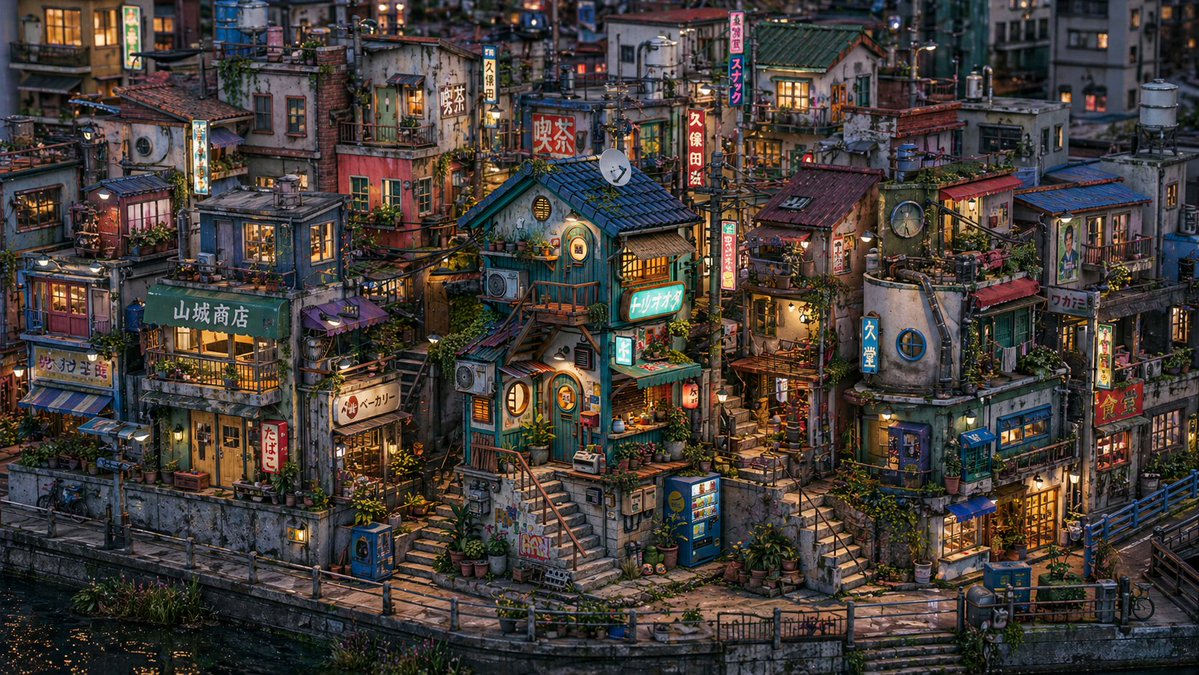
Miniature Japanese Canal Town at Dusk
This generates a highly detailed cozy retro Japanese canal-side city diorama, ideal for cinematic background art, concept illustration, or miniature-style urban scenes.
This is a GPT Image 2 prompt case for Landscape & Nature. Use the copy-ready prompt below to generate similar visuals, and review Awesome GPT Image 2 Prompts attribution plus commercial-use rights before reuse.
Free 1K preview
Generate one preview image instantly, no sign-up required.
Prompt
Copy-ready prompt
A highly detailed, cinematic-quality isometric street scene illustration depicting a dense, retro Japanese canal district under the blue hour, presented with the texture of a hyperrealistic handmade miniature landscape, rich in detail and full of life. The composition showcases a tightly packed arrangement of approximately {argument name="building count" default="18"} small, multi-story buildings, irregularly stacked along a curved embankment, viewed from a slightly elevated perspective. In the center of the scene, a teal-colored house with dark tiles serves as a visual focal point, surrounded by narrow stairs, balconies, rooftop sheds, pipes, satellite dishes, utility poles, intricate overhead wires, air conditioning units, potted plants, hanging lanterns, and weathered concrete walls. Warm amber light emanates from many windows and shops, contrasting with the cool twilight atmosphere. The canal extends along the bottom of the scene, with deep, reflective water, stone steps leading down to the waterline, and a narrow walkway with railings winding along the riverbank. Include 2 vending machines near the bottom right of the scene, 1 bicycle on the left edge, and 1 small canal bridge on the far right. Shopfronts are filled with vertical Japanese signs and faded teal, red, cream, and blue facades, displaying signs such as “Yamashiro Store,” “たばこ” (tobacco), “パン ベーカリー” (pan bakery), “Kubota,” “スナック” (snack), “Torino Oto,” “Kyudo,” “Wakami,” and “食堂” (dining hall). Add rooftop gardens, clotheslines, vines, flower pots, small lanterns, curtains, posters, and worn handrails to fill every corner with life. Employ a melancholic {argument name="time of day" default="Twilight blue hour"} atmosphere, soft volumetric lighting, intricate photographic-level surface details, shallow and realistic depth of field, and a nostalgic {argument name="setting style" default="Showa-era Japanese city alley"} tone. The overall color scheme blends cool indigo shadows with warm orange indoor light and soft, weathered paint tones. Create a canal district that feels both magical and realistic, dense, comfortable, cluttered, and layered, in a widescreen {argument name="aspect ratio" default="16:9"} format with extremely high detail, suitable as a key visual for concept art or a establishing shot for an animated film set in {argument name="city inspiration" default="Fictional old waterfront district of Tokyo"}.Prompt variables
Editable argument placeholders found in the prompt, with their default values.
Best for
- - Landscape & Nature visual exploration
- - Image generation and reference-image edits
- - Reusable briefs that keep source attribution visible
Change these parts
- - Subject, product, character, or scene
- - Aspect ratio, camera, lighting, and background
- - Brand, text, color, and output constraints
Recommended model and settings
- - Model: gpt-image-2
- - Input mode: Text to Image
- - Aspect ratio: source
- - Commercial status: review original source
How to use this prompt
- 1. Copy the prompt and preserve its structure for the first test.
- 2. Replace the subject, context, and publishing channel.
- 3. Change one camera, lighting, or style variable per iteration.
- 4. Inspect the output, source, text, and rights before reuse.
Limitations, source, and reuse cautions
- - Generated output is an editable draft, not factual, legal, or rights evidence.
- - Review the linked source, people, brands, logos, text, and third-party media before commercial use.
More cases in this category
Prioritized by category, input mode compatibility, quality, and lower risk.

Reuse and source notes
Use this prompt safely after previewing the case.
- 1.Copy the prompt or open it directly in Dovoo with the generation button.
- 2.Adjust variables, aspect ratio, and reference images for your own use case.
- 3.Before publishing or paid usage, verify source rights, attribution requirements, and brand or likeness risks.
Can I use this prompt commercially?
Commercial-use status is allowed. Review the original source, license, brand constraints, and legal requirements before paid usage.
Where does this case come from?
This case is imported from Awesome GPT Image 2 Prompts; keep attribution visible and check the source URL before reuse.