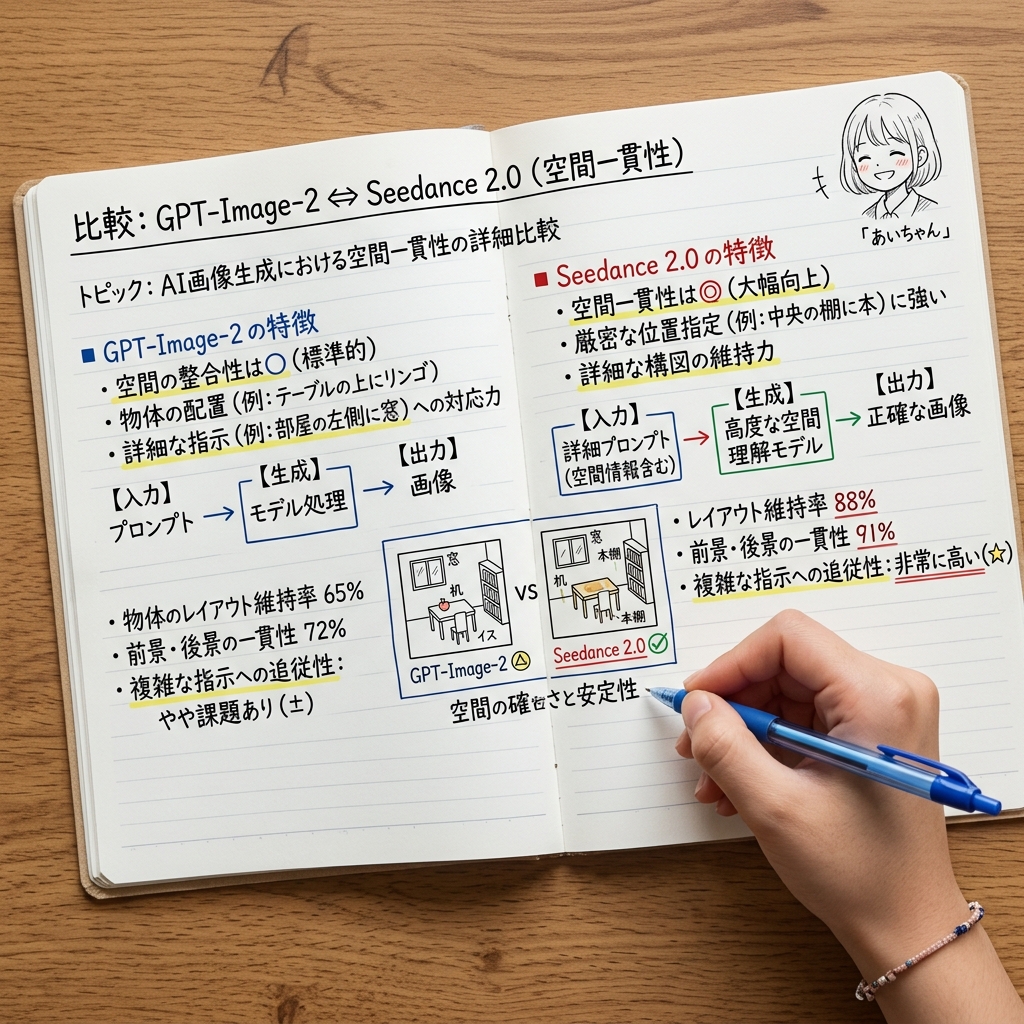
Japanese AI Spatial Consistency Notebook
Generates a realistic overhead notebook infographic comparing GPT-Image-2 and Seedance 2.0 for spatial consistency evaluation.
This is a GPT Image 2 prompt case for 平面海报. Use the copy-ready prompt below to generate similar visuals, and review Awesome GPT Image 2 Prompts attribution plus commercial-use rights before reuse.
Prompt
Copy-ready prompt
{
  "type": "一张逼真的俯视照片,展示了木桌上打开的手写对比笔记本",
  "scene": "从正上方俯瞰打开的横线笔记本,平铺在温暖的木质桌面上,拍摄效果如同学习笔记或技术评估备忘录。右下角有一只右手握着一支蓝色圆珠笔,正在底部中心附近划线或书写。使用自然光、柔和的阴影、清晰的纸张纹理、逼真的手部解剖结构,以及带有少量彩色高亮标记、字迹清晰的日文笔记。",
  "main title": "{argument name=\"main title\" default=\"比较:GPT-Image-2 ⇔ Seedance 2.0(空间一致性)\"}",
  "subtitle": "{argument name=\"subtitle\" default=\"主题:AI 图像生成中空间一致性的详细对比\"}",
  "layout": {
    "format": "双页笔记本对比图表",
    "sections": [
      {
        "title": "{argument name=\"left section title\" default=\"■ GPT-Image-2 的特点\"}",
        "position": "左页上半部分",
        "count": 4,
        "items": [
          "空间一致性为○(标准)",
          "物体布局(例如:桌子上的苹果)",
          "对详细指令(例如:房间左侧的窗户)的响应能力",
          "一个标有【输入】提示词 → 【生成】模型处理 → 【输出】图像的蓝色流程图"
        ]
      },
      {
        "title": "left results",
        "position": "左页下半部分",
        "count": 3,
        "items": [
          "物体布局维持率 65%",
          "前景与背景的一致性 72%",
          "复杂指令的遵循能力:稍有挑战(±)"
        ]
      },
      {
        "title": "{argument name=\"right section title\" default=\"■ Seedance 2.0 的特点\"}",
        "position": "右页上半部分",
        "count": 4,
        "items": [
          "空间一致性为◎(大幅提升)",
          "擅长严格的位置指定(例如:中间架子上的书)",
          "详细构图的维持能力",
          "一个标有【输入】详细提示词(包含空间信息) → 【生成】高级空间理解模型 → 【输出】精确图像的绿色流程图"
        ]
      },
      {
        "title": "right results",
        "position": "bottom half of the right page",
        "count": 3,
        "items": [
          "布局维持率 88%",
          "前景与背景的一致性 91%",
          "复杂指令的遵循能力:非常高(★)"
        ]
      },
      {
        "title": "center comparison",
        "position": "跨越两页的底部中心",
        "count": 3,
        "items": [
          "两个并排的小型框架草图示例",
          "左侧迷你草图标注 GPT-Image-2,带有一个黄色小警告三角形",
          "右侧迷你草图标注 Seedance 2.0,带有一个绿色勾选标记,中间由 VS 分隔"
        ]
      },
      {
        "title": "character doodle",
        "position": "Top right corner of the right page",
        "count": 1,
        "items": [
          "一个小型单色动漫女孩头部涂鸦,短波波头,面部表情模糊,标注『爱酱』及微小的动作符号"
        ]
      }
    ],
    "bottom note": "空间的准确性与稳定性"
  },
  "visual style": "简洁的日式手写学习笔记风格,黑色墨水文字,蓝色和红色章节标题,重要短语下方有黄色荧光笔划线,带有蓝色和绿色的小方框与箭头,整齐的横线纸,逼真的打开笔记本装订效果,略微圆角的页面,无数字 UI,除了笔和手之外没有多余的物体。",
  "camera": "正上方 3/4 俯视构图,笔记本占据大部分画面,边缘可见木纹,高分辨率,文字清晰可辨。",
  "custom accent": "{argument name=\"pen color\" default=\"blue\"}"
}
Prompt variables
Editable argument placeholders found in the prompt, with their default values.
More cases in this category
Prioritized by category, input mode compatibility, quality, and lower risk.
Reuse and source notes
Use this prompt safely after previewing the case.
- 1.Copy the prompt or open it directly in Dovoo with the generation button.
- 2.Adjust variables, aspect ratio, and reference images for your own use case.
- 3.Before publishing or paid usage, verify source rights, attribution requirements, and brand or likeness risks.
Can I use this prompt commercially?
Commercial-use status is allowed. Review the original source, license, brand constraints, and legal requirements before paid usage.
Where does this case come from?
This case is imported from Awesome GPT Image 2 Prompts; keep attribution visible and check the source URL before reuse.