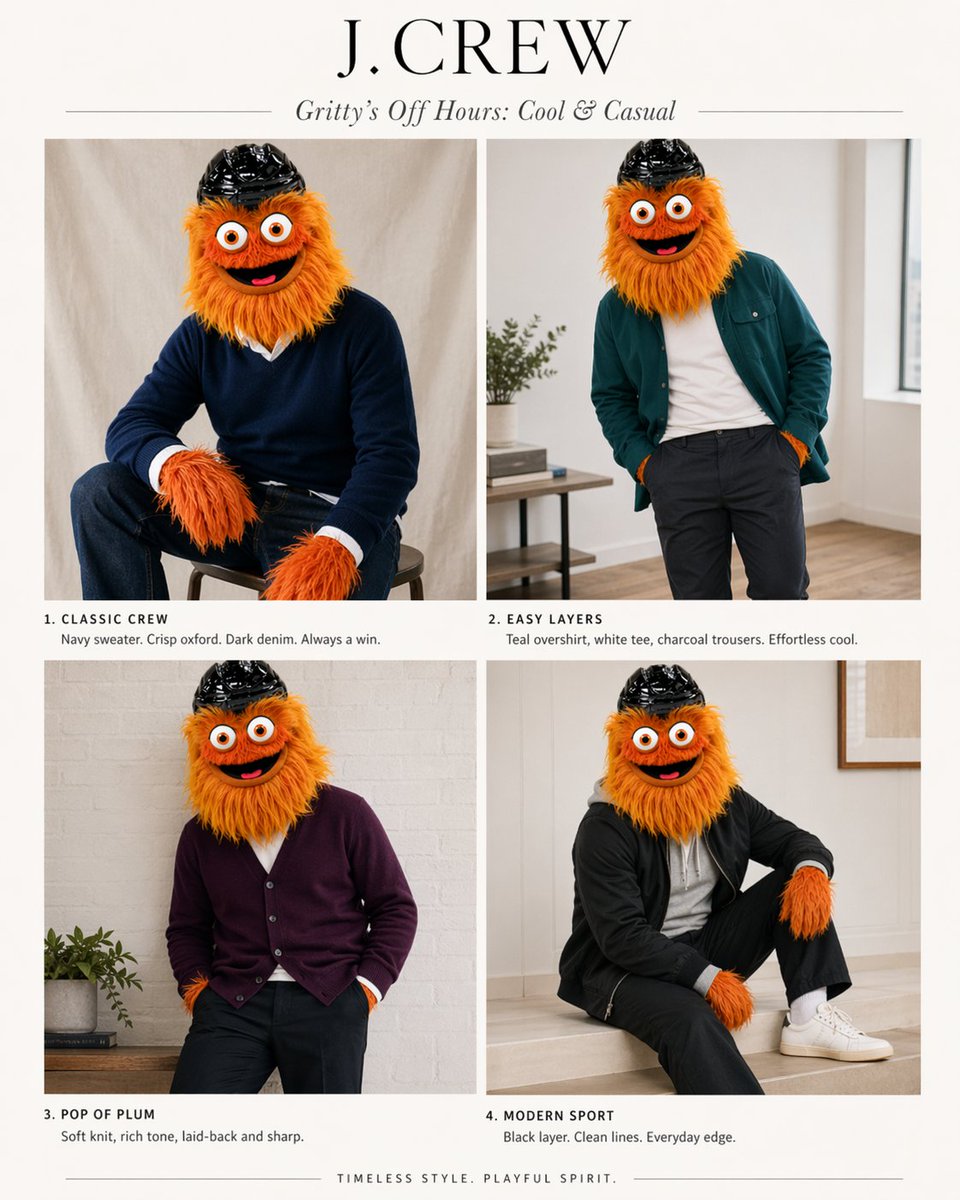
J.Crew Mascot Fashion Editorial
This prompt turns a mascot reference infographic into a four-look J.Crew-style fashion editorial spread for playful brand mockups or character styling concepts.
This is a GPT Image 2 prompt case for Fashion & Beauty. Use the copy-ready prompt below to generate similar visuals, and review Awesome GPT Image 2 Prompts attribution plus commercial-use rights before reuse.
Free 1K preview
Generate one preview image instantly, no sign-up required.
Free text preview doesn’t preserve reference-image consistency.
Prompt
Copy-ready prompt
Using the provided reference image as the character and color-palette guide, transform it into a polished J.Crew-style editorial fashion lookbook starring the same mascot. Replace the infographic/chart layout with a clean 2x2 magazine spread on an off-white background. Add a large serif brand header reading {argument name="headline text" default="J.CREW"} and an italic subhead reading {argument name="subhead text" default="Gritty’s Off Hours: Cool & Casual"}. Show exactly 4 styled outfit photos of the same character, keeping the fuzzy orange fur, big eyes, and black helmet, but placing the mascot in modern menswear inspired by the “best” colors from the reference: 1) “CLASSIC CREW” — seated on a stool in a navy sweater over a crisp white oxford with dark denim; 2) “EASY LAYERS” — standing casually in a teal overshirt, white tee, and charcoal trousers; 3) “POP OF PLUM” — relaxed pose in a plum cardigan with dark pants; 4) “MODERN SPORT” — seated in a black sporty layer with black pants, white socks, and white sneakers. Give each panel a short catalog-style caption under it matching those 4 titles and concise fashion copy. Use soft natural indoor lighting, minimal home-interior editorial settings, premium catalog photography, and a tasteful upscale preppy aesthetic. Add a small closing line centered at the bottom: {argument name="footer text" default="TIMELESS STYLE. PLAYFUL SPIRIT."}Prompt variables
Editable argument placeholders found in the prompt, with their default values.
Best for
- - Fashion & Beauty visual exploration
- - Image generation and reference-image edits
- - Reusable briefs that keep source attribution visible
Change these parts
- - Subject, product, character, or scene
- - Aspect ratio, camera, lighting, and background
- - Brand, text, color, and output constraints
Recommended model and settings
- - Model: gpt-image-2
- - Input mode: Image to Image
- - Aspect ratio: source
- - Commercial status: review original source
How to use this prompt
- 1. Copy the prompt and preserve its structure for the first test.
- 2. Replace the subject, context, and publishing channel.
- 3. Change one camera, lighting, or style variable per iteration.
- 4. Inspect the output, source, text, and rights before reuse.
Limitations, source, and reuse cautions
- - Generated output is an editable draft, not factual, legal, or rights evidence.
- - Review the linked source, people, brands, logos, text, and third-party media before commercial use.
More cases in this category
Prioritized by category, input mode compatibility, quality, and lower risk.


Reuse and source notes
Use this prompt safely after previewing the case.
- 1.Copy the prompt or open it directly in Dovoo with the generation button.
- 2.Adjust variables, aspect ratio, and reference images for your own use case.
- 3.Before publishing or paid usage, verify source rights, attribution requirements, and brand or likeness risks.
Can I use this prompt commercially?
Commercial-use status is allowed. Review the original source, license, brand constraints, and legal requirements before paid usage.
Where does this case come from?
This case is imported from Awesome GPT Image 2 Prompts; keep attribution visible and check the source URL before reuse.