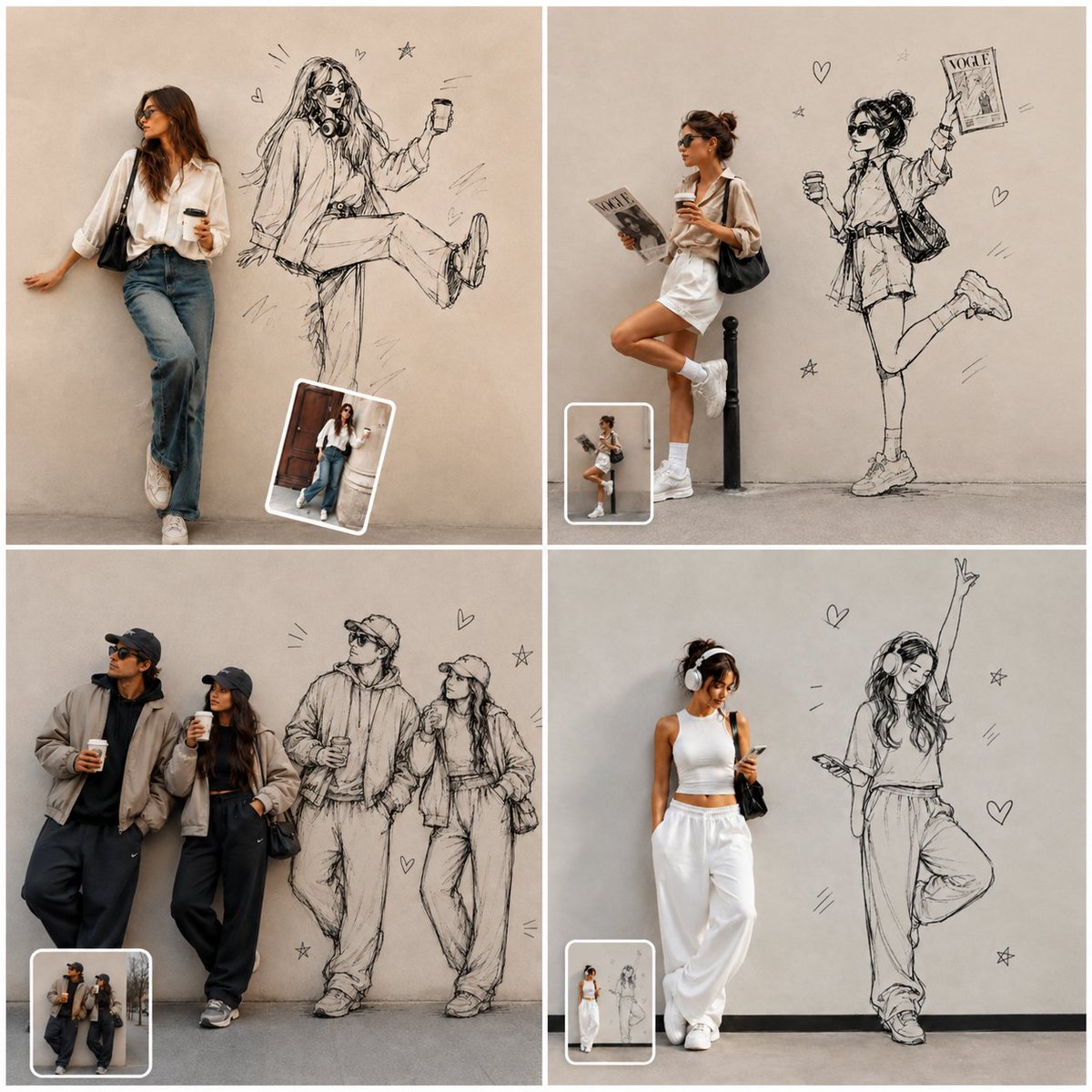
Street Fashion Wall Sketch Collage
Creates a four-panel editorial fashion collage blending realistic street portraits with oversized hand-drawn wall-sketch alter egos.
This is a GPT Image 2 prompt case for Fashion & Beauty. Use the copy-ready prompt below to generate similar visuals, and review Awesome GPT Image 2 Prompts attribution plus commercial-use rights before reuse.
Free 1K preview
Generate one preview image instantly, no sign-up required.
Free text preview doesn’t preserve reference-image consistency.
Prompt
Copy-ready prompt
Goal: Create a square 2x2 editorial photo-collage where real street-style fashion portraits are combined with oversized hand-drawn black ink sketch versions of the same subjects on a plain beige/gray wall, like a creative “photo to doodle illustration” transformation showcase.

Canvas: Square 1:1 image divided into exactly 4 equal panels with thin white gutters between panels. Each panel has a minimal urban backdrop: smooth concrete wall, gray floor, soft natural light, muted beige and gray tones, realistic shadows, and editorial fashion photography quality.

Layout: Use exactly 4 panels:
1. Top-left panel: one stylish woman leaning against a beige wall on the left, wearing sunglasses, a loose white button-up shirt, blue jeans, white sneakers, and a black shoulder bag, holding a takeaway coffee. To her right, draw a large black pen sketch version of her sitting casually with one leg raised, holding a phone, with headphones around the neck. Add small doodled hearts, stars, and motion marks around the sketch. Place one small rounded-corner inset photo thumbnail near the bottom center-right with a white border.
2. Top-right panel: one woman in a white oversized shirt dress and white sneakers leaning on one leg beside a short black bollard, holding a magazine/newspaper in one hand and a takeaway coffee in the other, wearing sunglasses and a black shoulder bag. To her right, draw a large playful black ink sketch of the same woman standing on one leg with the other leg kicked back, holding a coffee and raising a magazine labeled “VOGUE.” Add small hearts, stars, and motion lines. Place one small rounded-corner inset photo thumbnail near the bottom left with a white border.
3. Bottom-left panel: two streetwear fashion subjects leaning against a wall, both wearing dark caps, sunglasses, oversized neutral jackets, dark baggy pants, and sneakers, each holding takeaway coffee. To their right, draw a large black ink sketch version of the same two people standing side by side in similar poses and outfits. Add small hearts, stars, and motion marks. Place one small rounded-corner inset photo thumbnail near the bottom left with a white border.
4. Bottom-right panel: one sporty woman standing on the left in a white crop top, loose white sweatpants, white sneakers, headphones, sunglasses, and a small black shoulder bag, looking down at a phone. To her right, draw a large black ink sketch version of her dancing or posing with one arm raised high and one leg bent, wearing the same headphones and outfit. Add small hearts, stars, and motion marks. Place one small rounded-corner inset photo thumbnail near the bottom left with a white border.

Subject style: Ultra-realistic editorial fashion photography for the real people, natural skin tones, accurate fabric texture, casual candid poses, modern street-style styling. The illustration portions should look like loose hand-drawn fashion sketches in black pencil/ink directly on the wall, with expressive linework, crosshatching, imperfect contours, and sketchy shading.

Text content: The only readable text should be the sketch magazine title {argument name="magazine title" default="VOGUE"} in the top-right panel. Avoid any other logos, captions, watermarks, or extra typography.

Customizable details: Keep the overall concept as {argument name="concept" default="real fashion portraits beside oversized wall-sketch alter egos"}; use {argument name="wall color" default="warm beige gray concrete"}; keep the clothing palette {argument name="clothing palette" default="white, denim, black, taupe, and gray neutrals"}; render in {argument name="visual style" default="ultra-realistic editorial photography mixed with loose black ink fashion illustration"}.

Constraints: Exactly 4 panels, exactly 4 inset thumbnails total, exactly 5 real photographed people total across the collage, exactly 5 large sketched people total across the collage. Maintain clean square collage composition, soft daylight, high-resolution detail, no extra panels, no frame around the whole image, no watermark.
Prompt variables
Editable argument placeholders found in the prompt, with their default values.
Best for
- - Fashion & Beauty visual exploration
- - Image generation and reference-image edits
- - Reusable briefs that keep source attribution visible
Change these parts
- - Subject, product, character, or scene
- - Aspect ratio, camera, lighting, and background
- - Brand, text, color, and output constraints
Recommended model and settings
- - Model: gpt-image-2
- - Input mode: Image to Image
- - Aspect ratio: source
- - Commercial status: review original source
How to use this prompt
- 1. Copy the prompt and preserve its structure for the first test.
- 2. Replace the subject, context, and publishing channel.
- 3. Change one camera, lighting, or style variable per iteration.
- 4. Inspect the output, source, text, and rights before reuse.
Limitations, source, and reuse cautions
- - Generated output is an editable draft, not factual, legal, or rights evidence.
- - Review the linked source, people, brands, logos, text, and third-party media before commercial use.
More cases in this category
Prioritized by category, input mode compatibility, quality, and lower risk.

Reuse and source notes
Use this prompt safely after previewing the case.
- 1.Copy the prompt or open it directly in Dovoo with the generation button.
- 2.Adjust variables, aspect ratio, and reference images for your own use case.
- 3.Before publishing or paid usage, verify source rights, attribution requirements, and brand or likeness risks.
Can I use this prompt commercially?
Commercial-use status is allowed. Review the original source, license, brand constraints, and legal requirements before paid usage.
Where does this case come from?
This case is imported from Awesome GPT Image 2 Prompts; keep attribution visible and check the source URL before reuse.