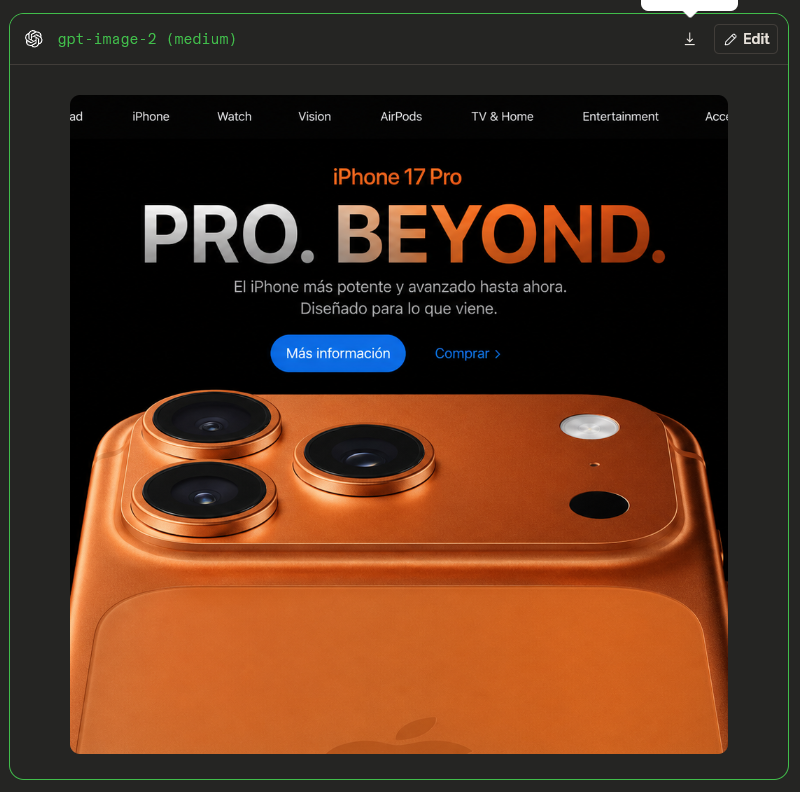
Apple-Style iPhone 17 Pro Hero Screenshot
Generates a dark ChatGPT-framed Apple-style landing page mockup for a copper iPhone 17 Pro hero advertisement.
This is a GPT Image 2 prompt case for Product & Commercial. Use the copy-ready prompt below to generate similar visuals, and review Awesome GPT Image 2 Prompts attribution plus commercial-use rights before reuse.
This prompt is designed for multiple reference images. We will open Dovoo with the prompt and the available preview image; add the remaining references in Dovoo before generating.
Free 1K preview
Generate one preview image instantly, no sign-up required.
Free text preview doesn’t preserve reference-image consistency.
Prompt
Copy-ready prompt
Goal: Create a realistic screenshot-style comparison image showing an AI-generated Apple-style product landing page inside a dark ChatGPT image result frame.

Canvas: Square 4:3 image, about 800×800 px, dark charcoal background. Add a thin rounded neon-green outline around the outer result container. At the very top center, include a small white speech-bubble pointer tab peeking down.

Outer frame: Dark UI container with rounded corners. Top bar height about 52 px. On the left show the OpenAI swirl icon and green monospace label “{argument name="model label" default="gpt-image-2 (medium)"}”. On the right show exactly 2 controls: a small download icon and a rounded “Edit” button with a pencil icon. Keep the interface minimal and dark.

Inner webpage: Center a large Apple-like homepage screenshot with black background, slightly inset from the outer frame. The webpage should be cropped so the far left and right edges are slightly cut off. At the top is a black navigation bar with exactly 8 visible menu items, spaced horizontally: “iPad” partially clipped on the far left, “iPhone”, “Watch”, “Vision”, “AirPods”, “TV & Home”, “Entertainment”, and “Accessories” partially clipped on the far right.

Hero section: Create an Apple-style product hero for “{argument name="product name" default="iPhone 17 Pro"}”. Place the small orange product name centered near the top. Below it, make a huge bold headline reading “{argument name="headline text" default="PRO. BEYOND."}” with a metallic silver-to-orange gradient, glossy dimensional lettering, and period marks after both words. Under the headline, include a two-line Spanish subtitle: “El iPhone más potente y avanzado hasta ahora.” and “Diseñado para lo que viene.” Below the subtitle place exactly 2 call-to-action links: a blue rounded button labeled “Más información” and a blue text link labeled “Comprar >”.

Product image: The bottom two-thirds of the webpage is dominated by a close-up macro render of an orange/copper iPhone back, cropped large so only the upper back and camera island are visible. Show exactly 3 raised black camera lenses in triangular arrangement on the left side of the camera plateau, exactly 1 silver circular flash near the upper right, exactly 1 tiny dot sensor below it, and exactly 1 black oval/circle sensor on the right. The phone has rounded corners, polished copper edges, realistic reflections, embossed Apple logo barely visible near the bottom center, and studio lighting.

Visual style: Hyper-realistic product render mixed with a clean web mockup, glossy Apple-like advertising aesthetics, high contrast black background, orange accents, sharp typography, no people.

Constraints: Preserve the Spanish text exactly as written, keep all counts exact, do not add extra buttons, icons, navigation labels, or product features, and avoid watermarks or captions outside the screenshot frame.
Prompt variables
Editable argument placeholders found in the prompt, with their default values.
Best for
- - Product & Commercial visual exploration
- - Image generation and reference-image edits
- - Reusable briefs that keep source attribution visible
Change these parts
- - Subject, product, character, or scene
- - Aspect ratio, camera, lighting, and background
- - Brand, text, color, and output constraints
Recommended model and settings
- - Model: gpt-image-2
- - Input mode: Multi Image to Image
- - Aspect ratio: source
- - Commercial status: review original source
How to use this prompt
- 1. Copy the prompt and preserve its structure for the first test.
- 2. Replace the subject, context, and publishing channel.
- 3. Change one camera, lighting, or style variable per iteration.
- 4. Inspect the output, source, text, and rights before reuse.
Limitations, source, and reuse cautions
- - Generated output is an editable draft, not factual, legal, or rights evidence.
- - Review the linked source, people, brands, logos, text, and third-party media before commercial use.
More cases in this category
Prioritized by category, input mode compatibility, quality, and lower risk.


Reuse and source notes
Use this prompt safely after previewing the case.
- 1.Copy the prompt or open it directly in Dovoo with the generation button.
- 2.Adjust variables, aspect ratio, and reference images for your own use case.
- 3.Before publishing or paid usage, verify source rights, attribution requirements, and brand or likeness risks.
Can I use this prompt commercially?
Commercial-use status is allowed. Review the original source, license, brand constraints, and legal requirements before paid usage.
Where does this case come from?
This case is imported from Awesome GPT Image 2 Prompts; keep attribution visible and check the source URL before reuse.