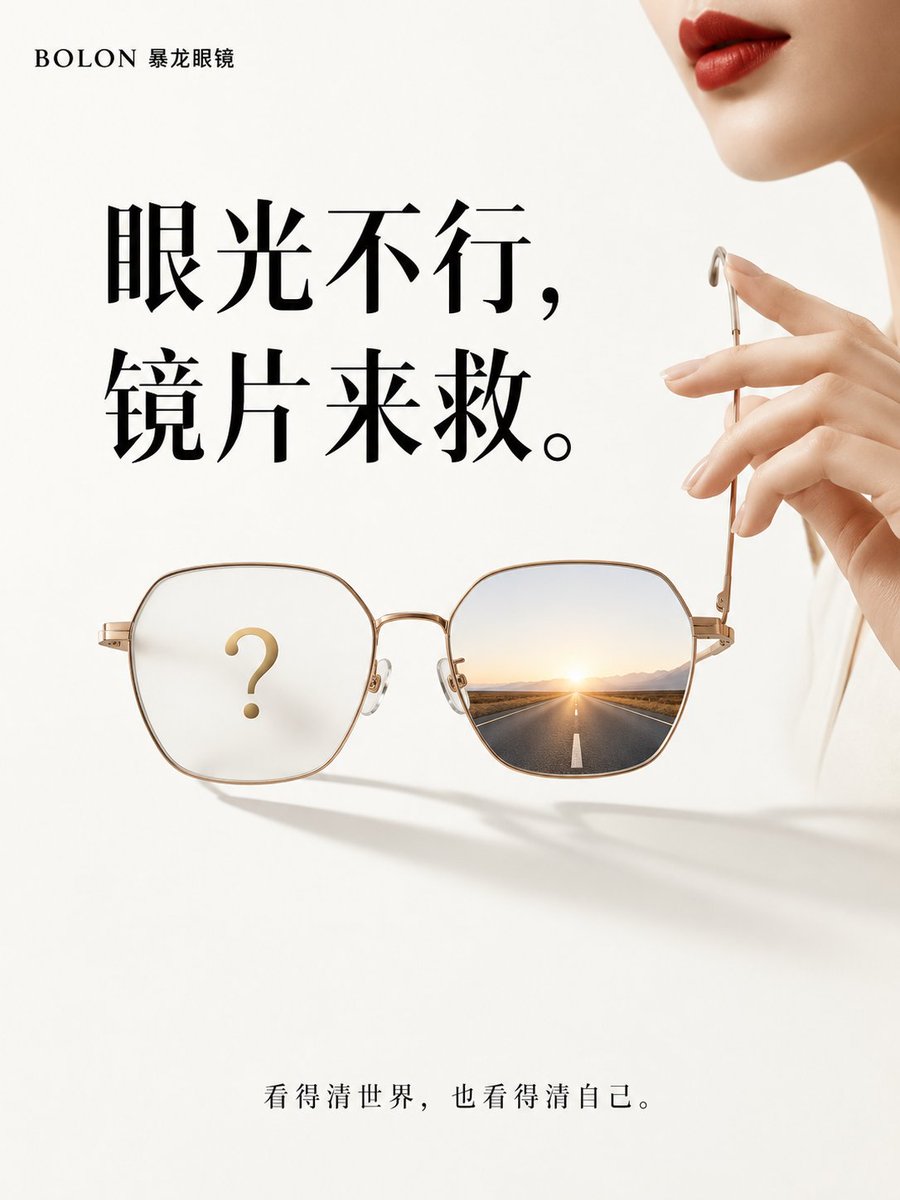
Minimalist Luxury Eyewear Conceptual Advertisement
A minimalist conceptual advertisement prompt for Bolon eyewear, featuring a champagne gold frame with high-contrast symbolic reflections.
This is a GPT Image 2 prompt case for Product & Commercial. Use the copy-ready prompt below to generate similar visuals, and review Awesome GPT Image 2 Prompts attribution plus commercial-use rights before reuse.
Free 1K preview
Generate one preview image instantly, no sign-up required.
Prompt
Copy-ready prompt
Generate a 3:4 vertical minimalist advertisement for Bolon eyewear. The background is a large area of warm white, with more than 60% white space. A pair of champagne gold thin-frame Bolon glasses is suspended below the center, the frame casting clean and soft geometric shadows. The left lens is slightly blurred, with only a golden question mark inside; the right lens is transparent and bright, showing a clear straight road and distant morning light. In the upper right corner of the frame, only an adult Asian woman's red lips, chin, and two slender fingers are visible as she gently removes the glasses, with the person naturally cropped by the canvas edge. Small brand text is placed in the upper left: '{argument name="brand" default="BOLON"}'. Large black high-contrast serif font is used in the center, strictly divided into two lines: '{argument name="style" default="Poor vision,"} {argument name="main_tag" default="Lenses to the rescue."}'. The bottom simply reads: '{argument name="sub_tag" default="See the world clearly, see yourself clearly."}'. The overall style refers to international high-end eyewear brand minimalist ads, with soft top lighting and sharp product edges. Prohibit complex backgrounds, full human faces, excessive decoration, garbled text, and cheap promotional elements.Prompt variables
Editable argument placeholders found in the prompt, with their default values.
Best for
- - Product & Commercial visual exploration
- - Image generation and reference-image edits
- - Reusable briefs that keep source attribution visible
Change these parts
- - Subject, product, character, or scene
- - Aspect ratio, camera, lighting, and background
- - Brand, text, color, and output constraints
Recommended model and settings
- - Model: gpt-image-2
- - Input mode: Text to Image
- - Aspect ratio: source
- - Commercial status: review original source
How to use this prompt
- 1. Copy the prompt and preserve its structure for the first test.
- 2. Replace the subject, context, and publishing channel.
- 3. Change one camera, lighting, or style variable per iteration.
- 4. Inspect the output, source, text, and rights before reuse.
Limitations, source, and reuse cautions
- - Generated output is an editable draft, not factual, legal, or rights evidence.
- - Review the linked source, people, brands, logos, text, and third-party media before commercial use.
More cases in this category
Prioritized by category, input mode compatibility, quality, and lower risk.
Reuse and source notes
Use this prompt safely after previewing the case.
- 1.Copy the prompt or open it directly in Dovoo with the generation button.
- 2.Adjust variables, aspect ratio, and reference images for your own use case.
- 3.Before publishing or paid usage, verify source rights, attribution requirements, and brand or likeness risks.
Can I use this prompt commercially?
Commercial-use status is allowed. Review the original source, license, brand constraints, and legal requirements before paid usage.
Where does this case come from?
This case is imported from Awesome GPT Image 2 Prompts; keep attribution visible and check the source URL before reuse.